Contents
- 17 Sep 2026
Tableau to Microsoft Fabric Migration: Workbooks Rebuilt in Power BI
Tableau to Microsoft Fabric migration can mean two different things. You can connect Tableau directly to Microsoft Fabric, keeping Tableau as the reporting front end while Fabric provides the underlying data platform. Or you can fully migrate, rebuilding Tableau workbooks as Power BI reports within Microsoft Fabric and moving the supporting data architecture to Fabric. The right approach depends on whether the goal is data-platform consolidation, reporting-platform consolidation, or both.
Many organizations are moving Tableau workloads to Microsoft Fabric to consolidate data, analytics, and reporting on Microsoft's unified platform. You can't simply open a Tableau workbook as a Power BI report. A full migration requires rebuilding the data connections, calculations, semantic logic, visuals, interactions, security, and publishing model for Power BI and Fabric.
The target architecture also doesn't require importing every dataset into Power BI. Microsoft Fabric supports Power BI semantic models using Direct Lake, Import, and DirectQuery, so the appropriate architecture depends on the data source, workload, performance requirements, and governance model.
Quick Summary
Tableau to Microsoft Fabric migration rebuilds Tableau workbooks as Power BI reports and redesigns the supporting data architecture on Fabric. Calculations, calculated fields, LOD expressions, and table calculations are rebuilt rather than translated line by line, and Tableau Prep workflows map to the Fabric data-engineering component that best fits the workload. A separate coexistence option exists too: Tableau connects natively to Fabric data sources, letting it stay the front end without any rebuild. Validation against Tableau, on numbers, security, and performance, is what determines whether a full migration actually succeeds.
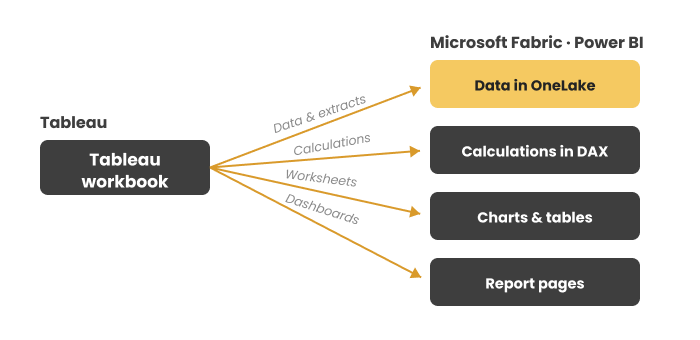
Figure 1: A Tableau workbook rebuilt in Power BI on Microsoft Fabric, showing Tableau data sources and calculations being mapped to Fabric data architecture, Power BI semantic models, DAX, and report pages.

- Share Post:
-

-

At a Glance
- Source: Tableau workbooks, worksheets, dashboards, data sources, extracts, calculations, and Tableau Prep workflows.
- Target: Power BI reports and semantic models within Microsoft Fabric, the same target architecture covered in our ETL migration to Microsoft Fabric guide.
- Data platform: Fabric Lakehouse, Warehouse, OneLake, or another appropriate Fabric architecture.
- Alternative to full migration: Keep Tableau and connect it directly to supported Fabric data sources.
- Main effort: Rebuilding calculations, semantic logic, visuals, interactions, security, and data preparation.
- Data architecture: Direct Lake, Import, DirectQuery, or a combination, selected based on workload requirements.
- Still required: Number-for-number, security, and performance validation before production cutover.
Key Takeaways
- Tableau workbooks are rebuilt, not simply converted. A full migration recreates Tableau reporting logic and visuals in Power BI because the two platforms use different report, modeling, and calculation architectures.
- Migration is not the only option. Tableau can remain the visualization layer while Fabric becomes the underlying data platform when direct connectivity meets the organization's requirements.
- Calculations are rebuilt. Tableau calculated fields, LOD expressions, and table calculations generally require Power BI/DAX-based reconstruction rather than one-to-one formula translation.
- OneLake underpins Fabric's unified data lake architecture. You can bring data into OneLake through pipelines, dataflows, shortcuts, mirroring, and other supported approaches.
- Direct Lake is one possible target architecture, consuming Delta-formatted data from OneLake without requiring a traditional import into the semantic model.
- A Tableau dashboard is not a Power BI dashboard. It's generally rebuilt as a Power BI report page or set of pages; Power BI's own "dashboard" is a separate, single-page artifact.
- Tableau Prep doesn't map to one Fabric component. Depending on the workflow, transformations may land in Dataflows Gen2, Power Query, Fabric pipelines, Lakehouse, Warehouse, or notebooks.
- Validation is central to migration. Rebuilt reports are checked against Tableau for calculations, filters, security, data completeness, and performance, not just visual similarity.
What Is Tableau to Microsoft Fabric Migration?
Tableau to Microsoft Fabric migration moves Tableau reporting workloads to Microsoft's Fabric analytics platform. In a full migration, teams analyze Tableau workbooks and rebuild them as Power BI reports. Teams redesign underlying data sources and preparation workflows for Fabric, while recreating calculations and business logic in Power BI semantic models.
Microsoft Fabric brings together data engineering, data integration, data warehousing, analytics, and Power BI reporting. OneLake provides Fabric's unified data lake, while Power BI semantic models provide the analytical layer used to build reports. A typical migration therefore involves several connected layers:
Tableau workbooks → Fabric data architecture → Power BI semantic model → Power BI reports
The objective is not to reproduce every Tableau technical implementation exactly. The objective is to preserve the required business logic, data accuracy, reporting functionality, security, and user experience within the target Fabric architecture, the same rebuild-by-intent principle covered in our Tableau to Power BI migration guide for teams not necessarily standardizing on Fabric as the underlying data platform.
Connect Tableau to Fabric vs. Migrate Tableau to Power BI
Before planning a full migration, organizations should distinguish between connecting Tableau to Fabric and migrating away from Tableau entirely.
Option 1: Keep Tableau and connect it to Fabric. Tableau has an official, native connector to Fabric. Using its Azure SQL Database connector, Tableau can point directly at a Fabric Warehouse or Lakehouse SQL endpoint, authenticating over TCP port 1433 via Microsoft Entra ID. For connecting to Power BI or Fabric semantic models specifically, rather than raw warehouse tables, Tableau can use XMLA read/write endpoints, which require Fabric capacity (Premium-tier) settings and the appropriate drivers. This reflects a real, dated partnership, not just a customer workaround: Microsoft and Tableau expanded their partnership in April 2024 specifically to support OneLake integration. This path is appropriate when Tableau remains the preferred reporting tool, the immediate goal is data-platform consolidation, and existing Tableau workbooks don't need to be rebuilt.
Tableau remains the reporting layer → Fabric becomes the data platform.
Option 2: Migrate Tableau to Power BI on Fabric. Here, Tableau workbooks are rebuilt as Power BI reports, calculations are recreated, the semantic model is redesigned, and the data architecture is implemented within Fabric. This is appropriate when the organization wants to standardize on Power BI, Tableau licensing is being retired, or Fabric is becoming the strategic analytics platform- the same platform-consolidation reasoning covered in our ETL migration to Microsoft Fabric guide.
Tableau → Power BI + Microsoft Fabric
Named accelerators exist for the migration path specifically, including a Microsoft Marketplace-listed "End to End Tableau to Fabric Migration" solution and an automated inventory tool for scanning existing Tableau REST APIs, worth evaluating against a pilot batch before trusting either with production content, the same pilot-first discipline covered in our key checklist for BI modernization. Make the decision between the two options before estimating migration scope and timelines.
Why Organizations Migrate from Tableau to Microsoft Fabric
- One data and analytics platform. Organizations using Fabric can bring data engineering, integration, storage, semantic modeling, and Power BI reporting into the same environment, simplifying architecture when Fabric is already becoming the organization's strategic data platform.
- Power BI and Fabric integration. Power BI is natively integrated with Fabric. Lakehouse and Warehouse data can build Power BI semantic models using Direct Lake, Import, or DirectQuery, so reporting architecture is designed alongside the data platform rather than as a separate Tableau stack.
- Shared semantic models. A Power BI semantic model can centralize relationships, measures, and business terminology used by reports. Microsoft describes Fabric semantic models as a logical description of an analytical domain containing metrics, business-friendly terminology, and analytical structure, reducing the duplication of logic across individual Tableau workbooks, the same consolidation goal covered in our key checklist for BI modernization.
- Unified data in OneLake. Fabric workloads can access data through Lakehouse, Warehouse, shortcuts, pipelines, dataflows, and mirroring. The migration objective should be to build an appropriate Fabric data architecture, not simply copy Tableau extracts into OneLake.
- Microsoft ecosystem alignment. Organizations already on Microsoft technologies may want Power BI and Fabric to integrate with existing data, identity, and governance processes, reducing the number of separate platforms teams maintain.
Tableau to Fabric Component Mapping
The following table shows common Tableau components and their likely Fabric or Power BI equivalents. These are functional mappings, not automatic conversions.
| Tableau Component | Fabric / Power BI Equivalent | Migration Approach |
|---|---|---|
| Tableau data sources | Fabric-supported data sources | Reconnect or migrate based on target architecture |
| Tableau extracts (.hyper) | Fabric Lakehouse/Warehouse architecture | Rebuild the data pipeline or source connection, not just the extract |
| Calculated fields | DAX measures / calculated columns | Rebuild and validate |
| LOD expressions | DAX and semantic-model logic | Rebuild based on evaluation context and business result |
| Table calculations | DAX/model/report logic | Recreate based on intended calculation behavior |
| Parameters | Power BI parameters/field parameters | Recreate based on use case |
| Worksheets | Power BI visuals | Rebuild |
| Tableau dashboards | Power BI report pages | Rebuild or redesign |
| Tableau Prep flows | Dataflows Gen2 / Power Query / Fabric pipelines | Rebuild based on transformation and orchestration needs |
| Tableau Server/Cloud | Power BI Service / Fabric workspaces | Recreate publishing and governance |
| Tableau permissions | Fabric/Power BI permissions | Reconfigure |
| Tableau row-level filtering/security | Power BI RLS and Microsoft identity controls | Rebuild and validate |
| Tableau schedules | Fabric pipelines / Power BI refresh schedules | Reconfigure |
| Tableau subscriptions | Power BI/Fabric subscriptions and notifications | Recreate based on supported functionality |
Tableau Extracts to Fabric: What Happens to the Data?
A Tableau extract, such as a .hyper file, shouldn't automatically be treated as the target architecture. The migration should first identify where the extract's data originated and how it's transformed and refreshed. The target may land in Fabric Lakehouse, Warehouse, or OneLake directly, via Data Factory pipelines, Dataflows Gen2, shortcuts, or mirroring- the same data lake foundation covered in our data lake work.
Once available in Fabric, the Power BI semantic model can use different storage modes: Direct Lake consumes data from OneLake without a traditional import; Import copies data into the model during refresh, giving strong query performance but requiring a refresh cycle to reflect source changes; DirectQuery queries the underlying source directly rather than importing it. The right choice depends on data volume, freshness needs, query performance, refresh requirements, governance, capacity, cost, and concurrency, not a default applied uniformly to every report.
Tableau Prep to Microsoft Fabric: What Changes?
Tableau Prep workflows don't map automatically to a single Fabric service; the correct target depends on what the flow actually does. A simple transformation may be rebuilt using Dataflows Gen2 or Power Query, while more complex ingestion and orchestration may use Fabric Data Factory pipelines, Lakehouse, Warehouse, or notebooks. Assess each flow for source connections, joins, filters, calculated fields, aggregations, unions, cleansing logic, output destinations, refresh schedules, dependencies, and error handling.
For example, Tableau Prep → Dataflows Gen2 → Lakehouse → Power BI semantic model may suit one workload, while another needs Source → Fabric pipeline → Lakehouse/Warehouse → semantic model → Power BI. Base the migration on workload requirements, not on forcing every Prep flow into the same Fabric component.
Tableau LOD Expressions to DAX
Level of Detail expressions are among the more complex components of a Tableau-to-Power BI migration. Common LOD expressions, {FIXED}, {INCLUDE}, and {EXCLUDE}, have no universal one-to-one DAX equivalent, so migration begins by understanding what the calculation is actually doing.
For each LOD expression, the migration team evaluates the level of aggregation, filter behavior, relationships, evaluation context, which dimensions are included or excluded from the calculation, aggregation logic, and expected output. The equivalent Power BI implementation may involve DAX measures, CALCULATE, filter context, iterators, calculated columns, or semantic model changes. The objective is result equivalence, not character-for-character formula translation; the same result-equivalence principle covered in our guide to automating ETL testing with Python.
Step-by-Step Migration Process
- Inventory the Tableau environment. Catalog workbooks, worksheets, dashboards, data sources, extracts, calculated fields, LOD expressions, table calculations, parameters, filters, Prep flows, users, groups, permissions, schedules, and subscriptions, ranked by usage and business importance. Unused or duplicate workbooks are candidates for retirement rather than rebuild.
- Assess dependencies and complexity. Determine how workbooks depend on data sources, extracts, Prep flows, shared calculations, custom visuals, and security rules; a dashboard with ten visuals can be harder to migrate than one with fifty if its calculations and dependencies are more complex.
- Design the Fabric data architecture. Decide where data resides and how it moves, through OneLake, Lakehouse, Warehouse, Data Factory, Dataflows Gen2, shortcuts, mirroring, or notebooks, before large-scale report rebuilding begins.
- Build the Power BI semantic model. Create the tables, relationships, dimensions, measures, DAX calculations, hierarchies, security, and business definitions that will support the migrated reports, using Direct Lake where appropriate.
- Rebuild calculations. Recreate calculated fields, LOD expressions, table calculations, aggregations, date logic, conditional logic, and parameters, reproducing the business result rather than translating formulas character by character.
- Rebuild Prep workflows. Map each flow to the appropriate Fabric transformation and orchestration components, and validate that the migrated workflow produces the same data result before connecting it to production reports.
- Rebuild visuals and report pages. Recreate worksheets as Power BI visuals and dashboards as report pages, since a Tableau dashboard generally becomes one or more Power BI report pages, not a Power BI "dashboard."
- Rebuild security and governance. Map users, groups, permissions, row-level rules, and project/workbook access to the appropriate Microsoft identity, Fabric workspace, and Power BI security model, testing security independently before production.
- Validate, test performance, and cut over. Compare migrated reports against Tableau on record counts, totals, filters, and calculations; test report load time, query performance, and capacity utilization under real workload conditions; then publish, configure access, train users, and retire Tableau content in phases, using the same validation discipline covered in our guide to BI automation for report migration.
Migrating Tableau workbooks is only one part of a broader estate migration. Tableau projects map to Fabric workspaces, users and groups map to Microsoft identity, and schedules and subscriptions need their own redesign around Fabric's refresh and notification model; the objective is migrating the reporting operation, not just the workbook files.
Common Migration Challenges
Migration automation can speed up workbook inventory, metadata extraction, dependency analysis, and parts of report reconstruction, but no universal one-click process turns every Tableau workbook into an identical Power BI report. The more complex the workbook, the more calculation, semantic model, security, and visual validation matter.
- Rewriting calculations. Tableau and DAX use different evaluation models; simple calculations are straightforward, while LOD expressions and context-sensitive logic can require significant redesign.
- Rebuilding LOD logic. LOD expressions depend on Tableau-specific evaluation behavior, and the equivalent Power BI solution may require semantic-model changes, not just a formula swap.
- Matching visuals. Not every Tableau visualization has an identical Power BI equivalent; some need native visuals, custom visuals, or a redesigned layout that preserves analytical intent rather than forcing pixel-level duplication.
- Rebuilding dashboard interactions. Tableau's actions, filters, and navigation may behave differently in Power BI and need recreating with the target platform's own capabilities.
- Consolidating data models. Multiple workbooks may hold separate copies of similar logic; moving to shared semantic models consolidates it, but the consolidation itself needs careful dependency analysis.
- Migrating Tableau Prep. Complex flows can contain extensive transformation logic, and deciding whether each piece belongs in Power Query, Dataflows Gen2, pipelines, Lakehouse, or Warehouse takes real assessment.
- Security mapping. Rules implemented inside Tableau workbooks, projects, or groups may need full redesign for Fabric and Power BI; a successful visual migration without correct security isn't a successful migration.
Security Migration from Tableau to Fabric
Treat security as its own migration workstream. A Tableau environment may hold project permissions, workbook permissions, data-source permissions, user filters, group access, row-level filtering, and Server or Cloud governance. The target environment maps this to Microsoft Entra groups, Fabric workspace roles, Power BI permissions, row-level security, Lakehouse/Warehouse security, and data-source credentials, the same governance consolidation covered in our key checklist for BI modernization.
Security validation should include both positive and negative tests: users who should see the data can access it, users who shouldn't see it can't, row-level filters return the correct records, workspace permissions match the intended access model, and data-source credentials don't expose unintended data.
Performance Validation After Migration
A Tableau workbook that performs well against a Tableau extract doesn't automatically perform the same way after migration. Performance testing should examine report load time, visual query time, semantic-model size, data refresh duration, query concurrency, large fact tables, Fabric capacity utilization, and, where applicable, Direct Lake or DirectQuery performance.
Direct Lake, Import, and DirectQuery have genuinely different architectural characteristics: Direct Lake consumes data directly from OneLake, Import stores a copy in the semantic model, and DirectQuery queries the source directly. Select the target storage mode based on the actual workload, not apply it uniformly to every migrated report; the same workload-based sizing applies to our Snowflake vs Microsoft Fabric comparison for a different platform pairing facing the same capacity question.
Tableau Migration Best Practices
- Rebuild the business purpose, not just the screen. Preserve what each dashboard needs to answer; recreating every pixel isn't always the most effective approach when Power BI's interaction model differs.
- Inventory before migration. Distinguish active, duplicate, and unused reports; high-value dashboards; complex workbooks; and shared data sources before rebuilding anything.
- Build the data architecture first. Establish where data lives, how it's ingested and transformed, and which storage mode fits each report before rebuilding hundreds of reports.
- Build shared semantic models where appropriate. Centralize repeated business definitions instead of recreating them independently across reports.
- Validate against Tableau, and validate security separately. Correct numbers don't guarantee correct access; test both independently before cutover.
- Test performance before cutover, not after, so you catch slow queries, long refreshes, and capacity constraints before they reach production.
- Migrate in waves, by business unit, priority, or complexity, refining the approach before scaling across the full estate.
- Decide the migration path first. If Fabric-as-data-platform is the actual goal, keeping Tableau connected may avoid unnecessary rebuilding entirely; deciding this before estimating effort avoids scoping work that isn't needed.
Frequently Asked Questions
Migrate Your Tableau Estate with DataTerrain
DataTerrain helps organizations assess, automate, and validate BI migration projects across major reporting platforms and target environments. With 17+ years of experience, 400+ enterprise customers, and 27,000+ reports and dashboards delivered, our approach for Tableau-to-Fabric projects covers workbook inventory, calculation and LOD assessment, Prep analysis, semantic-model development, report reconstruction, security mapping, validation, and performance testing- the same broad platform coverage reflected in our ETL migration to Microsoft Fabric work.
A Proof of Concept lets you evaluate the approach using representative Tableau workbooks before a broader migration, so you understand what can be automated, what requires rebuilding, and how the migrated reports compare with your existing Tableau environment.
Related Reading
Tableau to Power BI Migration | BI Reports Migration to Power BI | ETL Migration to Microsoft Fabric | Azure to Microsoft Fabric Migration | Snowflake vs Microsoft Fabric | Key Checklist for Successful BI Modernization | Automating ETL Testing with Python: Data Validation | Data Lake | From Any to Any: How BI Automation Simplifies Report Migration