Contents
- 16 Sep 2026
Data Warehouse to Microsoft Fabric: Migration Approach, Tools, and Best Practices
Data warehouse to Microsoft Fabric migration involves moving warehouse schemas, data, SQL code, ETL pipelines, security, and downstream reporting to Fabric Warehouse or Fabric Lakehouse, with data stored in OneLake and served to Power BI. For SQL-based analytics workloads, Fabric Warehouse is often the closest target, providing full T-SQL support and native Power BI integration. Fabric Lakehouse is better suited for workloads involving Spark, notebooks, or broader data engineering. The migration process typically includes assessment, target architecture selection, schema and code conversion, data migration, validation, and controlled cutover.
Quick Summary
Data warehouse migration to Microsoft Fabric moves schemas, data, T-SQL code, security, and semantic models onto Fabric Warehouse or Lakehouse over OneLake, served to Power BI through Direct Lake. Schema and data move predictably; the real work lies in the T-SQL surface area, data types, and performance constructs. The Fabric Migration Assistant for Data Warehouse supports schema migration, compatibility analysis, and data copy for supported source platforms. Reconciliation against the source gates every migration wave.

- Share Post:
-

-

What Is Data Warehouse Migration to Microsoft Fabric?
Data warehouse migration to Microsoft Fabric converts an existing warehouse's schemas, tables, views, stored procedures, security, and the reports built on them into Fabric equivalents, with data stored once in OneLake and served to Power BI. Still, the surrounding lake, pipelines, governance, and BI layer arrive as part of the same platform.
Microsoft frames the migration work as two strategies. Lift and shift moves the existing model with minimal change and is the default recommendation for well-designed star schemas under time pressure. Modernize re-engineers a warehouse that has evolved for years and is better run as a phased follow-on than as part of the initial move. This ordering holds for most source platforms.
What Gets Migrated from a Data Warehouse to Microsoft Fabric?
A data warehouse to Microsoft Fabric migration typically covers eight layers:
- Schemas and tables: DDL definitions, column types, constraints, and table structures
- Views: analytical and reporting views rebuilt in Fabric Warehouse
- Stored procedures and functions: T-SQL logic migrated with compatibility review
- ETL pipelines and scheduled jobs: source ETL rebuilt as Fabric Data Factory pipelines and triggers
- Security model: roles, grants, and row-level security remapped to Microsoft Entra ID, OneLake security, and Power BI RLS
- Historical data: moved into Delta Parquet format in OneLake
- Semantic models: existing import-mode Power BI semantic models re-pointed to Direct Lake where appropriate
- Reports and dashboards: Power BI reports re-pointed to the Fabric environment rather than fully rebuilt in most cases
An inventory often identifies low-usage, obsolete, or duplicate objects better retired than migrated. Rationalization before migration reduces active scope and improves what gets moved.
Why Enterprises Are Moving the Warehouse to Fabric
- Platform consolidation: one capacity covers warehouse, lake, pipelines, and Power BI, replacing several separately licensed and separately governed services
- Aging on-premises estates: SQL Server warehouses inherit the support window of their version, and hardware refresh cycles make modernization unavoidable
- Refresh windows that no longer fit the business: Power BI Direct Lake mode can reduce or eliminate traditional import-refresh requirements by allowing semantic models to read Fabric data directly from OneLake, depending on the architecture and workload
- Governance in one place: Microsoft Entra ID, Purview data lineage, and sensitivity labels apply across the warehouse and everything downstream
- Capacity-based pricing: Fabric uses a capacity-based pricing model, allowing organizations to size compute according to workload requirements rather than maintaining separate licenses per service
Which Fabric Workload Should Replace Your Data Warehouse?
Choosing between Fabric Warehouse and Fabric Lakehouse is the first architecture decision, and both engines read the same OneLake data, making the choice less final than it initially appears. Mixed estates commonly run both against the same OneLake tables.
| Requirement | Fabric Warehouse | Fabric Lakehouse |
|---|---|---|
| SQL-first analytics | Best fit | Good |
| T-SQL workloads with multi-table transactions | Strong | Limited |
| Enterprise BI and Power BI integration | Strong | Strong |
| Spark and notebook workloads | Limited | Best fit |
| Unstructured and semi-structured data | Limited | Strong |
| Traditional warehouse migration (lift and shift) | Often closest fit | Best when modernization is the goal |
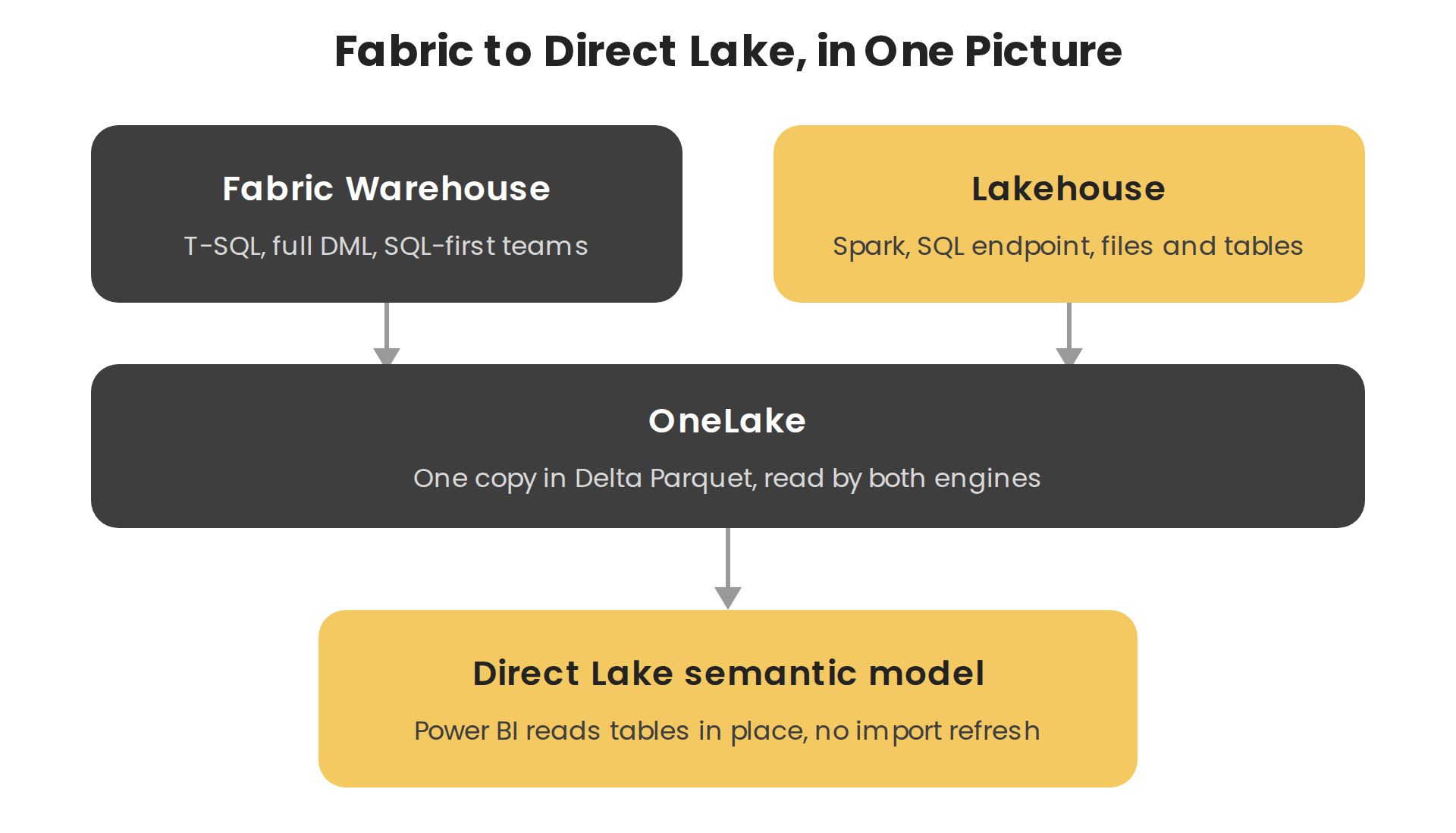
Figure 1: Both Fabric engines read one copy of the data in OneLake, and the semantic model reads it in place through Direct Lake.
Data Warehouse Migration Tools for Microsoft Fabric
Microsoft provides several migration tools and approaches depending on the source platform and target Fabric workload:
| Tool or Approach | Purpose in Fabric Migration |
|---|---|
| Fabric Migration Assistant for Data Warehouse | Migrate schemas, fix T-SQL definitions, and copy data from legacy SQL platforms (Synapse dedicated SQL pools and other supported sources) |
| DACPAC and SqlPackage | Export schema metadata from SQL Server or Azure SQL for compatibility assessment and schema deployment |
| Fabric Data Factory copy jobs | Move data from source warehouses into OneLake, including on-premises sources via the on-premises data gateway |
| COPY INTO | High-throughput data ingestion directly into Fabric Warehouse tables from supported storage sources |
| Dataflows Gen2 | Power Query-based transformation and load for data preparation and warehouse feeding |
| Fabric Mirroring | Near-real-time replication of supported source data into OneLake for analytics, without full warehouse rebuild |
| Power BI Direct Lake | Allows Power BI semantic models to read Fabric data directly from OneLake, reducing traditional import-refresh requirements depending on the architecture |
Which Source Warehouses Move to Fabric?
| Source Warehouse | What Drives the Move | Migration Profile |
|---|---|---|
| Synapse dedicated SQL pools | Natural successor platform, shared T-SQL lineage | Closest fit; Fabric Migration Assistant covers much of it |
| SQL Server on-premises | Support Windows and hardware refresh | Schema ports well; SSIS and agent jobs move separately |
| Oracle and Teradata | Licensing cost and specialist skills | Schema and SQL both need conversion; heaviest migration profile |
| Amazon Redshift | Consolidating onto Microsoft | Schema converts; SQL dialect and egress cost are the work |
| SAP BW | Moving analytics out of the ERP stack | Extraction is the hard part, not the target modeling |
Warehouse Asset Mapping to Fabric
| Source Asset | Fabric Equivalent |
|---|---|
| Schemas, tables, and views | Warehouse or Lakehouse tables in Delta Parquet on OneLake |
| Stored procedures and functions | Fabric Warehouse T-SQL procedures, reviewed for surface-area compatibility |
| Distribution keys, indexes, statistics | Dropped; Fabric optimizes storage and query performance automatically |
| Surrogate keys and slowly changing dimensions | Rebuilt in pipelines or notebooks |
| Roles, grants, and row-level security | Microsoft Entra ID roles, OneLake security, Power BI RLS |
| Scheduled loads and agent jobs | Fabric Data Factory pipelines and triggers |
| Import-mode Power BI semantic models | Direct Lake semantic models where appropriate |
| Reports and dashboards | Power BI reports re-pointed to Fabric rather than fully rebuilt in most cases |
Data Type and SQL Compatibility Considerations
Data type mapping is one of the most common sources of silent reconciliation differences. When migrating from Synapse or SQL Server, several type conversions occur automatically:
- money becomes decimal(19,4)
- smallmoney becomes decimal(10,4)
- datetime and smalldatetime become datetime2
- tinyint becomes smallint
- datetimeoffset is not supported; the timezone element needs to be extracted into a separate column during conversion
These conversions are silent and surface later as small reconciliation differences if not identified in the assessment phase. T-SQL surface area compatibility should also be assessed early: not every construct is supported in Fabric Warehouse, and constructs outside the supported surface area need rewriting. Identifying these during planning prevents mid-migration surprises.
Can an On-Premises Data Warehouse Be Migrated to Microsoft Fabric?
Yes. You can migrate on-premises data warehouses to Microsoft Fabric using supported connectivity and migration methods. For on-premises SQL Server, Fabric Data Factory copy jobs connected via an on-premises data gateway move data into OneLake. The on-premises data gateway bridges on-premises sources and Fabric cloud services and should be sized, installed, and tested before configuring data migration pipelines.
For other on-premises platforms such as Oracle, Teradata, and legacy warehouses, the migration approach depends on source platform compatibility, data volume, network connectivity, and the degree of SQL conversion required. Schema conversion and T-SQL compatibility review are typically more extensive for non-Microsoft source platforms.
Step-by-Step Data Warehouse Migration to Microsoft Fabric
- Assess and inventory: catalog schemas, stored procedures, views, ETL jobs, security, and downstream reports. Baseline query performance and identify anything outside the supported T-SQL surface area. Retire obsolete objects before migration begins.
- Plan and design: choose Fabric Warehouse or Lakehouse (or both), design workspaces and the security model, and decide whether to lift and shift or modernize by subject area. Select the appropriate migration tools for the source platform.
- Convert schema and code: export schema using DACPAC or a direct connection, run compatibility analysis using the Fabric Migration Assistant or manual review, and convert DDL and T-SQL.
- Load data into OneLake: ingest historical data using Fabric Data Factory copy jobs, COPY INTO, or Fabric Mirroring. Rebuild incremental load pipelines as Fabric Data Factory pipelines and triggers.
- Rebuild and re-point: rebuild incremental ETL as pipelines, re-point Power BI semantic models to Direct Lake where appropriate, and confirm reports match the source figures.
- Reconcile and run parallel: match row counts, totals, and report figures against the source for the same window through at least one month-end. Reconcile at both table level and report level; table-level matching alone misses semantic model and filter differences.
- Cut over and optimize: decommission the source only after sign-off. Size the Fabric capacity from measured demand rather than the old server specification.
Common Challenges and Best Practices
- T-SQL surface area gaps: not every construct is supported in Fabric Warehouse; assess compatibility during planning rather than discovering issues mid-conversion
- Silent data type drift: type mapping and rounding differences produce small mismatches that must be explained and resolved, not tolerated as acceptable variance
- Reports as the real acceptance test: business users judge the migration on whether the numbers in their reports match, so reconcile at report level and not only at table level
- Migrate by subject area: one conformed set of dimensions and its facts at a time, so each wave produces something the business can validate before proceeding
- Keep the source running until sign-off: running both systems in parallel through one reporting cycle costs far less than reversing a failed cutover at close
- Security validation: validate Entra ID roles and RLS with representative user accounts, not admin accounts, before cutover
How Long Does Data Warehouse Migration to Fabric Take?
| Migration Scope | Typical Effort |
|---|---|
| Small warehouse, limited SQL complexity | Weeks to a few months |
| Mid-size warehouse with ETL and reports | Several months |
| Large enterprise warehouse with complex SQL, ETL, and security | Multiple phases across quarters |
Timeline drivers include data volume, number of schemas and tables, stored procedure complexity, T-SQL compatibility scope, ETL pipeline workload, security requirements, and downstream report count. Migrating by subject area and reconciling each wave before the next is the most reliable approach for managing both timeline and risk.
How Much Does Data Warehouse Migration to Fabric Cost?
Migration cost depends on source platform, data volume, number of tables and schemas, stored procedure complexity, ETL pipeline scope, security requirements, downstream report migration, and validation effort. No universal cost applies to every migration.
Organizations should compare migration cost against the ongoing expense of the source environment for on-premises warehouses, including hardware refresh, SQL Server or legacy licensing, and infrastructure maintenance. Synapse dedicated SQL pools include compute costs that do not scale down automatically. A migration assessment is the most reliable way to estimate scope and cost before committing to a full migration plan. Contact DataTerrain for a free assessment of your warehouse environment.
Illustrative Example: Warehouse Consolidation on Microsoft Fabric
Illustrative Example. The following is a representative profile based on the types of data warehouse migration projects DataTerrain has supported. It is not an account of a specific named client.
A healthcare provider runs an on-premises SQL Server warehouse with approximately 900 tables and 300 stored procedures, feeding 200 Power BI reports through overnight import refreshes that regularly overrun into the working day. A hardware refresh is due, and the organization wants to move away from the overnight refresh dependency.
The assessment identifies well-formed star schemas, so the warehouse moves largely as-is into Fabric Warehouse rather than being redesigned. Approximately 40 stored procedures fall outside the supported T-SQL surface area and are refactored. Datetimeoffset columns are split during conversion. Migration runs by subject area each wave, reconciled at both table and report level, and run in parallel through a month-end before the next wave begins. Re-pointing the Power BI semantic models to Direct Lake mode reduces the overnight import-refresh dependency, and the on-premises estate is decommissioned after the final subject area receives sign-off.
Data Warehouse Migration to Microsoft Fabric with DataTerrain
DataTerra delivers end-to-end data warehouse migrations to Microsoft Fabric, covering assessment, SQL conversion, data pipelines, security, and validation. Our Automated BI reports conversion service accelerates report migration alongside the warehouse build.
Key Takeaways
- Lift and shift first, modernize second. Microsoft's own migration guidance recommends moving the model largely as-is, then re-engineering in a later phase where needed
- Fabric Warehouse is the closest fit for SQL-first workloads. It uses full T-SQL and integrates natively with Power BI.
- Both Fabric Warehouse and Lakehouse read from OneLake. The target workload choice is less final than it appears; mixed estates can run both against the same OneLake data.
- Indexes and tuning artifacts do not migrate. Fabric optimizes storage and query performance automatically; it drops distribution and index design from the source platform.
- Data types will change during migration. Several common types map to different targets, and datetimeoffset is not supported; both can cause silent reconciliation differences if you don't identify them early.
- Reconcile at report level, not only at table level. Business users judge the migration on whether the numbers in their reports match, making report-level validation essential before cutover.
Conclusion
Data warehouse migration to Microsoft Fabric is a multi-layer migration: schema and SQL conversion, data movement into OneLake, ETL pipeline rebuilding, security remapping, and semantic model re-pointing, all validated against the source before cutover. Organizations that approach the migration with a complete inventory, the right Fabric target workload, appropriate migration tooling, and reconciliation as a gate at every wave consistently produce Fabric environments that accurately replace the source warehouse. Contact DataTerrain for a free assessment of your data warehouse migration to Microsoft Fabric.
Related Articles
- SQL Server to Microsoft Fabric Migration: Steps, Tools, and Best Practices
- Cognos to Microsoft Fabric Migration: A Practical Guide
- Informatica to Microsoft Fabric Migration: A Complete Guide
- Microsoft Fabric vs Amazon Redshift: Which Fits Your Stack?