Contents
- 10 Sep 2026
BI Reports Migration to Power BI: What Actually Changes
Many organizations are moving existing dashboards and reports from legacy BI tools to Power BI to standardize reporting and simplify their analytics environment. This isn't a file conversion: each report's data connections, calculations, visuals, interactions, and security rules must be mapped and rebuilt, with the underlying data modeled in a shared Power BI semantic model (formerly called a dataset) so multiple reports can share consistent business definitions.
Quick Summary
BI reports migration to Power BI means rebuilding legacy dashboards, not converting files. You recreate calculations in DAX, rebuild data-preparation logic in Power Query or dataflows, and convert legacy worksheets and dashboards into Power BI visuals and report pages. Depending on the architecture, data may be imported, queried through DirectQuery, accessed via Direct Lake, or connected through a composite model. The technical specifics differ by source platform, but every rebuilt report needs validation against the original before cutover.
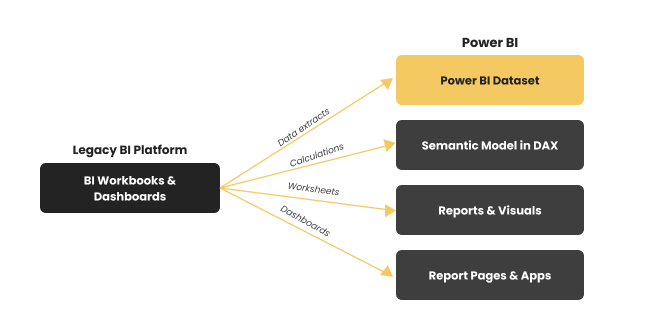
Figure 1: A legacy BI workbook rebuilt in Power BI, data lands in a dataset, calculations become DAX, worksheets become charts and pages.
At a Glance
- Source: Legacy BI reports and dashboards from Tableau, Qlik, Cognos, SAP BusinessObjects, SSRS, and similar platforms
- Target: Power BI reports built on shared semantic models
- Main effort: Rebuilding calculations, data models, visuals, interactions, and security
- What automation accelerates: Asset discovery, metadata analysis, and component mapping
- Still required: Number-for-number validation against the source before cutover

- Share Post:
-

-

What Is BI Reports Migration to Power BI?
BI reports migration to Power BI is the process of rebuilding legacy BI dashboards from platforms such as Tableau, Qlik, Cognos, SAP BusinessObjects, and SSRS as Power BI reports. Each platform connects data, defines calculations, and models relationships differently, so migration means recreating a report's business meaning, not converting its file.
A Tableau calculated field may need to become a DAX measure. A Qlik expression may need rebuilding around a different data model. Cognos logic tied to Framework Manager packages has no direct Power BI equivalent. This guide covers what's common across platforms, component mapping, reconstruction, semantic modeling, and validation, while our Qlik to Power BI, Tableau to Power BI, and WebI/Cognos to Power BI guides cover platform-specific technical detail directly.
Why Enterprises Choose This Migration
- One reporting platform. Consolidates reporting accumulated across acquisitions or departmental tool choices, and fits naturally for organizations already on Excel, Azure, or Microsoft Fabric.
- Shared semantic models. Centralizes relationships and DAX measures so multiple reports use the same business definitions instead of independently drifting apart- the same governance-consolidation goal covered in our key checklist for BI modernization.
- Flexible data connectivity. Import, DirectQuery, Direct Lake, or composite models let teams choose architecture based on data size, refresh needs, and governance, rather than forcing every report into one storage model.
- Consolidated governance. Migration is a natural checkpoint to review security, row-level access, and workspace permissions rather than reproducing years of legacy configuration unchanged.
- Broader adoption. Familiar Microsoft integration and a widely used interface extend self-service analytics to more of the business.
Legacy BI to Power BI Component Mapping
These are functional equivalents, not automatic file conversions, and there is generally no universal one-click conversion for any of them.
| Legacy BI Component | Power BI Equivalent | Migration Approach |
|---|---|---|
| Data sources and extracts | Semantic model + supported connections | Reconfigured for Import, DirectQuery, Direct Lake, or another architecture |
| Calculated fields | DAX measures or calculated columns | Rebuilt using Power BI calculation logic |
| Level-of-detail / table calculations | DAX measures and model logic | Rebuilt to preserve the result, not translated line by line |
| Parameters | Power Query, report, or field parameters | Recreated based on original use case |
| Worksheets or views | Power BI visuals | Rebuilt as one or more visuals |
| Dashboards | Power BI report pages | Recreated, redesigned where interaction differs |
| Data preparation flows | Power Query/dataflows | Rebuilt as part of the data layer |
| Security rules | Row-level security & workspace permissions | Reconfigured and validated |
| Legacy server/cloud platform | Power BI Service | Publishing and governance move to workspaces |
Effort scales with complexity, not report count: a simple chart with a basic calculation rebuilds quickly, while layered calculations, custom interactions, and multiple data sources need real redesign. Migration automation accelerates asset discovery, metadata extraction, and component mapping, but calculations, semantic logic, and interactions still require validation and, often, platform-specific rebuilding.
SSRS Reports to Power BI: A Different Migration Path
"SSRS to Power BI" describes two technically different scenarios, and confirming which one applies should be an early planning step, since the effort profiles differ significantly.
- Power BI Report Server to Power BI Service. If reports already run on Power BI Report Server and you're moving to the cloud service, this can be closer to rehosting than rebuilding: connecting existing reports to appropriate cloud resources rather than recreating every visual, especially where compatible semantic models and structures already exist.
- Classic SSRS to Power BI. Traditional RDL reports against relational sources require a different migration: rebuild them as Power BI paginated reports or redesign them as interactive reports, mapping expressions, connections, and formatting to the appropriate Power BI technology.
Step-by-Step Migration Process
- Inventory. List every report, data source, calculation, parameter, and security rule, ranked by usage and business importance, so effort focuses on what people actually depend on.
- Assess dependencies. Map relationships between reports, sources, and shared calculations before estimating, since a simple-looking report can hide complex upstream logic.
- Rebuild data connections and semantic model. Connect the required sources, choose Import, DirectQuery, Direct Lake, or another approach per workload, and rebuild shared relationships and definitions in one semantic model.
- Recreate calculations. Map legacy expressions to DAX, Power Query, or the source layer as appropriate, reproducing the business result rather than translating formulas character by character.
- Rebuild reports and interactions. Recreate visuals, filters, actions, and parameters, redesigning where no direct Power BI equivalent exists while preserving the original question the dashboard answered.
- Rebuild security. Map legacy access rules into workspace permissions and row-level security, and test security independently from visuals, since correct numbers can still expose data incorrectly.
- Validate and cut over. Run legacy and Power BI side by side, checking numerical accuracy, filters, security, refresh behavior, and completeness, the same validation discipline covered in our guide to BI automation for report migration. Publish and move users in phases once approved.
Common Migration Challenges
- Calculations, not visuals, drive effort. Level-of-detail logic, table calculations, and scripting expressions rarely have direct DAX equivalents and must be rebuilt to produce the same result.
- Not every visual matches. Some charts can be recreated natively; others need redesign, and pixel-for-pixel replication shouldn't be the goal if Power BI answers the same question more effectively.
- Interactivity needs redesigning, not copying. Drill-down, filtering, and navigation behave differently and are rebuilt using drill-through, bookmarks, and cross-filtering.
- Consolidating data models takes real design work. Merging separate per-workbook logic into one shared semantic model improves consistency but requires careful dependency analysis first.
- Validate security, don't assume it. Legacy access rules mapped into Power BI's model need testing before cutover, independent of report content.
Migration Best Practices
- Rebuild the dashboard's purpose, not every visual element, so the migrated report preserves business value while using the target platform properly.
- Inventory and prioritize by usage before migration begins; retire unused or duplicate reports instead of rebuilding them.
- Build the semantic model first where reports share logic, reducing duplicated DAX and keeping results consistent.
- Validate calculations, filters, totals, and security against the source, not just visual similarity.
- Involve report owners to confirm the rebuild actually answers the same business questions.
- Migrate in phases, validating high-priority reports first and applying what you learn to later waves.
Frequently Asked Questions
Ready to Migrate Your BI Reports?
DataTerrain helps organizations assess, map, and migrate BI reports to Power BI across Tableau, Qlik, Cognos, SAP BusinessObjects, SSRS, and other legacy environments. With 17+ years of experience, 400+ customers, and 27,000+ reports and dashboards delivered, we support the full process from asset discovery through parallel validation, and every migration can start with a free Proof of Concept using your own representative reports.
Related Reading
- Power BI Report Migration: What Actually Moves
- Tableau to Power BI Migration
- Qlik to Power BI Migration: The Complete Guide
- WebI/Cognos to Power BI Migration Challenges
- Crystal Reports to Power BI Migration
- Key Checklist for Successful BI Modernization
- From Any to Any: How BI Automation Simplifies Report Migration