Contents
- 27 Aug 2026
What Actually Happens When You Move From Azure to Microsoft Fabric
Quick Summary
Azure to Microsoft Fabric migration consolidates Azure Data Factory, Synapse, Data Lake Storage, and Analysis Services into Microsoft's unified Fabric platform. It's not a lift-and-shift: Microsoft's own assessment classifies every ADF pipeline into Ready, Needs Review, Coming Soon, or Unsupported, and that classification, not pipeline count, determines your real timeline. This guide covers what converts, what's rebuilt, what's on a forced Microsoft deadline, and when it's smart to wait.

- Share Post:
-

-

What Is Azure to Microsoft Fabric Migration?
Azure to Microsoft Fabric migration moves data engineering, warehousing, analytics, and BI workloads from individual Azure services into Microsoft Fabric. A traditional Azure analytics environment typically stitches together Azure Data Factory, Synapse Analytics, Data Lake Storage, Azure SQL Database, Analysis Services, Synapse Spark, Synapse Data Explorer, and Power BI as separate services. Fabric brings these capabilities into one managed, SaaS analytics platform built around OneLake, a single tenant-wide storage layer every Fabric workload reads from.
This is not a lift-and-shift. An Azure Data Factory pipeline does not become a Fabric pipeline by copying the original pipeline JSON. ADF and Fabric use incompatible pipeline structures, so connections, datasets, integration runtimes, parameters, activities, and triggers all need to be mapped to Fabric equivalents individually, the same structured mapping discipline covered in our Oracle to Microsoft Fabric migration guide for a different source platform. This is why assessment and workload classification matter more than simply counting Azure assets.
What Converts, What's Rebuilt, What's Redesigned
Every Azure workload falls into one of three migration patterns, and knowing which one applies before you scope the work is the single biggest driver of an accurate timeline:
Convert. Source and target are similar enough that most of the implementation carries over with configuration changes. Standard ADF copy activities and Synapse notebooks are typical examples.
Rebuild. The target provides the same business capability, but on a different architecture. Dedicated SQL pool workloads moving to Fabric Warehouse, and ADF mapping data flows moving to Dataflow Gen2, both fall here.
Redesign. No direct equivalent exists, so a different implementation approach is required. SSIS packages and metadata-driven pipelines with dynamically parameterized connections are the clearest examples; the same redesign-not-port principle behind our guide to BI automation for report migration.
The full asset mapping table below shows exactly which pattern applies to each Azure service.
Why Enterprises Are Making the Move
One platform instead of many. A traditional Azure stack runs data engineering, integration, warehousing, and BI as separate, individually provisioned and billed services. Fabric consolidates this work into one managed workspace, removing the overhead of keeping several services in sync, with the same consolidation logic behind Microsoft Fabric's ETL migration capabilities.
A real, independently studied ROI case. A Forrester Consulting Total Economic Impact study, commissioned by Microsoft, found Fabric delivered a 379% return on investment over three years for the composite organization studied, alongside a 25% increase in data engineering productivity. Treat the specific multiplier as directional for your own environment, not a guaranteed outcome, but it's a genuine, citable figure rather than a marketing estimate.
Faster Spark provisioning. Fabric provisions Spark starter pools in roughly 5 to 10 seconds, compared with managing and scaling dedicated Spark clusters in Synapse, a meaningful day-to-day difference for teams running frequent, smaller Spark jobs.
A Unified Compute Capacity model. Rather than provisioning and billing Synapse SQL pools, Spark pools, and other engines separately, Fabric's engines draw from a single, shared capacity pool that shifts processing power to whichever workload needs it. Capacity can be purchased directly through the Azure Portal using Capacity Units (CUs), the same procurement path many Azure teams already use for other services.
Newer capabilities Azure's separate services don't share natively, including native copy jobs, data mirroring, Teams and email alert activities built directly into pipeline authoring, and Copilot integration across Power BI and notebooks, the same AI-assisted direction covered in our Microsoft Fabric 2026 features roundup.
Azure vs Microsoft Fabric: Side-by-Side Comparison
| Criteria | Azure (Multi-Service) | Microsoft Fabric |
|---|---|---|
| Architecture | Separate services wired together | One managed platform in a single workspace |
| Storage | Data Lake Storage / Blob, per service | OneLake, one tenant-wide Delta Lake |
| Compute | Provisioned Synapse SQL / Spark pools | Serverless Fabric capacity, shared |
| Spark startup | Managed dedicated clusters | Starter pools, roughly 5 to 10 seconds |
| Billing | Separate meter per service | One Fabric capacity, purchasable via Azure Portal using Capacity Units |
| BI Integration | Power BI separate; import or query | Native Power BI with Direct Lake |
| Governance | Per-service access control plus Purview | Unified OneLake security with Purview |
| Best Fit | Granular control of each service | Standardizing on one governed platform |
Azure to Fabric Asset Mapping
| Azure Service / Asset | Microsoft Fabric Equivalent | Migration Pattern | Notes |
|---|---|---|---|
| Azure Data Factory | Fabric Data Factory | Convert | Same activity-based authoring, inside Fabric |
| ADF pipeline | Fabric Data Pipeline | Convert | Most activities port directly; structures are not compatible, so import is not automatic |
| ADF Linked Service | Fabric Connection | Rebuild | Recreated at the activity level, not centrally |
| ADF Dataset | Removed as a construct | Rebuild | Field mappings move to the activity level rather than a shared dataset object |
| Self-hosted integration runtime (SHIR) | On-premises data gateway (OPDG) | Rebuild | Manual reconfiguration; no automated conversion path |
| VNet-enabled Azure IR | Virtual Network Data Gateway | Rebuild | Security posture carries over conceptually; setup is manual |
| ADF mapping data flow | Dataflow Gen2 (or Spark notebooks) | Rebuild | Different execution engine; transformation logic is rewritten, not ported |
| Azure Synapse dedicated SQL pool | Fabric Warehouse | Rebuild | Heavy PolyBase or custom UDF logic needs refactoring, not a direct port |
| Synapse Spark pool | Fabric notebooks / Spark job definitions | Convert | Code largely carries over; runtime and config differ |
| Azure SQL Database | Fabric Warehouse or mirrored database | Convert / Rebuild | Migrated, or mirrored for low-latency sync |
| Azure Data Lake Storage (ADLS) | OneLake | Convert | Migrated in, or read in place via a Shortcut |
| Azure Blob Storage | OneLake Shortcut | Convert | Read in place, no copy |
| Azure Analysis Services | Fabric semantic model | Rebuild | Tabular models become Power BI semantic models |
| Azure Synapse Data Explorer | Fabric Eventhouse | Rebuild | Retired; migration to Eventhouse is required, not optional |
| Tumbling window trigger | Fabric interval-based scheduling | Redesign | Different dependency-chaining and backfill semantics |
| SSIS packages | No direct equivalent | Redesign | Interim: invoke ADF pipelines from Fabric while progressively rebuilding natively |
Microsoft's Pipeline Readiness Classification
Since March 2026, Microsoft has offered a built-in migration assessment directly inside the ADF authoring portal. Run this before estimating a timeline off guesswork: it scans every pipeline in your environment, assigns each one to a readiness state, and exports a full CSV report so you know your actual scope before committing resources. Migrated pipelines arrive with their triggers disabled by default, specifically so your team, not the import process, controls when each one actually goes live in production.
Ready. Standard copy activities, basic orchestration, most connectors, Synapse notebooks, Spark jobs, and simple triggers. Prioritize these first.
Needs Review. Typically metadata-driven pipelines with dynamically parameterized connections; each parameter permutation needs its own Fabric connection, so these need engineering review before conversion.
Coming Soon. Committed but not yet shipped in Fabric; mapping data flows currently fall here. Plan an interim path (Dataflow Gen2 or Spark notebooks) rather than waiting.
Unsupported. No current Fabric path. SSIS integration runtimes are the clearest example.
A migration plan based only on pipeline count can be misleading: two organizations with 500 pipelines each could face dramatically different effort if one has 450 Ready pipelines and the other has hundreds requiring review or redesign, the same complexity-over-count principle we apply in our key checklist for BI modernization.
Understanding OneLake Shortcuts
One of the most consequential design decisions in a Fabric migration is deciding what actually needs to move versus what can simply be referenced in place. OneLake Shortcuts handle this: a Shortcut is a pointer from OneLake to data still sitting in Azure Data Lake Storage Gen2 or Blob Storage, so Fabric's engines can query it directly without copying it.
This removes the false choice between "migrate everything now" and "keep everything on Azure." Teams can move high-value workloads into OneLake natively while leaving lower-priority data in place, queryable, until there's a reason to move it, avoiding the time and cost of moving large volumes of data as a migration prerequisite- often the single biggest reason large migrations stall before they start- the same staged-migration approach behind our data lake work more broadly.
Security and Governance Considerations
Design security before workloads move, not as a final migration task.
Identity and access. Review workspace roles, user permissions, service principals, managed identities, and data-source credentials.
Row-level security. Map existing rules to the target semantic models and validate them using representative user accounts, not just admin logins.
Network security. Organizations with private networking, managed virtual networks, gateways, or restricted connectivity should validate Fabric's networking model against their existing Azure architecture before committing to a timeline.
Data governance. Review sensitivity labels, data classification, lineage, data ownership, Purview integration, retention requirements, and regulatory controls.
Least privilege. Don't simply reproduce every existing Azure permission in Fabric. Migration is an opportunity to identify unnecessary access and establish a cleaner target-state security model, the same governance-first sequencing covered in our legacy scripts migration work.
How Much Does Azure to Fabric Migration Cost?
There is no reliable universal migration price; cost depends on the existing Azure estate and the target Fabric architecture. Key cost drivers include the number of ADF pipelines, the number of Synapse workloads, SQL complexity, Spark workload complexity, data volume, the number of semantic models and reports, SSIS dependencies, networking and security requirements, the required parallel-running period, Fabric capacity needs, and internal versus external migration resources.
Evaluate migration project cost and ongoing Fabric operating cost separately. A useful business case compares current Azure operating cost (infrastructure, licensing, engineering effort) against Fabric capacity, storage, networking, administration, and migration cost, based on actual workload consumption, not an assumption that consolidation automatically means a lower bill- the same evidence-based scoping we apply across our data analytics services.
What Determines the Migration Timeline?
Migration duration depends more on workload complexity and readiness than on the raw number of Azure assets. The major drivers are the number of Ready pipelines versus Those That Need Review or are unsupported, SQL refactoring requirements, data migration volume, the number of semantic models, security and governance complexity, networking requirements, the number of business-critical reports, and the required parallel validation period.
A 100-pipeline environment with straightforward copy activities can be easier to migrate than a 30-pipeline environment containing complex dynamic orchestration, custom SQL, SSIS dependencies, and strict networking requirements- the same complexity-first estimation approach covered in our Alteryx to Microsoft Fabric migration challenges guide for a different source platform.
Step-by-Step Migration Process
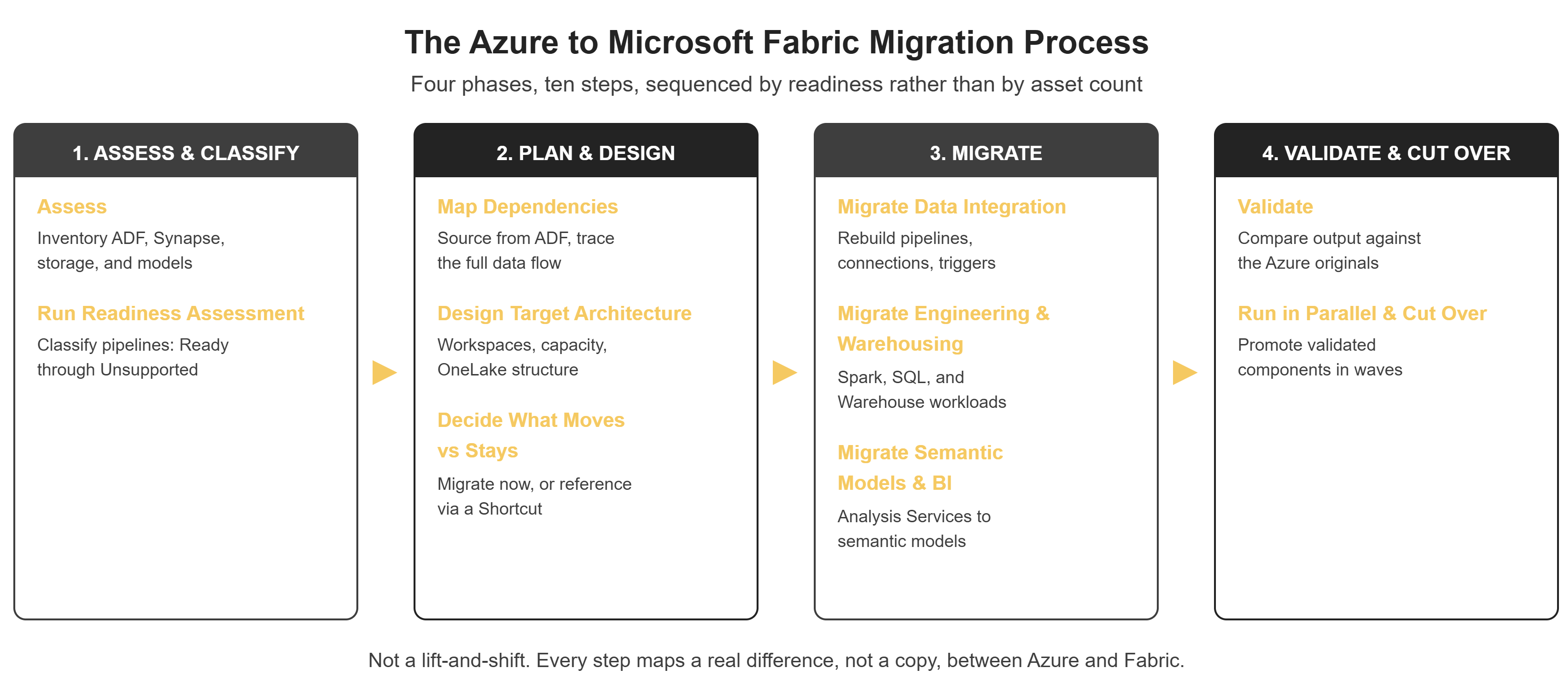
Diagram: 10-step migration sequence — Assess → Run Readiness Assessment → Map Dependencies → Design Target Architecture → Decide What Moves vs Stays → Migrate Data Integration → Migrate Data Engineering & Warehousing → Migrate Semantic Models & BI → Validate → Run in Parallel & Cut Over
- Step 1: Assess the existing Azure environment. Inventory ADF pipelines, linked services, datasets, data flows, Synapse SQL and Spark, ADLS, Blob Storage, Analysis Services, Power BI dependencies, SSIS, and security and governance.
- Step 2: Run the migration assessment. Use Microsoft's built-in ADF assessment to classify pipelines as Ready, Needs Review, Coming Soon, or Unsupported, and use the results to set the real scope.
- Step 3: Build the dependency map. Document the flow from sources through pipelines, storage, warehouse or lakehouse, semantic models, to reports, so migrating an upstream component doesn't break a downstream one.
- Step 4: Design the target Fabric architecture. Decide Lakehouse vs Warehouse, OneLake structure, workspaces, capacity, connections, gateways, security, and semantic model approach.
- Step 5: Decide what moves and what stays. Use OneLake Shortcuts where keeping data in Azure temporarily makes technical or financial sense.
- Step 6: Migrate data integration. Rebuild ADF pipelines as Fabric Data Pipelines, recreating connections, parameters, activities, dependencies, expressions, and triggers.
- Step 7: Migrate data engineering and warehousing. Move or rebuild Synapse SQL workloads, Spark notebooks, transformations, stored procedures, tables, and views.
- Step 8: Migrate semantic models and BI. Rebuild Analysis Services models as Fabric semantic models and validate downstream Power BI reports.
- Step 9: Validate. Compare record counts, aggregations, transformation results, query results, refresh behavior, performance, security, and report outputs against the Azure originals, using the same validation discipline covered in our guide to BI automation for report migration.
- Step 10: Run in parallel and cut over. Keep Azure workloads available while Fabric equivalents are validated, and promote in controlled waves rather than a single switch.
Migration Challenges
- Pipeline reconstruction, not import. Complex orchestration, parameters, expressions, and dependencies often need rebuilding, since ADF and Fabric pipeline structures are incompatible.
- Integration runtime conversion. SHIRs become on-premises data gateways, and VNet-enabled IRs become Virtual Network Data Gateways; neither conversion is automated, and both require manual reconfiguration of network connectivity and security settings.
- T-SQL and warehouse refactoring. Dedicated SQL pool workloads with heavy PolyBase usage or custom UDFs often need genuine refactoring for Fabric Warehouse, one of the most commonly underestimated pieces of a migration timeline, a pattern that echoes the T-SQL refactoring challenges covered in our OBIEE to OAS migration guide for a different platform pair.
- Dataflow transformation logic. ADF's mapping data flows and Fabric's Power Query-based Dataflow Gen2 use different execution engines, so transformation logic is rewritten, not translated automatically.
- Spark runtime differences. Code is often reusable, but runtime versions, libraries, and configuration should be validated, not assumed to run the same way.
- Governance spanning two models. In transition, governance can straddle per-service Azure access control and OneLake's unified security simultaneously; row-level security, workspace roles, and sensitivity labels need to move into Fabric and be validated so there's no gap at cutover.
- Performance assumptions. A workload performing well in Synapse should be benchmarked on Fabric, not assumed to perform identically.
Azure to Fabric Migration Readiness Checklist
Architecture
- Complete Azure service inventory
- Dependency map
- Target Fabric architecture
- Workspace strategy
- Capacity plan
Data
- Data sources identified
- Data volumes documented
- OneLake migration strategy
- Shortcut strategy
- Retention requirements documented
Pipelines
- ADF assessment completed
- Pipelines classified by readiness
- Unsupported workloads identified
- Parameter dependencies documented
- Trigger dependencies documented
Security
- Users and roles mapped
- Service identities mapped
- Row-level security validated
- Network requirements reviewed
- Governance requirements mapped
BI
- Semantic models identified
- Power BI dependencies documented
- Reports mapped
- Critical dashboards identified
- Validation criteria defined
Cutover
- Parallel-run strategy defined
- Business validation completed
- Rollback plan documented
- Production triggers controlled
- Stakeholder sign-off obtained
When to Wait: Legitimate Reasons Not to Migrate Yet
Microsoft Fabric is not automatically the right answer for every Azure workload today. Consider delaying or sequencing the migration when:
- Heavy dedicated SQL pool workloads with complex distribution, PolyBase, or UDFs need significant refactoring before running correctly on Fabric Warehouse.
- Strict managed VNet or private endpoint requirements that Fabric's current networking model doesn't yet fully match for some regulated environments.
- In-flight, critical production pipelines that can't tolerate parallel-run overhead without disrupting business operations.
- Significant SSIS investment with no direct Fabric migration path, where the interim workaround adds real operational complexity.
- Budget constraints where staying on Azure a bit longer genuinely makes more sense than an accelerated migration right now.
None of these rule out migrating eventually. They're reasons to sequence deliberately: move Ready pipelines first and revisit harder cases once the constraint resolves, rather than forcing everything onto one timeline.
Best Practices
- Run the migration assessment before committing to a timeline; don't estimate off guesswork.
- Classify workloads by readiness (Ready, Needs Review, Coming Soon, Unsupported), not just by complexity.
- Map dependencies early; a standalone pipeline migrates very differently than a Synapse-plus-Analysis-Services chain.
- Flag any component on a forced Microsoft retirement timeline (like Synapse Data Explorer to Eventhouse) immediately.
- Use OneLake Shortcuts to defer lower-priority data moves rather than treating "migrate everything" as a prerequisite.
- Validate Spark jobs on Fabric's runtime rather than assuming Synapse configuration carries over.
- Move every security rule into Fabric and validate each before cutover, not after.
- Cut over in waves rather than a single switch, the same phased discipline covered in our key checklist for BI modernization.
- Retire Azure components only after production validation and stakeholder sign-off.
Case Study: Unifying an Azure Analytics Estate on Fabric
The following is an illustrative example, not an account of a specific customer engagement. No customer names, figures, or performance results are implied.
Consider an enterprise running Azure Data Factory, a Synapse SQL pool, Synapse Spark, ADLS and Blob Storage, and Analysis Services behind its Power BI reports, each provisioned, billed, and secured separately.
Running Microsoft's readiness assessment first surfaces that most copy-activity pipelines and Spark jobs classify as Ready, while a handful of metadata-driven pipelines with dynamic connections need engineering review, and a legacy SSIS package with no direct path needs an interim ADF-from-Fabric workaround. Sequencing around that classification, rather than migrating everything in one wave, means Ready pipelines move first while harder cases get dedicated attention. Storage moves into OneLake where it needs to, with Shortcuts referencing lower-priority Blob data without an upfront copy. Each converted component is validated against its Azure original before its trigger is enabled in production.
The likely outcome: unified storage and compute on one governed platform, simpler capacity-based billing, native Power BI reporting, and a migration sequenced by actual technical risk rather than by request order- the kind of outcome our BI reports and dashboard development work is built to support downstream.
Should You Migrate From Azure to Microsoft Fabric?
| Situation | Recommended Approach |
|---|---|
| New Microsoft analytics implementation | Strongly consider Fabric |
| Large number of Ready ADF pipelines | Good migration candidate |
| Need unified analytics platform | Consider Fabric |
| Heavy legacy SSIS estate | Plan a phased migration |
| Complex Synapse SQL workloads | Assess and refactor first |
| Strict networking requirements | Validate architecture first |
| Stable Azure environment, little business pressure | Migration can be phased |
| Large Azure storage estate | Consider OneLake Shortcuts |
| Strong Power BI investment | Fabric may provide real architectural benefit |
The better question isn't "should we move to Fabric," it's which Azure workloads benefit from moving now, which should be redesigned, and which should stay on Azure temporarily. That framing produces a realistic migration strategy instead of an all-or-nothing decision, the same situational framing we use in our OAS vs OAC comparison for organizations weighing a different Oracle platform decision.
Key Takeaways
- Azure to Fabric is a platform migration, not simply a data move; pipelines, storage, semantic models, and security all require different migration patterns: Convert, Rebuild, or Redesign.
- Microsoft's four-state pipeline readiness classification should drive your sequencing far more than a generic timeline estimate.
- OneLake Shortcuts let teams defer lower-priority data moves, referencing existing Blob or Data Lake Storage data in place without an upfront copy.
- Integration runtime conversion (SHIR to OPDG, VNet IR to Virtual Network Data Gateway) is manual, not automated.
- A real, independently studied ROI case exists (Forrester's 379% three-year TEI figure), but treat any vendor-commissioned multiplier as directional for your own environment.
- Not every workload should migrate immediately; heavy T-SQL refactoring, strict networking, in-flight critical pipelines, and significant SSIS investment are legitimate reasons to sequence rather than rush.
- Migrated pipelines arrive with triggers disabled by default, giving your team control over exactly when each component goes live.
Frequently Asked Questions
Migrate Any Platform to Any Platform with DataTerrain
DataTerrain brings 17+ years of BI migration and automation, with 400+ customers and 27,000+ reports and dashboards delivered. Our Microsoft Fabric migration services cover the full Azure-to-Fabric lifecycle, starting with Microsoft's own readiness assessment, then asset mapping, pipeline and Spark migration, warehouse builds, and parallel validation, so every migrated component matches its source before go-live.
We migrate Azure to Fabric, Fabric back to Azure where that's the right call, and any BI or ETL platform to any other- Informatica, Alteryx, Qlik, Jaspersoft, OBIEE, Oracle BI Publisher, Power BI, Tableau, and beyond- using the same assess-map-convert-validate discipline throughout. Our PowerCenter on AWS guide and Qlik to Power BI migration guide walk through that same approach applied to two different platform pairs.
Every migration starts with a free Proof of Concept: we migrate a sample of your actual workloads into the target platform at no cost, so your team can evaluate the approach on real data before committing. Automation-driven migrations typically complete 70-80% faster than manual builds.
Related Reading
- Oracle to Microsoft Fabric Migration: ETL Guide
- Understanding Microsoft Fabric and Its ETL Migration Capabilities
- Alteryx to Microsoft Fabric Migration and Challenges
- Alteryx to Microsoft Fabric Migration
- Alteryx vs Informatica: ETL and Fabric Migration
- Microsoft Fabric vs Alteryx ETL: Complete Comparison
- Steps to Migrate Alteryx to Microsoft Fabric via Dataflow Gen2
- Alteryx vs Power BI Comparison
- Alteryx vs Python: A Data Analysis Comparison
- Tableau vs Alteryx: Enterprise Data Analytics Comparison