Contents
- 16 Sep 2026
Oracle to Azure Data Factory: The Real Migration Path
Organizations running batch ETL on Oracle, PL/SQL procedures, Oracle Scheduler jobs, and SQL*Loader loads are migrating to Azure Data Factory (ADF), Microsoft's cloud data integration and orchestration service. Because Oracle's database-resident, procedural approach has no direct equivalent in ADF's pipeline model, migration re-architects each job rather than lifting and shifting code: procedures become data flows, schedules become triggers, and data lands in Azure storage.
Quick Summary
Oracle to Azure Data Factory migration re-architects batch ETL, not lift-and-shift. PL/SQL procedures become mapping data flows or stored procedure calls, Oracle Scheduler jobs become ADF triggers, and SQL*Loader loads become Copy activities landing in Azure Data Lake or Azure SQL. On-premises Oracle needs a self-hosted integration runtime to bridge to the cloud service, connection details live in a Linked Service with credentials in Azure Key Vault, and every migrated pipeline is validated against Oracle's row counts, totals, and run timing before the original job retires.

- Share Post:
-

-

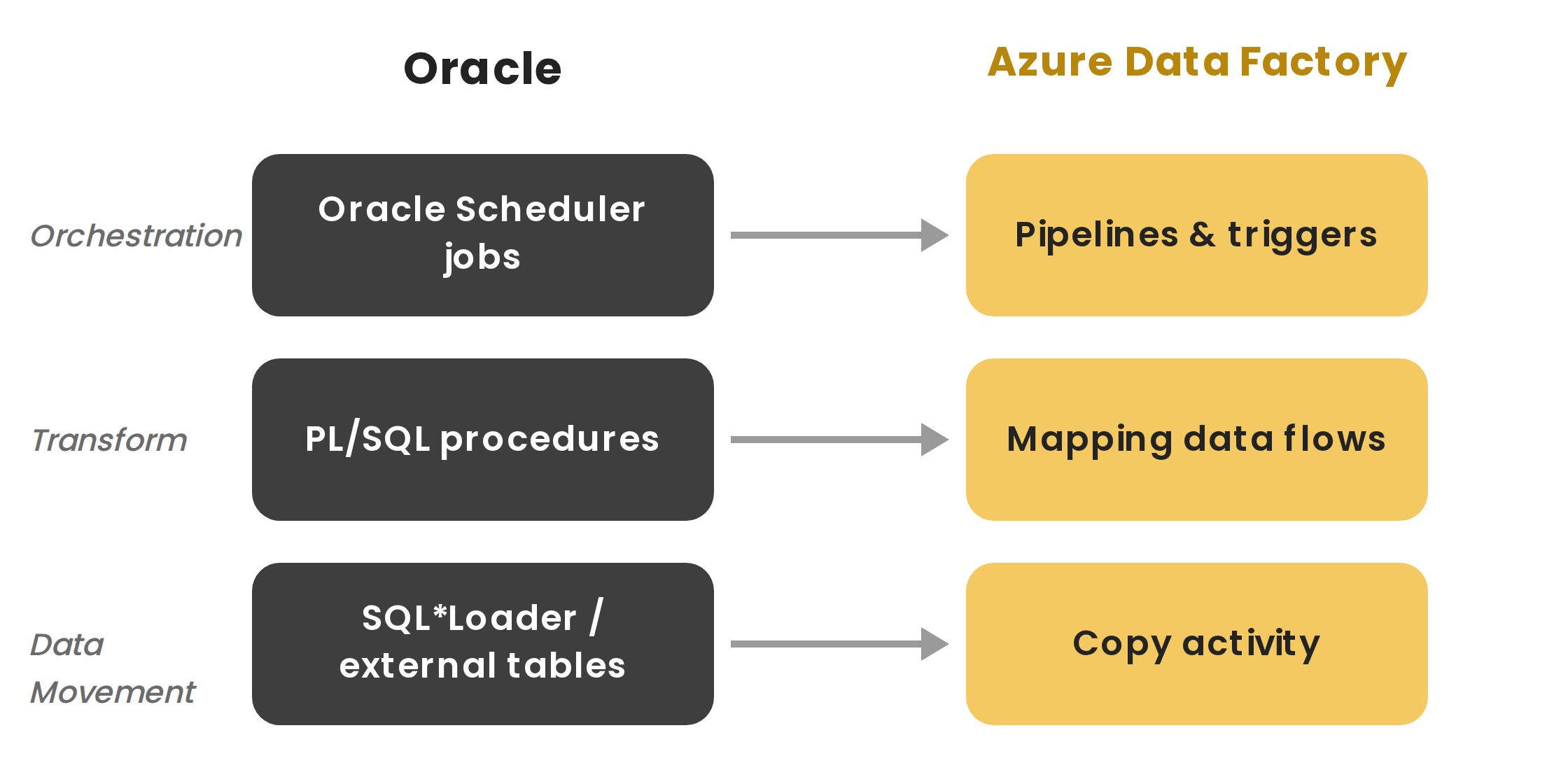
Figure 1: An Oracle job rebuilt in Azure Data Factory layer by layer, loads become Copy activities, procedures become data flows, and schedules become triggers.
Key Takeaways
- You can't lift and shift Oracle jobs; you re-architect them. PL/SQL's procedural logic has no direct ADF equivalent, so you redesign each job as pipeline activities and data flows.
- On-premises Oracle needs a self-hosted integration runtime. ADF is cloud-native, so reaching an on-prem Oracle database requires installing a runtime that bridges the two.
- The core ADF objects have specific names. A Linked Service holds the connection, source and sink Datasets define what moves, and a Copy Data activity does the actual transfer.
- PL/SQL procedures become data flows or stored procedure calls. Set-based logic maps well to ADF's data flows; logic that must stay in the database is called separately.
- Oracle Scheduler jobs become ADF triggers. Schedule triggers cover simple timing; tumbling window triggers replicate job chains and dependencies.
- Microsoft has its own assessment tooling for the schema layer, separate from ADF itself, and it's worth using alongside this migration, not instead of it.
- We validate every migrated pipeline against Oracle. We compare row counts, key totals, and run times before retiring the Oracle job.
What Is Oracle to Azure Data Factory Migration?
Oracle to Azure Data Factory migration moves batch ETL and job orchestration from Oracle to Azure Data Factory. Oracle typically runs this work inside the database, with PL/SQL packages triggered by Oracle Scheduler. ADF works differently: it's an orchestration layer that moves data between stores and applies transformations through code-free data flows or by calling external compute. Because the two run on different execution models, migration re-creates each job, procedures are redesigned as pipelines, schedules become triggers, and data lands in Azure storage rather than staying inside Oracle- the same re-architecture-not-conversion principle covered in our ETL migration to Microsoft Fabric guide for organizations targeting Fabric specifically rather than standalone ADF.
In ADF's own terms, this means creating a Linked Service to hold the Oracle connection details, defining source and sink Datasets that point to specific tables (a source dataset for a schema and table like HR.EMPLOYEES, for example, and a sink dataset for the Azure SQL or Data Lake target), and building a Copy Data activity that moves data between them. Credentials are stored in Azure Key Vault rather than embedded directly in the pipeline, the same credential-hygiene practice covered in our key checklist for BI modernization.
Why Organizations Migrate from Oracle to Azure Data Factory
- Separates compute from the database. ADF moves transformation logic out of the database engine, reducing load and licensing tied to Oracle compute.
- One orchestration layer across sources. Pipelines can pull from Oracle, SQL Server, files, and SaaS APIs side by side, replacing scattered database jobs.
- Native Azure integration. Pipelines can trigger Synapse, Databricks, and Azure Functions, and are secured through Entra ID, the same Azure-native connectivity covered in our ODI (Oracle Data Integrator) ETL guide for a different Oracle source-tool pairing.
- A different pricing model. ADF is billed per activity run and data movement rather than per-core licensing, so it needs its own sizing.
Oracle to Azure Data Factory Component Mapping
Each Oracle component is rebuilt in ADF, not converted:
| Oracle | Azure Data Factory | Migration Note |
|---|---|---|
| Oracle connection details | ADF Linked Service (Oracle connector) | Credentials stored in Azure Key Vault, not embedded in the pipeline |
| PL/SQL procedures | Mapping data flows / Stored Procedure activity | Set-based logic maps to data flows; in-database logic is called via stored procedure activity |
| Oracle Scheduler jobs | Pipelines & triggers | Schedule and tumbling window triggers replicate job timing and chaining |
| SQL*Loader / external tables | Copy Data activity | Full and incremental loads are copied into Data Lake or Azure SQL, with source and sink Datasets defining what moves |
| Oracle tables | Azure Data Lake Storage / Azure SQL | Data lands in Azure storage rather than staying inside the database |
| On-premises connectivity | Self-hosted integration runtime | Required to reach an on-prem Oracle database from cloud-native ADF |
| PL/SQL cursors & loops | Pipeline activities (ForEach, Lookup) | Procedural control flow is redesigned using ADF's activity model |
| Oracle job chains & dependencies | Tumbling window triggers | Dependency and retry behavior is rebuilt using trigger dependencies |
| Table and index schema | Schema Conversion Toolkit / SSMA for Oracle | Schema-layer conversion, a separate step from the ETL rebuild covered in this guide |
Microsoft's Own Assessment and Schema Conversion Tools
Before rebuilding pipelines, it's worth knowing that Microsoft provides dedicated tooling for the schema and database side of this migration, separate from ADF, which handles orchestration and transformation. Conflating the two leads to scoping errors, so be precise about what each tool does.
- Database Migration Assessment for Oracle is an Azure Data Studio extension, currently in preview, that provides migration recommendations, evaluates database code complexity, and gives target sizing recommendations for moving an Oracle database to Azure SQL or Azure Database for PostgreSQL. Run this early, during the inventory phase, to understand complexity before committing to a pipeline rebuild plan.
- SQL Server Migration Assistant (SSMA) for Oracle automates migration of tables, views, and, in some cases, functions and stored procedures into Azure SQL or Synapse. It handles the schema and, partially, the procedural-code layer, complementing ADF's role in orchestrating ongoing data movement and transformation.
- Database Schema Conversion Toolkit, another Azure Data Studio extension, converts Oracle schemas, columns, indexes, primary and foreign keys, and constraints, along with associated programming objects like procedures and triggers, into Azure SQL-compatible definitions.
None of these tools replace the ADF pipeline rebuild this guide covers; they accelerate the schema and assessment work that happens alongside it.
Rebuilding an Oracle Job in ADF, Step by Step
A typical migration follows this sequence:
- Inventory the Oracle jobs. List every procedure, scheduled job, and load process, noting data volumes, run times, and dependencies. Running Database Migration Assessment for Oracle at this stage helps quantify code complexity before estimating effort.
- Provision Azure and connectivity. Set up Data Factory, Azure storage, and a self-hosted integration runtime for on-premises Oracle access. Create the Oracle Linked Service and test the connection before building anything on top of it.
- Rebuild data movement. Define source and sink Datasets, then build Copy Data activities using watermark, change-tracking, or native Oracle CDC patterns for incremental data. Create table structures first via ADF's auto-create, then apply constraints, indexes, and foreign keys separately once the data load completes, a sequencing approach that avoids constraint-violation errors during bulk load.
- Re-architect the transformation logic. Redesign PL/SQL procedures as data flows or stored procedure calls, breaking logic into pipeline activities.
- Rebuild schedules and dependencies. Recreate Oracle Scheduler jobs as ADF triggers, matching timing and job chains.
- Validate and cut over. Compare pipeline output with Oracle results, correct any differences, then retire the Oracle job, the same validation discipline covered in our guide to automating ETL testing with Python.
Where This Migration Gets Hard
- Re-architecting procedural logic. PL/SQL's loops, cursors, and exception handling don't map directly to ADF's model, so this is usually the most detailed work, the same manual-redesign discipline covered in our Oracle PL/SQL ETL migration guide for teams weighing multiple target platforms.
- Connectivity to on-premises Oracle. The self-hosted integration runtime needs its own setup, networking, and ongoing monitoring.
- Oracle connector version. ADF has released a newer Oracle connector (v2.0) with different configuration and behavior from the original. Pipelines built against the older connector may need review when migrating or upgrading; check which version your environment is actually running before assuming existing pipelines will behave identically.
- Matching job timing and dependencies. Oracle Scheduler's chains are rebuilt using ADF trigger dependencies, which behave a little differently.
- Designing incremental loads. Oracle can automatically track which rows changed, but ADF has no equivalent built in by default, so a manual process, either a watermark that remembers the last load time, native Oracle CDC support where available, or a custom change-data-capture pattern, has to be built to avoid reloading the entire table on every run.
- Tuning data flow performance. Mapping data flows run on Spark clusters, which behave differently from Oracle's engine and need separate tuning.
- New skills for the team. Developers fluent in PL/SQL learn ADF's pipeline model and data flow expressions.
What Experienced Teams Do Differently
- Migrate job by job. Moving one process at a time keeps the work manageable and lets teams validate incrementally, the same phased discipline covered in our key checklist for BI modernization.
- Reuse pipelines through parameterization. Build parameterized pipelines that serve multiple similar jobs instead of rebuilding logic per job.
- Baseline before you build. Capture Oracle's actual row counts and figures as a validation baseline before rebuilding.
- Sequence schema constraints after data load. Create empty table structures first, load the data, then apply foreign keys, indexes, and constraints separately, rather than migrating with constraints intact from the start.
- Use Parallel copies for large tables. ADF's Copy Data activity can split large table loads into multiple parallel channels under Source settings, a real throughput lever distinct from Mapping Data Flow's Spark-based tuning.
- Use native Oracle CDC where available. Rather than building a fully custom watermark process from scratch, ADF's own change data capture support handles incremental extraction more reliably for tables where it's a viable option.
- Use Microsoft's assessment tooling early. Database Migration Assessment for Oracle and SSMA can surface schema-level complexity before you commit to a pipeline rebuild timeline.
- Monitor pipeline runs after cutover. Use ADF's monitoring views to track run times and failures once real workloads are live.
Frequently Asked Questions
Migrate Your Oracle ETL with DataTerrain
DataTerrain has re-architected Oracle batch ETL and job orchestration for organizations moving to Azure Data Factory, covering PL/SQL redesign, Oracle Scheduler-to-trigger conversion, and row-level validation against the original Oracle jobs. Our assessment inventories your Oracle estate and delivers a migration plan sequenced by complexity, not job count alone, the same broad platform coverage reflected in our ETL Solutions overview and our best data analytics services.
Related Reading
ETL Migration to Microsoft Fabric | Oracle to Microsoft Fabric: Migration & Mirroring | Oracle PL/SQL ETL to Informatica, SnapLogic, Alteryx, or Microsoft Fabric | ODI (Oracle Data Integrator) ETL Guide | Oracle Data Migration Guide: Tools, Steps, and Best Practices | AWS Glue vs Other Cloud ETL Tools: Feature Comparison | Automating ETL Testing with Python: Data Validation | Key Checklist for Successful BI Modernization | ETL Solutions | Best Data Analytics Services and Solutions