Contents
- 16 Sep 2026
Legacy Systems to Microsoft Fabric: Estate Assessment, Disposition, and Modernization
Quick Summary
Legacy system migration to Microsoft Fabric covers the whole estate, not just the pipelines or the warehouse. Legacy BI reports, on-premises databases, desktop tools, undocumented scripts, and the extracts holding them together all need to be assessed. The defining challenge isn't conversion; it's archaeology: most legacy systems have no current owner and no documentation, so classification comes before any engineering work. The process starts with discovery and usage analysis, assigns every asset a disposition: retire, replatform, rebuild, or retain, and then converts in waves, reconciling at the report level before each cutover.
Legacy estates rarely fail. They just stop being supportable, and usually all at once. As vendor maintenance windows close and specialist skills become harder to find, organizations running legacy BI platforms, on-premises ETL tools, and aging databases face converging deadlines that make modernization unavoidable. Legacy system migration to Microsoft Fabric involves assessing, classifying, and modernizing legacy databases, ETL platforms, BI tools, reports, scripts, and data workflows into Fabric workloads: data landing in OneLake, ingestion through Data Factory, transformation through Dataflow Gen2 or Spark notebooks, warehousing in Fabric Warehouse, and reporting in Power BI. The process typically follows six stages: discovery, classification, target design, migration, validation, and decommissioning.

- Share Post:
-

-

What is Legacy System Migration to Microsoft Fabric?
Legacy system migration to Microsoft Fabric modernizes an aging analytics estate onto one platform: data lands in OneLake, ingestion and orchestration happen in Data Factory, transformation occurs in Dataflow Gen2 or Spark notebooks, warehousing happens in Fabric Warehouse, and reporting happens in Power BI. It typically includes work that ETL and data warehouse migration projects cover in depth, plus the parts that belong to neither: legacy BI content, desktop databases, and orphaned scripts.
The distinguishing feature is uncertainty. A data warehouse migration starts from a known schema. A legacy estate migration starts from a question: what is actually here, who uses it, and does the logic still reflect how the business works? You have to answer that question before you can scope the platform work honestly.
Why Migrate Legacy Systems to Microsoft Fabric?
- Unified analytics platform: Fabric brings Data Factory, Data Engineering, Data Warehouse, Power BI, and other workloads into one governed platform, replacing a fragmented set of separately licensed and separately maintained services.
- OneLake as a shared data foundation: data can be accessed across Fabric workloads through a unified storage layer, reducing the duplicate copies and overnight extracts that accumulate in multi-platform legacy estates.
- Modern BI and analytics: legacy BI content from BusinessObjects, Cognos, OBIEE, and Crystal Reports can be transitioned to Power BI and Fabric semantic models, with Direct Lake enabling Power BI to read Fabric data directly from OneLake.
- Reduced infrastructure dependency: organizations can reduce reliance on aging on-premises servers and fragmented legacy platforms by moving analytics workloads to Fabric's cloud-native, capacity-based architecture.
- Modern data integration: Fabric supports Data Factory pipelines, Copy jobs, Mirroring, OneLake Shortcuts, and Dataflow Gen2 for different migration and integration patterns; no single approach is required for every legacy source.
What Legacy Systems Can Be Migrated to Microsoft Fabric?
| Legacy Asset Class | Typical Driver | Conversion Profile |
|---|---|---|
| Legacy BI (BusinessObjects, Cognos, OBIEE, Crystal) | Maintenance ending, license cost | Report logic converts; layout and prompts need rework |
| On-premises databases and warehouses | Support Windows, hardware refresh | Schema ports well; stored procedures need surface-area review |
| Legacy ETL (Informatica, Talend, SSIS, DataStage) | Support deadlines, skills scarcity | Orchestration maps well; custom transformation code is the risk |
| Access databases and Excel-based processes | Single owner, no controls | Cheap to rebuild, hard to find and verify |
| Orphaned scripts and stored procedures | No owner, no documentation | Logic recovery dominates the effort |
| Mainframe and ERP extracts | Cost and access constraints | Extraction is the hard part, not the target modeling |
Microsoft Fabric Migration Tools for Legacy Systems
| Tool or Approach | Best Used For in Legacy Migration |
|---|---|
| Fabric Data Factory | ETL orchestration, scheduled data movement, pipeline conversion from SSIS and legacy ETL |
| Copy Job | Batch data movement from legacy sources into OneLake or Fabric Warehouse |
| Fabric Mirroring | Near-real-time replication of supported legacy sources into OneLake for analytics |
| OneLake Shortcuts | Accessing legacy data in place without physically copying it; useful for transitional architectures |
| Dataflow Gen2 | Low-code transformation of legacy data during ingestion; rebuilding simple ETL logic |
| Fabric Warehouse | Migrating legacy SQL-based data warehouses with T-SQL workloads |
| Fabric Lakehouse | Consolidating mixed-format legacy data, file shares, and Spark-based engineering workloads |
| Power BI and Report Builder | Modernizing legacy BI content from BusinessObjects, Cognos, OBIEE, and Crystal Reports |
Legacy System Migration Strategy: Retire, Replatform, Rebuild, or Retain
Before converting any asset, assign every element of the legacy estate to one of four dispositions. Completing and signing off on this classification makes a migration estimate defensible, and identifying what can be retired is usually the largest single saving in any legacy program.
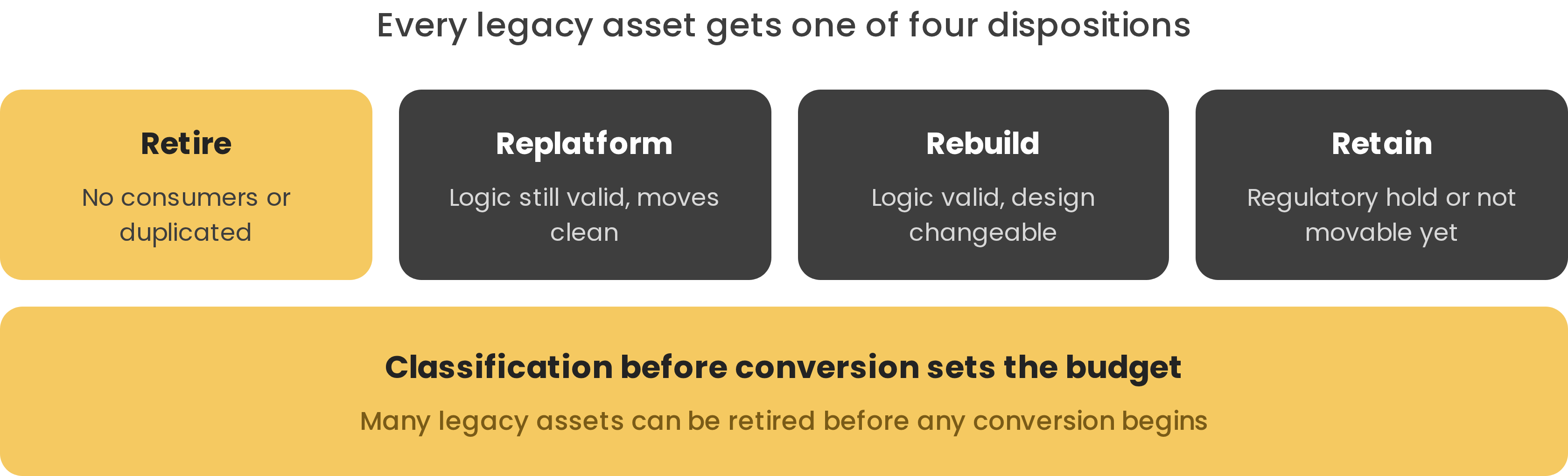
Figure 1: The four dispositions. Retiring dead and duplicated assets first removes work that would otherwise require conversion, reconciliation, and maintenance.
- Retire: switch off assets that are unused, duplicated, or no longer serve a business purpose rather than migrating them. Usage statistics settle most retirement arguments without requiring opinion. Retiring dead content first removes work that would otherwise be converted, reconciled, and maintained in Fabric.
- Replatform: assets that can move to Fabric with minimal change: warehouse schemas that port well, ETL jobs with straightforward orchestration equivalents, reports with standard layouts. These are the lowest-risk migration candidates.
- Rebuild: assets where the business logic needs redesign for the target Fabric architecture, or where the existing implementation is too fragile or too undocumented to replatform reliably.
- Retain: assets that cannot be moved yet due to regulatory holds, active vendor contracts, external dependencies, or unmovable technical constraints. These are classified in scope but migrated in a later phase rather than forcing them into the current wave.
A meaningful portion of many legacy estates can be retired, consolidated, or retained rather than migrated. The exact proportion depends on usage analysis, duplication, business ownership, dependencies, and regulatory requirements; there is no universal percentage. Usage analysis, not opinion, should drive the retirement decision.
Fabric Warehouse vs Lakehouse for Legacy Modernization
| Requirement | Fabric Warehouse | Fabric Lakehouse |
|---|---|---|
| SQL-first analytics and traditional warehouse migration | Strong fit | Good fit |
| Spark, notebooks, and data engineering workloads | Limited | Strong fit |
| Unstructured data and file-share migration | Limited | Strong fit |
| Legacy BI modernization (Power BI front end) | Strong with Power BI | Strong with Power BI |
| Access databases and Excel-based processes | Possible | Lakehouse tables with Power BI front end |
Mixed estates commonly use both Fabric Warehouse and Lakehouse against the same OneLake data; you don't need to choose one option uniformly across the entire legacy estate.
Legacy Asset Mapping to Fabric
| Legacy Asset | Fabric Equivalent |
|---|---|
| Legacy BI reports and dashboards | Power BI reports on Direct Lake semantic models |
| Universes and business layers | Power BI semantic models with shared measures |
| Warehouse schemas and stored procedures | Fabric Warehouse with T-SQL review |
| ETL jobs and scheduled loads | Data Factory pipelines and Dataflow Gen2 |
| Access databases and Excel models | Lakehouse tables with Power BI front end |
| Orphaned scripts | Fabric notebooks, once the logic is recovered |
| File shares and landing folders | OneLake bronze layer via OneLake Shortcuts or pipelines |
| Report bursting and distribution lists | Power BI subscriptions or Power Automate flows |
Legacy Systems to Microsoft Fabric: Step-by-Step Migration
- Discover: catalog every system, job, report, and consumer, including usage statistics. Usage data settles most retirement arguments without requiring opinion, and the retirement list is usually the program's largest single saving.
- Classify: assign every asset a disposition (retire, replatform, rebuild, or retain) and get the retirement list signed off before conversion work begins. This is what makes an estimate defensible.
- Recover the logic: document what surviving assets actually do, in business terms, before rebuilding them. For orphaned scripts and undocumented stored procedures, logic recovery dominates the effort and must be scoped explicitly.
- Design the target: workspaces, medallion layers, security model, and the shared semantic layer designed once at the architecture phase rather than per migration wave.
- Convert and reconcile in waves: migrate by business process, matching output at both the data and report levels for the same time window. Report-level reconciliation is the acceptance test business users will apply.
- Run parallel, then decommission: run both environments through at least one full business cycle, including month-end close, before decommissioning. Release licenses and servers only after sign-off from a named business sponsor.
Legacy System Migration Challenges and Best Practices
- Logic archaeology: recovering undocumented business rules is the largest and least predictable element of any legacy migration program. Scope it explicitly rather than assuming it will be straightforward; it is the most common source of schedule overrun.
- Make the retirement decision: nobody will voluntarily own the decision to retire content. Use usage data rather than opinion, and put the retirement list in front of a named business sponsor for sign-off.
- Reports are the acceptance test: business users judge the migration on whether their numbers match. Reconcile at report level and not only at table level; table-level matching alone misses semantic model and filter differences.
- Do not modernize during the move: redesigning the architecture while migrating makes reconciliation impossible because there is no longer a single correct answer to compare against. Match the numbers first, improve the design in a later phase.
- Enablement is part of the program: the migration succeeds when your team can extend the result without the partner who built it. Plan for training and knowledge transfer from the start, not as an afterthought.
How Long Does Legacy System Migration to Microsoft Fabric Take?
The migration timeline is driven primarily by estate size and how much logic must be recovered, not simply converted. Key drivers include total asset count, the proportion requiring logic recovery, the number of business validation cycles, dependencies between systems, and security and governance requirements.
| Estate Scope | Typical Effort |
|---|---|
| Small legacy estate with documented assets | Weeks to a few months |
| Mid-size estate with mixed documentation | Several months across multiple waves |
| Large enterprise estate with extensive undocumented logic | Multiple migration waves across several quarters |
Discovery and classification take weeks. Conversion runs in waves, with each wave requiring a full business cycle of parallel running before cutover. The most reliable way to calibrate effort is to run discovery and usage analysis first; the retirement list and asset count it produces make a timeline estimate defensible.
Illustrative Example: Legacy Estate Modernization on Microsoft Fabric
Illustrative Example. The following is a representative profile based on the types of legacy estate migration projects DataTerrain has supported. It is not an account of a specific named client.
A financial services firm runs an estate assembled over fifteen years: a legacy BI environment with over a thousand reports, an on-premises SQL Server warehouse, legacy ETL workflows, and a long tail of Access databases and scheduled scripts with no identified owner. BI platform maintenance is ending, and several original architects have moved on.
Discovery captures usage alongside inventory and finds that a significant portion of the reports were not opened in the previous year; these are retired with sponsor sign-off before any conversion begins. Surviving reports are rebuilt in Power BI on Direct Lake semantic models. The warehouse is lifted into Fabric Warehouse. Legacy ETL workflows become Data Factory pipelines. The Access estate is rebuilt as Lakehouse tables with a Power BI front end, and orphaned scripts are documented in business terms before being rewritten as Fabric notebooks. Waves are reconciled at report level and run in parallel through a quarter-end close before the legacy platforms are decommissioned.
Legacy System Migration to Microsoft Fabric with DataTerrain
17+ Years Experience | 400+ US Clients | BI & ETL Migration Expertise
DataTerrain helps enterprises migrate legacy BI, ETL, and data warehouse environments to Microsoft Fabric through discovery, modernization, migration, and validation. Our Automated BI reports conversion service accelerates legacy BI content migration from BusinessObjects, Cognos, OBIEE, and Crystal Reports into Power BI at scale.
Key Takeaways
- Classification comes before conversion. Every legacy asset should be assigned a disposition retire, replatform, rebuild, or retain before anyone estimates conversion effort.
- Discovery and usage analysis first. Usage statistics settle most retirement arguments, and the retirement list is usually the largest single saving in any legacy migration program.
- Archaeology is the real risk. Undocumented logic written by people who have left drives more schedule overrun than any technical difficulty.
- Do not modernize during the move. Match the numbers first, redesign in a later phase. Changing the design mid-migration makes reconciliation impossible.
- Reports are the acceptance test. Reconcile at the report level, not only at the table level, before each cutover wave.
- Microsoft Fabric provides multiple migration paths. Data Factory, Mirroring, OneLake Shortcuts, and Copy jobs serve different legacy source patterns; no single approach is required across the entire estate.
Conclusion
Legacy system migration to Microsoft Fabric is a multi-layer program covering the full estate, not just the data warehouse or the ETL pipelines. The defining challenge is not technical conversion but estate archaeology: understanding what is actually in use, who owns it, and whether the logic still reflects how the business works. Organizations that start with discovery and usage analysis, classify every asset before converting any, and reconcile at the report level at each migration wave consistently deliver Fabric environments that accurately modernize and support the legacy estate.
Related Articles
- Oracle BI to Power BI Migration: Complete Enterprise Guide
- Cognos to Microsoft Fabric Migration: A Practical Guide
- Informatica to Microsoft Fabric Migration: A Complete Guide
- Data Warehouse to Microsoft Fabric: Migration Approach