Contents
- 07 Aug 2026
Power BI Copilot Use Cases: A Practical Guide
Power BI Copilot is Microsoft's generative-AI assistant built into Power BI. It lets people work with their data in plain English, asking questions, drafting DAX, generating report pages, and producing narrative summaries, across Power BI Desktop, the Power BI service, mobile, and embedded reports. Power BI Copilot is Microsoft's AI assistant for Power BI that helps users generate reports, create DAX, summarize dashboards, answer natural-language questions, and document semantic models using generative AI grounded in governed business data.

- Share Post:
-

-

What Is Power BI Copilot?
Copilot in Power BI is a chat-based AI experience that uses generative AI to translate natural-language prompts into Power BI actions. It helps report authors and modelers create content, pages, DAX, and model documentation, and gives business users new ways to consume that content through questions and summaries. It is part of the wider Copilot in Microsoft Fabric, and it draws on your semantic model as its source of truth, so the quality of the model shapes the quality of every answer. Each prompt supports up to 10,000 characters across all Copilot surfaces.
Organizations moving onto Power BI from another platform entirely should also see our OBIEE to Power BI Migration page, since Copilot's usefulness depends on the same well-modeled semantic layer that migration work establishes in the first place.
Every Capability, From Report Pages to Fixing Your Model
| Capability | Supported | Notes |
|---|---|---|
| Generate report pages | Yes | From natural-language descriptions |
| Generate and explain DAX | Yes | Includes plain-language explanations, plus a dedicated DAX query view (GA) |
| Write Power Query transformations | Partial | Depends on feature availability |
| Fix semantic model structure | Yes (preview) | Via Copilot in web modeling: rename tables/columns, create relationships, generate measures |
| Answer business questions | Yes | Grounded in the semantic model, including filtered summaries (preview) |
| Summarize reports and dashboards | Yes | Includes quick summary shortcuts for consumers |
| Analyze data in Excel | Yes (Aug 2026) | Grounded in the same governed Power BI data |
| Cross-artifact search | Yes | Standalone Copilot across multiple reports, models, and Fabric data agents |
| Create full end-to-end apps | No | Generates pages, not complete applications |
| Work with real-time streaming models | No | Unsupported |
| Work in sovereign clouds | No | Unavailable in Azure Government, Azure China |
Our own BI Products team applies this same model-quality discipline manually when Copilot's automated fixes aren't enough.
Which Use Case Fits Your Role
| Role / Scenario | How Copilot Helps |
|---|---|
| Report authors | Generate report pages and suggested page outlines from a description |
| DAX authoring | Draft and explain DAX measures and queries in natural language, including the DAX query view |
| Semantic model prep | Generate descriptions for model measures; fix naming and structure via Copilot in web modeling |
| Data analysts | Ask questions of a report or model in the Copilot chat pane, including filtered summaries |
| Executives & consumers | Narrative summaries and summary shortcuts of a report's key points |
| Embedded reports & apps | A narrative visual that travels with embedded reports for in-context summaries |
| Mobile users | Standalone Copilot with preset and free-form prompts, plus voice input on iOS |
| Microsoft 365 users | Ask Power BI data questions inside Microsoft 365 Copilot Chat via Fabric IQ, or in Excel directly |
| Finance, Sales, Marketing, HR, Operations | Same core Q&A and summary capabilities, applied to department-specific reports and KPIs |
Power BI Copilot Prompts You Can Use Today
Analysis and summaries:
- Summarize revenue trends over the last 12 months.
- Explain why gross margin declined in Q2.
- Compare this quarter with last quarter.
- Identify unusual sales patterns by region.
- Show the top five customers by profit.
DAX and modeling:
- Generate a DAX measure for year-over-year sales growth.
- Explain what this DAX measure does.
- Suggest a measure for average order value by customer segment.
Report building:
- Create an executive dashboard for monthly KPIs.
- Recommend visuals for this dataset.
- Generate a report page summarizing regional performance.
Model documentation:
- Write a description for this measure.
- Suggest synonyms for this field so that Copilot understands its variations.
Real Time Saved: Scenarios Worth Knowing
- Cutting executive briefing prep time. Copilot generates the narrative summary directly from the live report, cutting prep from hours to minutes.
- Prioritizing what needs attention. Analysts use Copilot's Q&A to quickly surface which segments, regions, or accounts have moved the most, without first building a new filtered view.
- Turning a blank report into a starting draft. Report authors use Copilot to generate an initial page layout and DAX measures, then refine from there. Teams migrating a large existing report portfolio to Power BI can pair this with our Reports Conversion service to handle the conversion, while Copilot handles new build work.
- Letting non-technical stakeholders self-serve. Business users get their own answer through the Copilot chat pane, reducing the ad-hoc request backlog.
One estimate worth noting with appropriate caution: a Power BI consulting firm's guide, based on Fortune 500 deployments, cites report creators saving an average of 2-3 hours per week on DAX authoring specifically; treat this as directional rather than a guaranteed figure for your own environment.
How Does Power BI Copilot Work?
Copilot sits between a natural-language prompt and your governed data. It interprets the prompt with generative AI, grounds the answer in your semantic model, and returns pages, DAX, or narratives, all within your existing capacity and permissions.
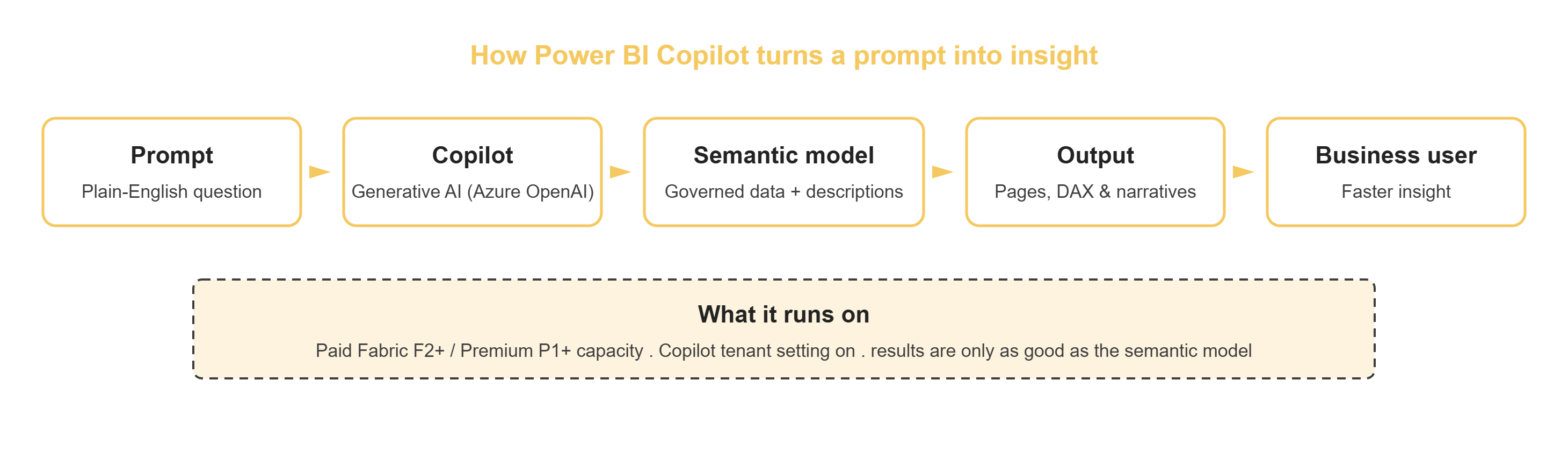
Figure 1: The Power BI Copilot data flow
Because answers are grounded in the semantic model, the model is the single biggest factor in Copilot's usefulness. Clear names, measure descriptions, synonyms, and business context let Copilot interpret prompts correctly; a vague or undocumented model produces generic or misleading results. Copilot also respects your existing security, so users only see data they are permitted to access.
This is exactly the DAX and modeling discipline covered in our 10 Essential Power BI Best Practices piece; a well-modeled report is what makes Copilot's answers reliable rather than generic.
Desktop vs. Service vs. Mobile: Where to Use Each
| Aspect | Power BI Desktop | Power BI Service | Power BI Mobile |
|---|---|---|---|
| Best for | Authoring reports & DAX | Consuming, Q&A & narratives | Quick insights on the go |
| Primary user | Report authors & modelers | Analysts & business users | Field & executive users |
| Typical actions | Build pages, write DAX, add descriptions | Summarize, ask questions, standalone chat | Preset & free prompts, voice input |
| Strength | Deep authoring control | Broadest Copilot surface | Speed and convenience |
| Choose when | You are building content | You are exploring or sharing | You are away from your desk |
What Are the Limitations of Power BI Copilot?
- Model quality drives results: an unprepared semantic model yields generic or wrong answers no matter how good the prompt is.
- Q&A switch required, but changing. The model's Q&A feature switch must currently be on for Copilot to create and edit report pages. Microsoft announced the legacy, standalone Q&A feature will be deprecated in December 2026, superseded by Copilot's broader capabilities.
- Some models unsupported: Copilot can't create pages for real-time streaming models or live connections to Analysis Services.
- Region limits: Copilot isn't available in sovereign clouds such as Azure Government and Azure China, where it returns errors.
- Paid capacity only: trial and free capacities aren't supported; Copilot needs a paid Fabric or Premium capacity.
- Outputs need review: treat the generated DAX and narratives as a fast first draft for validation, not a final answer.
Power BI Copilot vs. Other AI Assistants
| Comparison | Key Difference |
|---|---|
| vs. ChatGPT | Copilot is grounded in your governed semantic model and respects existing security; ChatGPT has no awareness of your data model unless integrated separately |
| vs. Tableau AI | Both ground answers in a platform's own data model; capability parity varies by feature and is worth checking directly against your use case |
| vs. Copilot in Microsoft Fabric more broadly | Power BI Copilot is one surface within the wider Fabric Copilot experience, which also spans data engineering and data science workloads |
For teams evaluating Power BI itself against other platforms, not just its AI layer, see our comparisons of Power BI vs. Tableau and Power BI vs. SAP Crystal Reports.
Best Practices for Answers You Can Trust
- Prepare the semantic model: use clear table, column, and measure names, add descriptions, and hide technical helper fields.
- Add business context: provide synonyms, terminology, and instructions such as your fiscal calendar and default analysis grain.
- Turn on the Q&A feature switch: for every model you intend to use with Copilot.
- Curate what Copilot sees: well-defined, consistent measures beat ad-hoc calculations scattered across reports.
- Verify outputs: validate generated DAX and narrative summaries before anyone relies on them for decisions.
- Roll out by persona: start with authors for DAX and pages, then enable consumers for Q&A and summaries.
Common Mistakes to Avoid
- Poor semantic model naming and cryptic field names produce cryptic answers.
- Missing measure descriptions; Copilot has nothing to draw on for context.
- No synonyms defined, so natural variations of a term go unrecognized.
- Querying raw, unmodeled tables instead of a curated semantic model.
- Not validating AI-generated DAX before it reaches a report used for decisions.
- Ignoring row-level security assumptions when testing as an admin instead of as a real end user.
- Expecting reliable answers without doing any model preparation first.
Several of these same mistakes, particularly rewriting complex calculations without a validation framework, also show up constantly in platform migrations. Our OBIEE to Power BI: Key Challenges and Solutions piece covers the DAX-conversion version of this problem in more depth.
Troubleshooting Common Issues
- Copilot isn't showing up: confirm the workspace is assigned to a paid Fabric (F2+) or Premium (P1+) capacity, and that the tenant setting is enabled by a Fabric admin.
- Copilot won't generate DAX or create pages; check that the Q&A feature switch is enabled for that specific model.
- Answers are inaccurate or generic: almost always a semantic model problem; add names, descriptions, and synonyms before assuming the tool itself is unreliable.
- Copilot is slow or times out: check current capacity load; token consumption against a shared capacity can affect response time as adoption grows.
- Copilot doesn't understand my model: verify relationships are defined correctly and that the model isn't relying on undocumented calculated columns Copilot has no context for.
When Not to Use Power BI Copilot
- Highly regulated reports requiring manual sign-off and audit trails beyond what a fast AI draft supports.
- A poorly designed semantic model you haven't had time to clean up; results will be unreliable regardless of prompt quality.
- Real-time streaming scenarios, where Copilot's page-generation support is limited.
- One-off, single-use analyses that don't justify the time investment in model preparation Copilot depends on.
Capacity, Licensing, and What It Actually Costs to Run
- Capacity & licensing: Copilot runs on a paid Fabric capacity (F2 or higher) or Premium capacity (P1 or higher); a Pro or Premium Per User license alone does not unlock it. The earlier F64 minimum was removed in 2025; current Microsoft documentation confirms that F2+/P1+ is sufficient, though some online articles and forum posts still cite the outdated F64 requirement.
- Tenant setting: a Fabric administrator controls the Copilot tenant setting in the Admin Portal; on many tenants it is now enabled by default.
- Governance & security: Copilot honors existing role-based access and row-level security.
- Data handling: prompts and data are processed within the Microsoft and Azure OpenAI service boundary; confirm current data-use terms with Microsoft's documentation.
- Consumption: Copilot usage is token-metered against your capacity; monitor load as adoption grows.
- Technical debt risk: organizations that delay building AI-ready semantic models, establishing clear business terminology, defining relationships, and implementing governance rules are effectively accumulating technical debt that limits Copilot's reliability as usage scales. Our AI/ML Consulting team can assess how ready your current model actually is before you scale the rollout further.
A Real Rollout, Start to Finish
Consider a common sample scenario: a mid-size organization with an F8 Fabric capacity wants to speed up reporting and reduce the backlog of ad hoc report requests. Adoption stalls at first because early answers are generic, the semantic model has cryptic field names, and there are few descriptions.
The team resets the approach. The model owners prepare the semantic model with clear names, measure descriptions, synonyms, and a note about the fiscal calendar, and they turn on the Q&A feature switch. Report authors then use Copilot in Desktop to draft pages and DAX, reviewing each output. Once the model is AI-ready, executives get reliable narrative summaries in the service, and analysts self-serve answers through the Copilot chat pane. The result is faster authoring, fewer ad-hoc requests, and answers the business trusts, because the model behind Copilot was prepared first.
How to Get Started in 5 Steps
- Confirm capacity: make sure a paid Fabric F2+ or Premium P1+ capacity is available, and your workspace is assigned to it.
- Enable Copilot: have a Fabric administrator turn on the Copilot tenant setting in the Admin Portal.
- Prepare the model: add names, descriptions, synonyms, and context, and turn on the Q&A feature switch.
- Pilot by persona: run a small pilot with a few authors and a few consumers on one well-prepared model.
- Measure and expand: track time saved and answer quality, then roll out to more teams and models.
Readiness Checklist Before You Roll Out
- Confirm a paid Fabric (F2+) or Premium (P1+) capacity
- Assign the report workspace to that capacity
- Enable the Copilot tenant setting in the Admin Portal
- Prepare the semantic model: clear names, descriptions, hidden helper fields
- Add synonyms, terminology, and business context
- Turn on the Q&A feature switch for Copilot-facing models
- Pilot with authors (DAX, pages) and consumers (summaries, Q&A)
- Validate generated DAX and narratives before relying on them
- Confirm RBAC and row-level security behave as expected with Copilot
- Monitor capacity load and token consumption
Key Insights at a Glance
- Copilot spans authoring and consumption, and now model-building itself via Copilot in web modeling.
- Model quality is the deciding factor: prepare the semantic model or expect generic answers.
- It runs on paid capacity: Fabric F2+ or Premium P1+, not Pro or PPU alone; the old F64 floor is gone.
- The legacy Q&A feature is being retired in December 2026, in favor of Copilot's broader capabilities.
- Treat outputs as a first draft: verify DAX and narratives before anyone relies on them.
Related Reading
- OBIEE to Power BI Migration
- 10 Essential Power BI Best Practices
- Power BI vs. Tableau
- Power BI vs. SAP Crystal Reports
- WebI to Power BI Report Migration
- Power BI to Tableau Migration
- 5 Advanced Power BI Solutions
How DataTerrain Gets You There
DataTerrain helps you prepare AI-ready semantic models, roll out Copilot by persona, and validate its DAX and narratives, so your team gets reliable answers, not generic ones. Our broader BI Products practice supports the dashboard and reporting layer Copilot sits on top of, and our ETL Migration Solutions team ensures the data feeding that model is clean and well-governed before Copilot ever touches it.
Want a Power BI Copilot Readiness Assessment?
Ask us about a Power BI Copilot readiness assessment →