Contents
- 20 Aug 2026
Jaspersoft Reporting Services: Enterprise Reporting, Scheduling, and Distribution
Jaspersoft is one of the most widely used platforms for enterprise reporting, built to design, run, schedule, and distribute reports at scale and embed analytics directly inside applications. This guide explains what Jaspersoft reporting services are, why enterprises rely on them, their core capabilities, how to implement them, the challenges to plan for, and the best practices that keep large-scale reporting reliable.
Jaspersoft reporting services provide an end-to-end environment for designing, generating, scheduling, distributing, and embedding business reports. The platform combines Jaspersoft Studio and JRXML for report design, the JasperReports Library for report generation, and JasperReports Server for centralized execution, security, scheduling, distribution, and report management.

- Share Post:
-

-

Jaspersoft Reporting Services at a Glance
| Capability | Jaspersoft Reporting Services |
|---|---|
| Report design | Jaspersoft Studio and JRXML |
| Report execution | JasperReports Library and JasperReports Server |
| Report management | JasperReports Server repository |
| Scheduling | Automated time-based and event-based scheduled jobs |
| Distribution | Email, repository, file-based, and FTP delivery |
| Reporting formats | PDF, Excel, CSV, HTML, and others |
| Self-service reporting | Ad Hoc Editor for business-user reporting |
| Embedded analytics | REST APIs and Visualize.js for application integration |
| Security | Roles, permissions, organizations, row-level security |
| Deployment | On-premises and cloud environments |
What Are Jaspersoft Reporting Services?
Jaspersoft reporting services are the set of capabilities provided by the Jaspersoft reporting platform for designing, generating, scheduling, distributing, and embedding reports across an organization. At the center sits JasperReports Server, the runtime that stores report templates, connects to data sources, executes reports on demand or on a schedule, and delivers them to users, applications, and other systems.
Commonly known as TIBCO Jaspersoft, the platform is built on the open-source JasperReports library and is a leading example of open-source BI reporting: enterprises get production-grade reporting, from Jaspersoft report design through delivery, without the per-seat licensing model of many proprietary BI tools. Reports can be consumed in the server's own web interface, delivered by email or to a file share, or offered as Jaspersoft reports as a service to downstream applications.
Jaspersoft Reporting Services: Core Components
The Jaspersoft reporting platform is made up of four tightly connected components, each serving a distinct role in the reporting lifecycle:
JasperReports Library
The JasperReports Library is the open-source Java reporting engine at the foundation of the platform. It generates reports from JRXML templates and data by handling data extraction, formatting, calculation, and output rendering. Every Jaspersoft report ultimately runs through the JasperReports Library.
Jaspersoft Studio
Jaspersoft Studio is the desktop-based report design environment built on Eclipse. Report authors use it to create JRXML report definitions covering pixel-perfect layouts, multi-page reports, charts, tables, subreports, parameters, expressions, conditional formatting, and print-ready templates. Jaspersoft Studio is the primary design tool for complex production reports.
JasperReports Server
JasperReports Server is the centralized server platform for managing, executing, scheduling, securing, and distributing Jaspersoft reports. It stores report definitions in a structured repository, connects to enterprise data sources through Domains and Topics, manages users and access through roles and organizations, runs reports on demand and on schedule, and delivers output by email, file, or API. JasperReports Server is the operational heart of Jaspersoft reporting services.
Jaspersoft Web Studio
Jaspersoft Web Studio is a browser-based report authoring and editing interface that enables report design without requiring a local software installation. It provides an accessible alternative to Jaspersoft Studio for users who need to build or modify reports directly through a web browser.
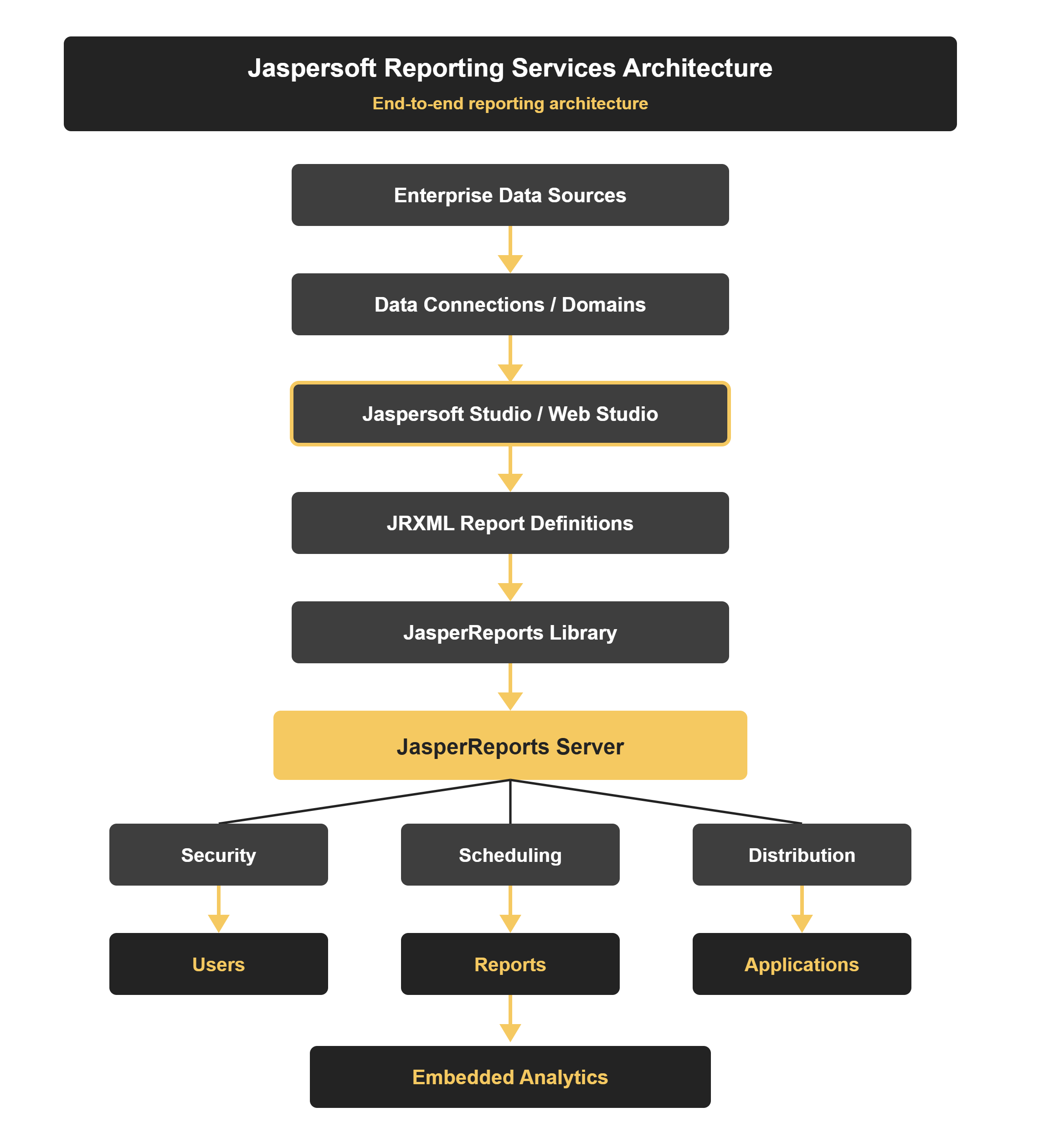
Figure 1: Jaspersoft reporting services architecture: from enterprise data sources through Jaspersoft Studio, JRXML, JasperReports Library, JasperReports Server, security, scheduling, and distribution, to users, reports, applications, and embedded analytics.
Jaspersoft vs JasperReports: Terminology Guide
Several related terms are often used interchangeably. The table below clarifies the distinctions:
| Term | What It Is |
|---|---|
| Jaspersoft | Reporting and embedded analytics platform and vendor ecosystem |
| JasperReports Library | Open-source Java reporting engine that generates reports from templates and data |
| JasperReports Server | Server platform for managing, executing, scheduling, securing, and distributing reports |
| Jaspersoft Studio | Desktop report design environment for creating JRXML templates |
| Jaspersoft Web Studio | Browser-based interface for report design without local software installation |
| JRXML | XML-based report definition format used by Jaspersoft Studio and JasperReports |
JasperReports is the reporting engine and library; JasperReports Server is the server-side platform for managing, executing, scheduling, and distributing reports. Jaspersoft refers to the broader commercial reporting and embedded analytics platform ecosystem built on the JasperReports foundation.
Why Enterprises Use Jaspersoft for Reporting
Jaspersoft enterprise reporting is popular because it combines flexibility, control, and cost efficiency at scale:
- Cost efficiency: built on an open-source BI reporting foundation, it offers enterprise reporting capability with a flexible licensing model compared to many proprietary BI tools.
- Pixel-perfect and interactive: it produces both precise, print-ready documents and interactive, self-service reports from one platform.
- Automation at scale: Jaspersoft report scheduling and distribution deliver thousands of reports automatically, without manual effort.
- Embeddability: Jaspersoft embedded analytics places reports and dashboards inside your own applications for a seamless user experience.
- Openness and integration: standards-based connectivity and REST APIs integrate cleanly with existing data sources and systems.
- Control and governance: role-based access, organizations, and a central repository keep large deployments governed and auditable.
- Deployment flexibility: the Jaspersoft reporting platform runs on-premises or in the cloud, as a VM, container, or managed service.
Types of Reports Supported by Jaspersoft
- Pixel-perfect reports: invoices, statements, regulatory filings, financial documents, and operational documents requiring precise, print-ready layout
- Ad hoc reports: business-user self-service reports built through the Ad Hoc Editor without developer involvement
- Interactive reports: reports with drill-down, drill-through, filters, and user-driven parameters
- Dashboards: executive and operational dashboards combining multiple data views and visualizations
- Embedded reports: reports surfaced directly inside web applications, portals, and SaaS products through REST APIs and Visualize.js
Core Capabilities: Report Types, Scheduling, and Distribution
Four capabilities define what the platform delivers day-to-day:
Report Types and Design
Jaspersoft report design supports pixel-perfect production reports (via JRXML), ad-hoc self-service reports, interactive dashboards, and data visualizations: from regulatory documents to executive dashboards, all from one design environment.
Report Scheduling
Jaspersoft report scheduling runs reports automatically on a time- or event-based trigger: hourly, daily, monthly, or on data conditions, with parameters, so recurring reports generate without manual effort.
Report Distribution
Jaspersoft report distribution delivers output to email, file shares, FTP, or the repository, in PDF, Excel, CSV, HTML, and more: pushing the right report to the right audience in the right format.
Embedded Analytics
Jaspersoft embedded analytics surfaces reports and dashboards inside your own web applications and portals through REST APIs and Visualize.js, so users never leave the app to get insight.
Jaspersoft Reports as a Service
A Jaspersoft reports as a service model uses JasperReports Server as a centralized reporting engine that generates and delivers reports for many users, systems, and applications from a single platform. Downstream applications request reports via REST API, receive formatted output, and surface it to their own users without building their own reporting infrastructure.
Common use cases include SaaS platforms embedding reports for customers, customer portals surfacing account and transaction reports, partner portals with tenant-specific reporting, and enterprise applications offering white-label analytics. This model is one of the most practical ways to scale reporting across a large user base without replicating reporting logic across multiple systems.
Jaspersoft Reporting Services Use Cases
- Financial reporting: financial statements, revenue reports, budget reporting, and cost analysis
- Operational reporting: inventory, sales, order, and service operations reports on automated schedules
- Regulatory and compliance reporting: standardized documents, regulatory submissions, and audit reports
- Customer-facing reporting: customer statements, account summaries, and portal-based self-service access
- Embedded analytics: reports and dashboards inside SaaS applications, enterprise portals, and customer-facing products
- Enterprise distribution: scheduled department-level reporting, partner reporting, and multi-channel delivery
How to Implement Jaspersoft Reporting Services
A structured implementation gets JasperReports Server from install to production reporting reliably:
- Plan and assess: define reporting requirements, users and roles, data sources, output formats, and distribution needs, and choose on-premises or cloud deployment.
- Install and configure JasperReports Server: stand up the server, its repository database, and security organizations, roles, and single sign-on, sized for expected load.
- Connect data and build the semantic layer: configure data sources and define Domains/Topics so report authors and self-service users work from governed, business-friendly data.
- Design the reports: use Jaspersoft Studio for pixel-perfect JRXML reports and the Ad Hoc Editor for self-service, applying shared styles and templates for consistency.
- Configure scheduling and distribution: set up schedules, parameters, and output formats, and define delivery to email, file shares, or the repository.
- Embed where needed: integrate reports and dashboards into applications via REST APIs and Visualize.js for Jaspersoft embedded analytics.
- Test, secure, and go live: validate output fidelity, performance under load, and access controls, then roll out with monitoring in place.
Common Challenges
Large Jaspersoft deployments tend to hit the same issues, all manageable with planning:
- Semantic-layer design: poorly modeled Domains and Topics lead to inconsistent or slow self-service reports.
- Report performance: complex queries and heavy pixel-perfect reports need query and template tuning.
- Scheduling and distribution load: large batch runs and big distribution lists must be sized and staggered to avoid overloading the server.
- Security and multi-tenancy: role-based access, organizations, and row-level security require careful, deliberate design.
- Embedding complexity: integrating reports into applications adds authentication, theming, and API considerations.
- Version upgrades: upgrading JasperReports Server and migrating content needs testing to avoid regressions.
- Skills: JRXML, the semantic layer, and server administration call for expertise many teams are still building.
Best Practices for Enterprise Jaspersoft Reporting
- Invest in the semantic layer: well-designed Domains and Topics are the foundation of reliable self-service reporting.
- Standardize report design: use shared styles, templates, and naming so reports stay consistent and maintainable.
- Right-size the server: provision for peak scheduling and distribution loads, and scale out where needed.
- Automate scheduling and distribution: let the platform deliver recurring reports so teams stop generating them by hand.
- Govern access: design roles, organizations, and row-level security up front rather than retrofitting them.
- Tune for performance: optimize queries, templates, and caching, especially for high-volume reports.
- Version-control report content: treat JRXML and configurations as code, with change tracking and reviews.
- Plan embedding early: design authentication and theming for Jaspersoft embedded analytics before integrating.
Case Study: Enterprise Report Delivery at Scale
Representative scenario: the example below reflects a typical enterprise engagement.
An enterprise needed to deliver thousands of operational, financial, and compliance reports to internal teams and external partners every month, in multiple formats, on strict schedules, while also embedding key dashboards inside a customer-facing portal. Its previous tooling required heavy manual effort and offered little automation.
Standardizing on JasperReports Server as a central Jaspersoft reporting platform resolved it. A governed semantic layer powered both pixel-perfect and self-service reports; Jaspersoft report scheduling automated recurring runs; and Jaspersoft report distribution delivered each report to the right audience by email, file share, and repository in the right format. Jaspersoft embedded analytics surfaced dashboards directly in the customer portal, effectively offering Jaspersoft reports as a service to downstream users.
The result was large-scale, automated, governed reporting at a lower total cost than proprietary alternatives: the kind of Jaspersoft enterprise reporting outcome DataTerrain delivers through report design, Automated BI reports conversion, migration, and ongoing support.
Need Enterprise Jaspersoft Reporting Services?
17 Years Experience | 400+ US Clients | Report Design | Migration Support | Embedded Analytics
DataTerrain is a specialist data engineering and analytics migration company that designs, implements, migrates, and supports JasperReports Server environments: pixel-perfect reports, scheduling and distribution, and embedded analytics, on-premises or in the cloud. Our automated BI reports conversion service accelerates Jaspersoft report migration and modernization at scale.
Here is what matters most
- JasperReports Server is the operational center of Jaspersoft reporting services. It handles repository management, execution, scheduling, security, distribution, and API access.
- The semantic layer determines self-service quality. Well-designed Domains and Topics separate reliable self-service reporting from fragmented, inconsistent outputs.
- Scheduling and distribution at scale require planning. Server sizing, job staggering, and distribution list management must be designed before go-live, not after performance problems appear.
- Embedding requires early design commitment. Authentication, theming, and API integration for Jaspersoft embedded analytics are significantly harder to retrofit than to design up front.
- The platform is only as reliable as its governance model. Roles, organizations, row-level security, and report lifecycle management need structure and ownership to remain manageable at scale.
Final Thoughts
Jaspersoft reporting services remain a practical choice for enterprises that need pixel-perfect report production, large-scale scheduling and distribution, self-service reporting, and embedded analytics from a single platform. The platform's open-source foundation, flexible deployment, and REST API-driven embeddability make it well-suited to complex enterprise reporting environments. Organizations that get the most value from Jaspersoft invest in the semantic layer, standardize report design, govern access up front, and treat server sizing and scheduling load as first-class architectural concerns rather than afterthoughts. For organizations looking to implement, migrate, or modernize their Jaspersoft environment, contact DataTerrain for a reporting assessment.
Related Jaspersoft Resources
- Jaspersoft to Tableau Migration: The Complete Enterprise Guide
- BI Modernization Checklist: A Step-by-Step Guide for Enterprises
- Generative AI in Analytics: A Practical Enterprise Guide