Contents
- 04 Aug 2026
Snowflake Migration Services: A Complete Guide to Migrating Your Data Warehouse
Organizations are modernizing their data platforms to support growing data volumes, advanced analytics, and AI-driven decision-making. Legacy data warehouses struggle with scalability, performance, and operational overhead that compound as data volumes grow. Migrating to Snowflake resolves these constraints through elastic compute, separation of storage and compute, and a cloud-native architecture that runs across AWS, Azure, and Google Cloud. DataTerrain delivers end-to-end Snowflake migration services with automated conversion tooling and structured validation processes that reduce migration risk and accelerate time to production.

- Share Post:
-

-

Why Organizations Migrate to Snowflake
Four structural advantages consistently drive the data warehouse migration decision toward Snowflake. Separating compute and storage allows virtual warehouses to scale independently and pay per workload, rather than provisioning fixed infrastructure for peak demand. Performance elasticity enables multiple virtual warehouses to query the same data simultaneously without resource contention between analytics, ETL, and ad hoc workloads. Multi-cloud architecture lets data teams operate natively across AWS, Azure, and Google Cloud without being locked to a single provider. Zero-copy data sharing through the Snowflake Marketplace allows live, governed data exchange across business units or external partners without duplication or data movement overhead. Organizations migrating from on-premises Teradata or Netezza also eliminate hardware refresh cycles, data center costs, and the DBA overhead associated with maintaining dedicated warehouse infrastructure.
DataTerrain Snowflake Migration Workflow
DataTerrain's Snowflake migration engagement follows a structured six-phase process from initial assessment through production deployment and continuous optimization:
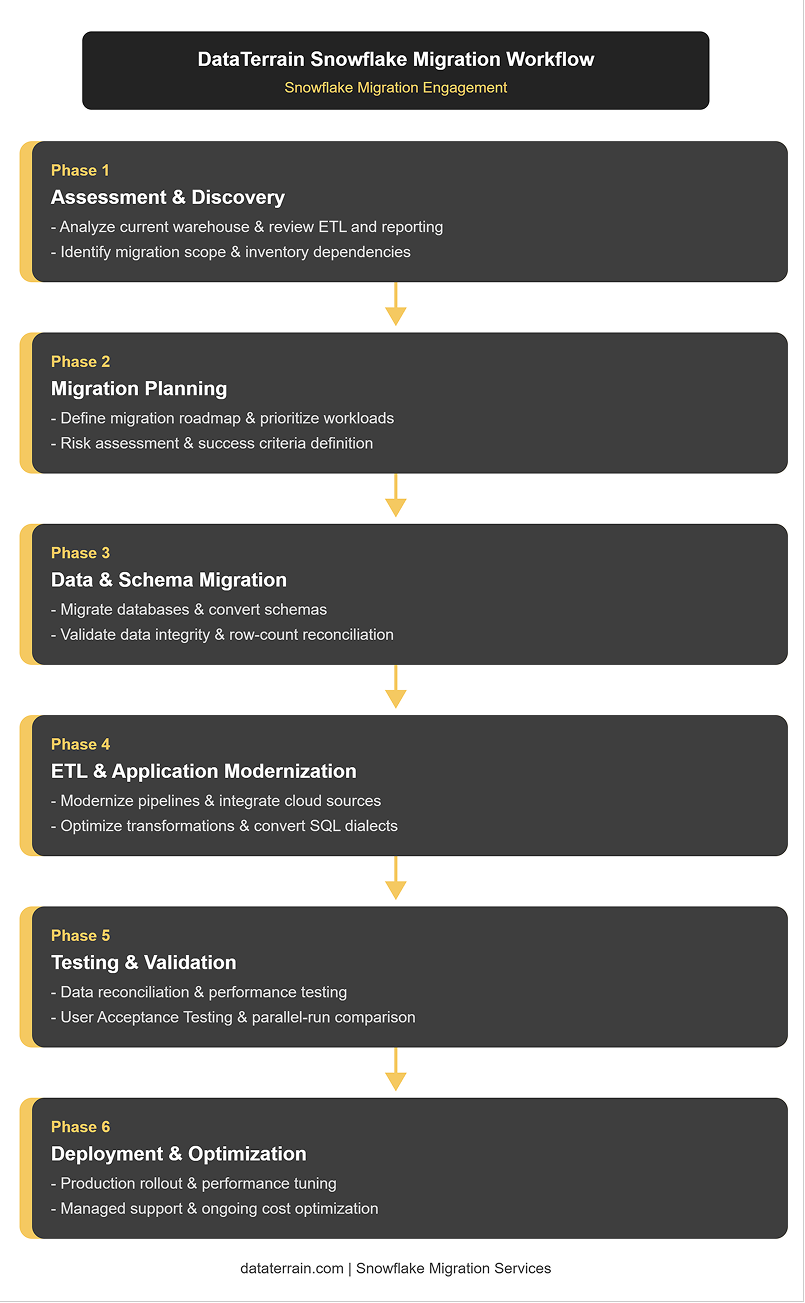
Figure 1: Snowflake Migration Workflow
Phase 1: Assessment and Discovery
The assessment phase inventories what the organization actually runs in its legacy data warehouse: tables, views, stored procedures, scheduled ETL jobs, reports, dashboards, and the downstream applications and processes that depend on them. DataTerrain maps dependencies between objects, identifies the workloads carrying the most business risk, and sets the success criteria that Phase 5 validation will check against. This phase also determines what not to migrate, because most legacy warehouses contain historical or deprecated objects that have not been queried in years. Excluding those from the scope reduces migration complexity without losing any operational value. The output is a complete migration inventory with each object classified by complexity, business priority, and estimated conversion effort.
Phase 2: Migration Planning
The planning phase converts the assessment inventory into a sequenced migration roadmap. High-usage tables, frequently run queries, and the dashboards and SLAs most visible to business stakeholders are prioritized for early migration waves so users experience immediate benefit before the full cutover. Risk assessment identifies the specific workloads most likely to encounter conversion complexity, SQL dialect differences, or ETL redesign requirements, and allocates additional time and resources to those items. A change management plan covers user communication, training on Snowflake's query interface and performance characteristics, and the parallel-run period during which both the legacy warehouse and Snowflake operate simultaneously before the legacy system is decommissioned.
Phase 3: Data and Schema Migration
Schema conversion is one of the most technically demanding phases of any data warehouse migration. Legacy platforms use proprietary data type definitions, partitioning schemes, and indexing structures that have no direct Snowflake equivalents and must be redesigned rather than translated. Teradata's Primary Index, Oracle's index-organized tables, and SQL Server's clustered indexes are all replaced by Snowflake's clustering key model, which determines the micro-partition layout that drives query pruning performance. Automated tools like SnowConvert handle the SQL dialect conversion for standard DDL and DML statements, typically achieving 80 to 95 percent automated translation coverage. The remaining percentage covers complex stored procedure logic, proprietary functions, and macro structures that require manual review and rewriting. Physical data transfer uses Snowflake's COPY INTO command for bulk loading from staged cloud storage, Snowpipe for continuous micro-batch ingestion, or change-data-capture connectors for near-zero-downtime migrations where the source system must remain live during the migration period.
Phase 4: ETL and Application Modernization
ETL pipeline redesign is where Snowflake migration services deliver the most long-term value beyond the data copy itself. Legacy ETL tools built for on-premises infrastructure, including Informatica PowerCenter, SSIS, DataStage, and Ab Initio, use patterns optimized for row-based processing that do not translate efficiently to Snowflake's columnar architecture. Rebuilding these pipelines using modern cloud-native tools, dbt for SQL-based transformation, Fivetran or Airbyte for managed connector-based ingestion, and Apache Airflow or Prefect for orchestration, produces pipelines that take full advantage of Snowflake's query engine, Snowpipe's continuous loading, and the data sharing capabilities that legacy ETL architectures cannot access. Application modernization also covers the reports and dashboards connected to the legacy warehouse, updating their data source connections to point to Snowflake and validating that output remains consistent with pre-migration baselines.
Phase 5: Testing and Validation
Validation is the most time-intensive phase and the one most frequently underestimated in migration planning. The data copy is straightforward. Proving that the migrated platform returns identical results to the legacy system for every query, report, and ETL output is the work that separates a successful migration from one that causes production incidents after cutover. DataTerrain's validation approach runs the legacy warehouse and Snowflake in parallel, executing the same queries in both environments and comparing outputs at three levels: row counts for all migrated tables, aggregate value comparisons for key metrics, and sample record-level checks for tables with complex transformation logic. Performance testing confirms that Snowflake's query execution times meet or exceed the SLAs the business currently operates under. User Acceptance Testing gives business analysts and report consumers the opportunity to validate that their specific workflows produce correct results before the cutover date is confirmed.
Phase 6: Deployment and Post-Migration Optimization
Production deployment follows a validated parallel-run period with clearly defined go-no-go criteria. Once all validation checks pass and UAT sign-off is complete, downstream consumers are redirected to Snowflake, the legacy warehouse is placed in read-only mode for a defined warranty period, and the migration is complete. Post-migration optimization is an ongoing practice rather than a one-time configuration. Virtual warehouse right-sizing, auto-suspend and auto-resume policies, clustering key review for high-frequency query patterns, and Snowflake credit monitoring establish the cost-control discipline that prevents the overspending often seen after migrations when optimization is deferred. Organizations that implement structured optimization practices within the first 30 days post-cutover typically reduce monthly Snowflake spend by 30 to 50 percent compared to the initial go-live configuration.
Snowflake Migration Tools
The toolset that accelerates a Snowflake migration depends on the source platform and the complexity of the workload being migrated:
- SnowConvert: Automated SQL code translation from Teradata, Oracle, SQL Server, and other source dialects to Snowflake SQL, covering DDL, stored procedures, views, and ETL scripts.
- dbt (data build tool): SQL-based transformation framework that replaces legacy ETL transformation logic with version-controlled, testable Snowflake SQL models running natively in the warehouse.
- Fivetran and Airbyte: Managed connector-based ingestion platforms that load data from cloud applications, databases, and APIs into Snowflake with automatic schema drift handling and incremental loading.
- Snowpipe: Snowflake's native continuous ingestion service that automatically loads data as it arrives in cloud storage, eliminating scheduled batch window constraints.
- Change-data-capture (CDC) connectors: Enable near-zero-downtime migration by replicating ongoing changes from the source system to Snowflake during the migration period, keeping both environments synchronized until cutover.
- COPY INTO: Snowflake's native bulk loading command for high-throughput initial data loads from staged files in Amazon S3, Azure Blob Storage, or Google Cloud Storage.
Migrating from Specific Source Platforms
Each source platform brings distinct migration challenges:
- Teradata to Snowflake: Teradata's BTEQ scripting, Primary Index design, and multiload ETL patterns all require conversion. SnowConvert handles most BTEQ SQL translation. Replacing the Primary Index with Snowflake clustering keys is the most architecturally significant design decision in a Teradata migration.
- Oracle to Snowflake: Oracle PL/SQL stored procedures contain complex procedural logic that automated translation tools partially convert. Oracle sequences, synonyms, and database links require Snowflake-specific equivalents or redesign. Oracle's optimizer hints are discarded since Snowflake's query optimizer manages execution plans automatically.
- SQL Server to Snowflake: T-SQL is among the most compatible dialects for Snowflake migration. Most standard DML translates directly. SQL Server Agent jobs should be replaced with Snowflake Tasks or an external orchestrator such as Apache Airflow.
- Redshift to Snowflake: Both are cloud SQL warehouses with similar concepts but different distribution key, sort key, and compression models. Redshift distribution styles are replaced by Snowflake's automatic micro-partitioning and clustering keys.
Common Snowflake Migration Challenges
Understanding the most common failure points before starting a Snowflake migration reduces surprises and allows teams to allocate the right resources to the right workstreams from the start.
- SQL dialect incompatibility: Legacy platforms use proprietary SQL extensions, functions, and stored procedure syntax that have no direct equivalents in Snowflake. Teradata BTEQ macros, Oracle PL/SQL procedural blocks, and SQL Server T-SQL cursor logic all require manual rewriting beyond what automated tools like SnowConvert can translate. Teams that underestimate this effort consistently miss migration deadlines.
- Data validation complexity: Proving that migrated outputs match the source system exactly is far more time-intensive than the data copy itself. Row counts can match, while aggregate values diverge due to differing NULL handling, rounding behavior, or date arithmetic conventions across platforms. Validation frameworks must compare outputs at multiple levels before cutover is safe.
- ETL pipeline redesign scope: Legacy ETL tools built for row-based on-premises processing do not map cleanly to Snowflake's columnar architecture. A direct lift-and-shift of Informatica PowerCenter or SSIS workflows to Snowflake produces pipelines that run correctly but ignore the performance and cost advantages the migration was intended to deliver.
- Virtual warehouse cost surprises: Organizations that go live without auto-suspend policies, warehouse right-sizing, or credit monitoring frequently encounter Snowflake bills significantly higher than projected. Warehouses left running between jobs, oversized compute resources for lightweight queries, and unoptimized large-table scans are the most common cost culprits in the first 30 to 60 days post-cutover.
- Incomplete dependency mapping: Legacy warehouses accumulate years of undocumented dependencies between tables, views, stored procedures, and downstream reports. An incomplete inventory at the assessment phase leads to broken reports and failed ETL jobs discovered after go-live rather than during validation, which is significantly more expensive to fix.
- Change management and team adoption: Snowflake's query interface, performance-tuning model, and operational practices differ from those of legacy platforms. Teams accustomed to Teradata's EXPLAIN plan, Oracle's hint-based optimization, or SQL Server's execution plan viewer need structured enablement to operate effectively in Snowflake, not just access to the new environment.
Snowflake Migration Best Practices
These practices consistently separate migrations that reach production on time with stable performance from those that run over schedule and require post-cutover remediation.
- Prioritize validation over speed: The mechanical data copy is the easiest part of a Snowflake migration. Invest the most time in designing comprehensive validation frameworks that check row counts, aggregates, and sample records before any cutover date is confirmed. A migration that cuts over before validation is complete will surface errors in production.
- Decide what not to migrate: Most legacy warehouses contain years' worth of historical data, deprecated tables, and unused stored procedures. Running a query-based age analysis during discovery and excluding objects not accessed in the past 12 to 18 months significantly reduces the migration scope without removing anything of operational value.
- Design for Snowflake's architecture, not the source platform: Rebuilding ETL pipelines using dbt, Fivetran, and Snowflake Tasks, rather than replicating legacy scheduler patterns, produces a data platform that delivers the cost and performance advantages for which Snowflake was adopted. A direct lift-and-shift preserves legacy constraints on a new platform.
- Implement cost controls before go-live: Auto-suspend and auto-resume policies, credit monitoring through Resource Monitors, and virtual warehouse right-sizing must be configured before the first production workload runs. Retrofitting cost controls after go-live is more difficult and more expensive than building them in from the start.
- Run a parallel period with defined go/no-go criteria: Both the legacy warehouse and Snowflake should run simultaneously for a defined period, with specific numeric criteria that must be met before the legacy system is decommissioned. Matched row counts and aggregate values across all critical report outputs are the go-no-go criteria.
- Plan the ETL and report migration as part of the same project: Migrating the data warehouse without migrating the report and ETL layer creates a production environment where the new platform is live, but the old tooling still feeds it. Treating the full analytics stack as a single migration scope yields a cleaner cutover and a faster time to full value.
Snowflake Migration Checklist
Use this checklist to track readiness across each phase before proceeding to the next stage of the migration.
Assessment and Planning
- Complete inventory of all source tables, views, stored procedures, and ETL jobs documented
- Dependency map between objects and downstream reports completed
- Objects not accessed in the past 12 months identified and excluded from scope
- Migration roadmap approved with prioritized workload sequence
- Success criteria and go-no-go thresholds defined for validation phase
Schema and Data Migration
- SnowConvert or equivalent automated translation run on all source SQL
- Manual review completed for procedural code flagged as untranslatable
- Clustering key design reviewed and documented for all large tables
- Initial data load completed and row counts reconciled against source
- Change-data-capture or Snowpipe configured for ongoing delta loads
ETL and Pipeline Modernization
- Legacy ETL workflows mapped to Snowflake-native equivalents (dbt, Tasks, Snowpipe)
- All pipeline outputs validated against legacy system baselines
- Scheduling and dependency orchestration reconfigured in new tooling
- Data source connections updated across all downstream reports and dashboards
Testing and Validation
- Parallel run executed with both legacy and Snowflake environments live
- Row counts matched for all migrated tables
- Aggregate values compared for all key business metrics
- Performance testing confirms query SLAs met or exceeded
- User Acceptance Testing sign-off received from business stakeholders
Deployment and Cost Control
- Auto-suspend and auto-resume configured for all virtual warehouses
- Resource Monitors set with credit limits and alerting thresholds
- Virtual warehouse sizes reviewed against actual workload requirements
- Legacy warehouse placed in read-only mode for warranty period
- Runbook and operational documentation completed and handed over
Key Takeaways
- Validation is the most demanding phase, not the data copy - proving that migrated outputs match the legacy system exactly across all queries, reports, and ETL outputs takes more time than the physical data transfer and is where most migration delays occur.
- ETL pipeline modernization delivers more long-term value than a direct lift-and-shift - rebuilding legacy ETL tools with dbt, Fivetran, and cloud-native orchestration produces pipelines that take full advantage of Snowflake's architecture rather than replicating legacy patterns on a new platform.
- SnowConvert automates 80 to 95 percent of SQL code translation. It handles standard DDL, DML, and most stored procedure logic, but complex procedural code and proprietary platform functions require manual expert review.
- Post-migration cost optimization must be implemented within the first 30 days - auto-suspend policies, virtual warehouse right-sizing, and credit monitoring established immediately after cutover prevent the overspending that commonly follows migrations where optimization is deferred.
Conclusion
Snowflake migration services deliver the most value when they treat the project as a data platform modernization initiative rather than a data copy exercise. Moving data from a legacy warehouse to Snowflake is straightforward. Designing the new environment for optimal performance, cost control, and AI readiness, converting ETL pipelines to cloud-native patterns that fully leverage Snowflake's architecture, and validating every output against the source system before cutover are the workstreams that determine whether the migration produces a production-ready platform or a technically migrated warehouse that still carries the operational limitations of the system it replaced.
Why Organizations Choose DataTerrain for Snowflake Migration
DataTerrain is a specialist data platform migration partner with over 17 years of experience and 400+ US clients. For Snowflake migration engagements, DataTerrain delivers automated SQL code conversion, structured six-phase migration execution, parallel-run validation frameworks, and post-migration cost optimization, reducing both migration risk and time to production. DataTerrain also migrates the legacy report and ETL layer alongside the data warehouse, so the full analytics environment is production-ready at cutover rather than being treated as a post-migration cleanup project.
Contact DataTerrain for a free Snowflake migration assessment, or visit our website to explore the full range of data platform migration and analytics services.
Explore DataTerrain's Snowflake Migration Services
- Automated BI Reports Conversion - migrating legacy reports to modern BI tools connected to your Snowflake environment as part of the full migration
- ETL Migration Solutions - migrating legacy ETL pipelines to dbt, Fivetran, and cloud-native architectures running against Snowflake
- Data Lake Services - building cloud data lake foundations that feed Snowflake analytics environments
- BI Products and Dashboard Development - rebuilding Power BI, Tableau, and Looker dashboards on Snowflake post-migration
- Data Analytics Services - end-to-end analytics platform design and Snowflake implementation
Frequently Asked Questions
Related Articles
ETL Migration Solutions | Migrating Legacy Systems to Cloud-Native BI | Efficient Snowflake ETL Conversion | Snowflake-Based Services for Enterprise | Alteryx to Snowflake ETL Conversion