Contents
- 21 Aug 2026
Oracle Reports to Jaspersoft Migration: A Practical Guide for Enterprises
This guide explains why organizations migrate from Oracle Reports to Jaspersoft, how Oracle Reports components map to JasperReports, the migration process, effort and cost drivers, common challenges, automation opportunities, and best practices, building on our Jaspersoft data visualization services and pixel-perfect reporting guides.

- Share Post:
-

-

What Is Oracle Reports to Jaspersoft Migration?
Oracle Reports to Jaspersoft migration is the process of moving reporting applications built with Oracle Reports to the JasperReports/Jaspersoft reporting platform.
The migration can involve: Oracle Reports report definitions, data model queries, PL/SQL formula columns, summary columns, parameters, bind and lexical parameters, format triggers, report triggers, groups and repeating sections, frames, matrix reports, subreports, output formats, scheduling and distribution, and security and access requirements.
The important distinction is that this is not simply a file-format conversion.
Oracle Reports and JasperReports use different report-definition and rendering models. A migrated report therefore needs its data logic, layout, parameters, formatting, and business rules mapped to the target platform, the same discipline behind our broader reports conversion services.
Jaspersoft Studio is used to design JasperReports definitions, while JasperReports Server can provide centralized report management, scheduling, security, and distribution. Jaspersoft's own documentation describes JasperReports Server as providing shared services such as security, a repository, and scheduling on top of the JasperReports Library.
What Happens to an Oracle Report During Migration?
A typical migration transforms:
Oracle Report → analysis → target design → JRXML → validation → deployment
The process generally involves assessing the original report, extracting its data model and logic, mapping Oracle Reports constructs to JasperReports, rebuilding queries and calculations, recreating the report layout, rebuilding parameters and conditional formatting, validating the output against the original, and publishing the report to the target environment.
Why Migrate from Oracle Reports to Jaspersoft?
Oracle has deprecated Oracle Reports since Fusion Middleware 12c Release 2 (12.2.1.3.0). Oracle states that no further functional enhancements are planned for Oracle Reports other than critical bug fixes and changes required for compatibility with supporting technology. Oracle recommends Oracle Analytics Publisher as its strategic reporting path.
That creates a modernization decision for organizations that still operate large Oracle Reports estates.
1. Oracle Reports Deprecation. Organizations continuing to depend heavily on Oracle Reports face increasing pressure to modernize their reporting architecture. The objective is not simply to replace an old reporting tool. It is to move business-critical reporting to a platform that fits the organization's longer-term application, data, and deployment strategy.
2. Modern Reporting Architecture. Jaspersoft provides a reporting architecture centered around JasperReports, JRXML report definitions, Jaspersoft Studio, and JasperReports Server. This allows organizations to rebuild reports while separating report design, report execution, data access, report management, scheduling, and distribution.
3. Flexible Deployment. JasperReports-based environments can support different deployment architectures and reporting use cases, including web-based report access and scheduled report distribution, the same modernization path covered in our Jaspersoft cloud migration guide.
4. Report Estate Rationalization. Migration is also an opportunity to identify duplicate reports, unused reports, reports with outdated business logic, reports that can be consolidated, and reports that should be retired. Migrating every legacy report without assessing its business value can unnecessarily increase costs.
5. Broader Integration Options. Organizations can evaluate how JasperReports fits into their existing applications, databases, APIs, and enterprise data architecture rather than continuing to maintain a reporting environment solely because legacy reports depend on it.
Important: Jaspersoft and Oracle Analytics Publisher are not interchangeable products. Oracle recommends Analytics Publisher as its strategic path; choosing Jaspersoft is an architectural and business decision based on factors such as deployment requirements, integration, licensing, skills, and reporting use cases.
Oracle Reports vs Jaspersoft: Side-by-Side Comparison
| Criteria | Oracle Reports | Jaspersoft / JasperReports |
|---|---|---|
| Report definition | Oracle Reports definitions | JRXML |
| Report designer | Oracle Reports Builder | Jaspersoft Studio |
| Report engine | Oracle Reports engine | JasperReports Library |
| Report server | Oracle Reports Services | JasperReports Server |
| Data queries | SQL and Oracle Reports data model | SQL, datasets and data adapters |
| Calculations | Formula and summary columns | Variables and expressions |
| PL/SQL logic | Formula columns/triggers | Expressions, SQL, database logic or scriptlets |
| Conditional formatting | Format triggers | Expressions and conditional styles |
| Matrix reporting | Matrix/cross-product reports | Crosstabs |
| Parameters | Bind and lexical parameters | JasperReports parameters |
| Subreports | Supported | Supported |
| Scheduling | Oracle Reports Services | JasperReports Server |
| Output | PDF and other report formats | PDF, HTML, XLSX, CSV and other formats |
| Report design | Oracle Reports layout model | Bands, frames, elements and styles |
| Long-term direction | Deprecated | Modern JasperReports/Jaspersoft reporting stack |
The objective of migration should not be to reproduce every technical construct one-to-one. The better objective is to preserve the business outcome while redesigning the implementation for the target platform, the same principle behind pixel-perfect Jaspersoft reporting.
Mapping Oracle Reports to JasperReports
A migration becomes easier to scope when each Oracle Reports construct is mapped to a target JasperReports capability.
| Oracle Reports | JasperReports / Jaspersoft | Migration Approach |
|---|---|---|
| RDF/REX report definition | JRXML | Rebuild report definition |
| Data model query | Report query/dataset | Recreate SQL and datasets |
| Data model groups | Report groups | Recreate grouping |
| Formula columns | Variables/expressions/SQL | Translate business logic |
| Summary columns | Variables | Configure calculation type |
| Placeholder columns | Variables/parameters | Recreate based on purpose |
| Bind parameters | $P{} parameters | Map parameter behavior |
| Lexical parameters | $P!{} parameters | Rebuild carefully and validate |
| Format triggers | printWhenExpression / styles | Recreate conditional behavior |
| Frames | Frames/bands | Rebuild layout |
| Repeating frames | Detail bands/lists/subreports | Redesign based on structure |
| Matrix reports | Crosstabs | Recreate rows, columns, and measures |
| Subreports | Subreports | Rebuild dependencies |
| Report triggers | Scriptlets/database logic | Reassess execution location |
| Summary calculations | Variables | Recreate calculations |
| Bursting/distribution | JasperReports Server scheduling/delivery | Configure target distribution |
Oracle Reports to Jaspersoft Migration Process
Treat a successful migration as a structured modernization program, not a collection of independent report conversions.
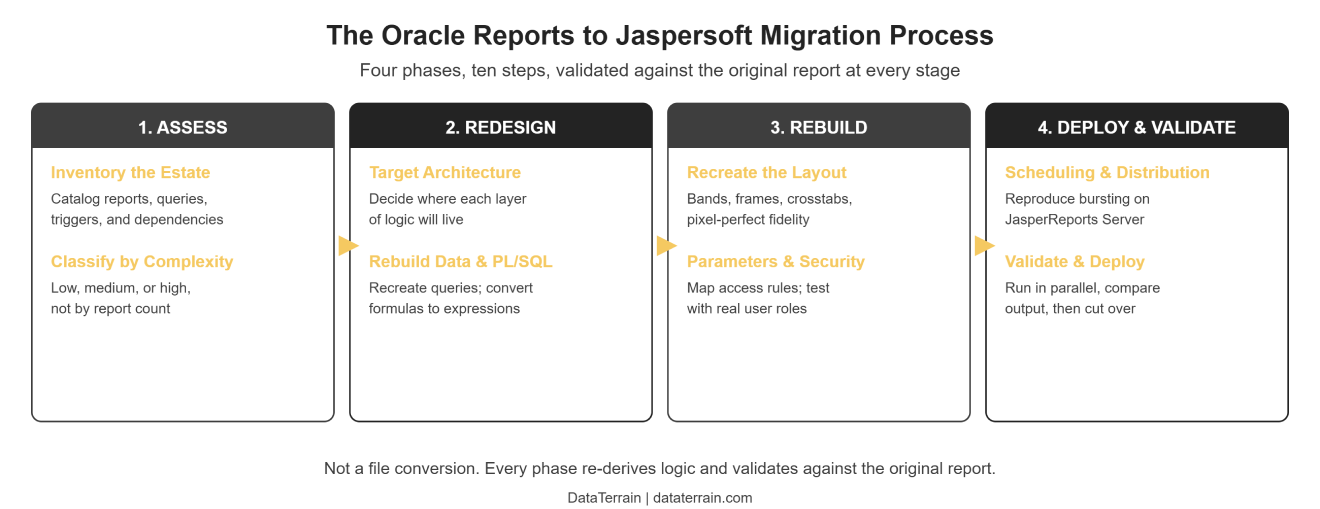
Step 1: Inventory the Oracle Reports Estate. Start by creating an inventory of reports, report definitions, queries, data sources, parameters, formula columns, summary columns, PL/SQL logic, format triggers, report triggers, groups, subreports, matrix reports, fonts, images, output formats, scheduling requirements, security requirements, and usage frequency. At this stage, also identify reports that can be retired rather than migrated.
Step 2: Assess Report Complexity. Classify reports according to migration complexity. Low complexity: simple SQL, basic fields, minimal formatting, few parameters, no complex triggers. Medium complexity: multiple queries, groups, subreports, formula columns, conditional formatting, multiple output formats. High complexity: extensive PL/SQL, complex triggers, matrix reports, multiple linked queries, heavy parameter logic, pixel-perfect requirements, complex bursting, and large numbers of dependencies. This classification helps establish realistic migration effort before development begins.
Step 3: Extract and Analyze Report Definitions. Analyze the source report definitions to identify data sources, SQL statements, columns, groups, parameters, formula logic, formatting, layout dimensions, triggers, and dependencies. The objective is to understand the report's business logic and rendering behavior, not simply its file structure.
Step 4: Design the Target Jaspersoft Architecture. Determine where each responsibility will live: data logic in SQL/database/ETL, report calculations in JasperReports variables and expressions, report layout in JRXML, report design in Jaspersoft Studio, and scheduling/distribution in JasperReports Server. This prevents excessive business logic from being embedded directly into JRXML.
Step 5: Rebuild the Data Model. Recreate Oracle Reports queries and datasets in the target environment, which may involve SQL queries, multiple datasets, subdatasets, subreports, database views, stored procedures, or data preparation outside the report. Assess complex PL/SQL logic individually rather than copying it blindly into report expressions.
Step 6: Convert PL/SQL and Formula Logic. Formula columns are one of the most important migration areas. Depending on the logic, the target implementation may use SQL CASE statements, database views, stored procedures, JasperReports variables, JasperReports expressions, or scriptlets where appropriate. The objective is to reproduce the business result, not simply reproduce the original syntax.
Step 7: Recreate the Report Layout. Rebuild page dimensions, margins, headers, footers, detail sections, groups, frames, text, images, tables, crosstabs, subreports, and conditional elements. Pixel-perfect reports require additional attention to font metrics, element positioning, line spacing, page breaks, band heights, margins, images, and PDF rendering. For fixed-format reports, treat visual validation as a separate testing activity rather than assuming that matching data means the migration is complete.
Step 8: Rebuild Parameters and Security. Map user parameters, default values, required/optional behavior, bind parameters, lexical parameters, access rules, and report permissions. Test security using representative user roles, not only administrator accounts.
Step 9: Configure Scheduling and Distribution. If the original Oracle environment distributes reports automatically, reproduce the required behavior using the target reporting architecture. JasperReports Server supports report management, security, scheduling, and distribution capabilities. Validate schedule frequency, recipients, output format, file naming, delivery method, failure handling, and permissions.
Step 10: Validate and Deploy. Run the original and migrated reports in parallel. Compare data, record counts, totals, subtotals, calculations, filters, parameters, layout, alignment, fonts, page breaks, headers, footers, spacing, images, tables, behavior, conditional formatting, sorting, grouping, scheduling, and distribution. Only after business validation should the migrated report move into production, using the same validation discipline covered in our guide to BI automation for report migration.
Migration Effort by Component
Migration effort varies significantly by report complexity.
| Component | Typical Effort | Main Reason |
|---|---|---|
| Simple SQL query | Low | Usually straightforward to recreate |
| Basic fields | Low | Direct layout recreation |
| Summary columns | Low to Moderate | Rebuilt as variables |
| Parameters | Moderate | Behavior and defaults need validation |
| Groups | Moderate | Grouping and pagination need recreation |
| Formula columns | Moderate to High | Depends on business logic |
| PL/SQL | High | Often requires logic redesign |
| Format triggers | Moderate to High | Conditional behavior needs recreation |
| Matrix reports | High | Requires crosstab redesign and validation |
| Subreports | Moderate to High | Dependencies need to be rebuilt |
| Complex layouts | High | Pixel-level reconstruction |
| Fonts | Moderate | Rendering differences can affect output |
| Bursting/distribution | Moderate to High | Target scheduling and delivery must be configured |
| Large report estates | High | Requires inventory, prioritization, and migration waves |
Key point: Report count alone is not a reliable measure of migration effort. A 500-report estate containing mostly simple operational reports may be easier to migrate than a 100-report estate containing complex PL/SQL, matrix reports, triggers, subreports, and strict pixel-perfect requirements; the same complexity-first scoping covered in our key checklist for BI modernization.
Common Migration Challenges
PL/SQL Logic Conversion. Oracle Reports may contain business logic inside formula columns and triggers. This logic often needs to be converted into SQL, moved into database objects, recreated using JasperReports expressions, or reimplemented using scriptlets where appropriate. The correct approach depends on where the logic belongs architecturally.
Pixel-Perfect Layout Fidelity. One of the most common migration challenges is reproducing the exact appearance of a legacy report. Differences can occur because of fonts, font metrics, margins, element coordinates, band heights, page dimensions, line wrapping, dynamic content, and page breaks. Visual comparison should therefore be part of the formal migration validation process, the same discipline covered in our pixel-perfect Jaspersoft reporting guide.
Complex Data Models. Reports with multiple linked queries, nested datasets, and complex relationships may require redesign rather than direct recreation, using SQL joins, subdatasets, subreports, database views, or stored procedures.
Matrix Reports. Oracle Reports matrix or cross-product reports require careful recreation as JasperReports crosstabs. Validation should include row groups, column groups, measures, totals, subtotals, empty values, and pagination.
Parameters. Parameters can be deceptively complex. A migration should preserve parameter names, data types, default values, required/optional status, validation rules, query behavior, and user prompts.
Lexical Parameters. Lexical parameters require special care because they influence query structure rather than simply supplying a value. Review them individually for query correctness, security, dynamic SQL behavior, and target syntax.
Fonts and Rendering. A report can contain correct data but still fail acceptance testing because the output looks different. Font configuration should therefore be established early, especially for financial statements, invoices, regulatory documents, forms, and preprinted layouts.
Scheduling and Distribution. Legacy environments may have complex report delivery rules. Migration teams should document who receives each report, when it runs, which format is delivered, where it is stored, which permissions apply, and what happens when execution fails.
Oracle Reports to Jaspersoft Migration Risks
| Risk | Potential Impact | Mitigation |
|---|---|---|
| Undocumented PL/SQL | Incorrect calculations | Analyze and document logic before conversion |
| Layout differences | Business rejection | Side-by-side visual validation |
| Missing dependencies | Failed report execution | Build a dependency inventory |
| Parameter mismatch | Incorrect report results | Test parameter behavior |
| Font differences | Pagination/layout changes | Standardize fonts early |
| Complex matrix reports | Incorrect totals/layout | Dedicated crosstab testing |
| Security gaps | Unauthorized access | Role-based validation |
| Unused reports migrated | Increased cost | Rationalize before migration |
| Big-bang migration | High operational risk | Use phased migration waves |
| Incomplete validation | Production defects | Establish formal acceptance criteria |
How Much Does Oracle Reports to Jaspersoft Migration Cost?
There is no reliable single price for an Oracle Reports to Jaspersoft migration because the cost depends on report complexity, not simply report count.
The main cost drivers include number of reports, report complexity, PL/SQL volume, number of queries, number of parameters, matrix reports, subreports, format triggers, report triggers, pixel-perfect requirements, security requirements, scheduling requirements, data-source complexity, validation requirements, and number of migration waves.
A useful cost assessment should therefore begin with an inventory and representative Proof of Concept. For example, an organization with 1,000 simple reports should not necessarily receive the same estimate as an organization with 1,000 reports containing complex PL/SQL and highly customized layouts.
How Long Does Oracle Reports to Jaspersoft Migration Take?
Migration timelines vary according to the complexity and size of the report estate. A small set of straightforward reports can be migrated relatively quickly, while a large enterprise estate involving complex PL/SQL, matrix reports, subreports, security, scheduling, and pixel-perfect requirements can require several migration waves.
The major timeline drivers are report inventory size, report complexity, PL/SQL conversion, data-model redesign, layout reconstruction, parameter complexity, security requirements, validation scope, business-user availability, and number of migration waves.
The most reliable way to establish a timeline is to migrate or assess a representative sample of reports first and use the results to estimate the broader estate.
Can Oracle Reports Migration Be Automated?
Yes, parts of Oracle Reports migration can be automated, but you should not assume a fully hands-off conversion.
Automation is particularly useful for repetitive activities such as report inventory, metadata extraction, component identification, field mapping, structural conversion, JRXML generation, template application, dependency analysis, and validation support.
AI-assisted approaches can also generate an initial JRXML draft from source report definitions and visual references. However, generated output still needs human review, particularly when reports contain complex PL/SQL, triggers, dynamic parameters, matrix layouts, complex subreports, pixel-perfect requirements, or business-specific calculations.
The best approach is therefore automation-assisted migration with technical validation, rather than treating generated JRXML as production-ready without review- the same approach behind DataTerrain's report migration automation.
Oracle Reports to Jaspersoft Migration Checklist
Before starting: Inventory all Oracle Reports, identify report owners, identify business-critical reports, identify unused reports, document data sources, extract SQL and PL/SQL logic, identify parameters, identify triggers, identify matrix reports, identify subreports, document fonts and page sizes, document security requirements, document scheduling and distribution, classify reports by complexity, and select a representative Proof of Concept.
During migration: Rebuild data queries, convert business logic, recreate parameters, rebuild layouts, recreate conditional formatting, configure fonts, rebuild subreports, recreate matrix reports, configure scheduling, test security, and compare output with the original.
Before production: Complete data reconciliation, complete visual validation, complete parameter testing, complete security testing, complete user acceptance testing, obtain business sign-off, deploy in controlled waves, monitor production, and retire the legacy report only after successful validation.
Best Practices for Successful Migration
1. Rationalize Before Migrating. Do not automatically migrate every report. Determine whether each report is active, business-critical, duplicated, rarely used, or no longer required.
2. Start With a Representative Proof of Concept. Choose reports that represent the complexity of the estate, including examples with simple layouts, complex PL/SQL, parameters, subreports, matrix reports, and pixel-perfect requirements. This provides a more realistic estimate than testing only the easiest reports.
3. Separate Business Logic From Presentation. Where appropriate, move complex business logic into SQL, views, stored procedures, or enterprise data layers. Avoid recreating unnecessary legacy complexity inside JRXML.
4. Create Reusable Templates. Establish common styles, fonts, page configurations, headers, footers, parameters, and branding. This can accelerate migration across large report estates.
5. Validate Data and Layout Separately. A report should pass two different validation layers: data validation (does it produce the correct result?) and visual validation (does it produce the expected output?). Both are necessary for business-critical reports.
6. Migrate in Waves. A phased approach reduces risk, for example: Wave 1, low-complexity reports; Wave 2, medium-complexity reports; Wave 3, high-complexity reports; Wave 4, exception reports and final legacy retirement.
7. Document Every Mapping. Maintain a migration mapping document covering source construct, target construct, conversion approach, validation status, known differences, business owner, and sign-off. This creates a repeatable migration methodology for the remaining estate, the same discipline behind our legacy scripts migration work.
Case Study: Migrating a Legacy Oracle Reports Estate
The following is an illustrative example and does not represent a specific customer engagement.
Consider an enterprise running several hundred Oracle Reports across operational, financial, and administrative functions. The environment contains standard tabular reports, complex PL/SQL formula columns, format triggers, matrix reports, multiple parameters, scheduled reports, and pixel-perfect financial outputs.
A practical migration would begin by inventorying and rationalizing the estate. Unused reports would be retired before conversion. Remaining reports would be classified according to complexity and business criticality. A representative set would then be rebuilt in Jaspersoft Studio.
The migration could involve recreating SQL queries, moving appropriate PL/SQL logic into database objects, rebuilding formula and summary calculations, recreating layouts in JRXML, converting matrix reports to crosstabs, rebuilding parameters, establishing fonts and page dimensions, configuring JasperReports Server, and validating output against Oracle Reports.
The resulting architecture would provide a modernized reporting environment while preserving the business reports that users actually require.
Key Takeaways
- Oracle Reports was deprecated as of Fusion Middleware 12c Release 2 (12.2.1.3.0), and Oracle states that no further functional enhancements are planned beyond critical bug fixes and technology compatibility changes.
- Oracle's strategic recommendation is Oracle Analytics Publisher, but Jaspersoft can be considered when an organization prefers a different reporting architecture based on its requirements.
- Migrating from Oracle Reports to Jaspersoft is a rebuild-and-modernization exercise, not simply a file conversion.
- Oracle Reports definitions need to be mapped to JRXML and recreated in the JasperReports architecture.
- PL/SQL and formula logic are among the most important migration areas.
- Pixel-perfect reports require dedicated visual validation.
- Matrix reports can be recreated using JasperReports crosstabs.
- Parameters, triggers, fonts, security, scheduling, and distribution all need assessment.
- Migration cost depends more on report complexity than report count.
- Migration timelines should be established using representative assessments rather than report count alone.
- Automation can accelerate repetitive migration activities, but complex reports still require technical and business validation.
- Inventory, rationalization, phased migration, and side-by-side validation reduce migration risk.
Migrate Your Oracle Reports Estate with DataTerrain
Oracle Reports modernization is not simply about replacing one report designer with another. The most important work is understanding the existing report estate, preserving business logic, rebuilding complex layouts, validating output, and creating a target architecture that can be maintained after migration.
With 17+ years of experience in BI migration and automation, and having helped over U.S. organizations transition legacy Oracle reporting to modern platforms, DataTerrain provides Oracle Reports migration services covering Oracle Reports assessment, report inventory and rationalization, Oracle Reports to Jaspersoft conversion, PL/SQL and formula conversion, JRXML development, pixel-perfect report recreation, parameter migration, matrix and crosstab migration, report validation, JasperReports Server deployment, scheduling and distribution, and phased migration planning.
The migration can begin with a representative Proof of Concept to assess the complexity of your Oracle Reports estate and determine the appropriate conversion approach.
Related Reading
- Jaspersoft Data Visualization Services
- Jaspersoft Pixel-Perfect Reporting
- Jaspersoft Cloud Migration
- Reports Conversion Services
- Legacy Scripts Migration
- From Any to Any: How BI Automation Simplifies Report Migration