Contents
- 20 Aug 2026
Power BI to Tableau Migration: The Complete 2026 Enterprise Migration Guide

- Share Post:
-

-

What Is Power BI to Tableau Migration?
Power BI to Tableau migration is the structured process of moving business intelligence content from Microsoft Power BI to Tableau. It can involve rebuilding Power BI reports, semantic models, datasets, DAX measures, Power Query transformations, security rules, dashboards, visualizations, and publishing structures in Tableau.
It is not a simple file conversion.
Power BI and Tableau use different data architectures, calculation languages, visualization frameworks, and governance models. A .pbix file therefore cannot simply be imported into Tableau as an equivalent workbook.
A typical migration involves:
- Rebuilding the Power BI semantic model as Tableau data sources
- Converting Power Query transformations into Tableau Prep or an appropriate ETL layer
- Re-deriving DAX measures as Tableau calculated fields and LOD expressions
- Rebuilding Power BI Row-Level Security requirements using Tableau security capabilities
- Recreating dashboards and visual interactions
- Replacing unsupported custom visuals
- Recreating bookmarks, navigation, filters, and actions
- Moving content from Power BI workspaces and apps to Tableau Projects and Sites
- Validating Tableau outputs against the original Power BI reports
- Deploying approved workbooks to Tableau Server or Tableau Cloud
The most important principle is to migrate business logic and analytical outcomes rather than attempting a literal technical copy, the same principle behind any-to-any BI automation generally.
Why Enterprises Migrate from Power BI to Tableau
Organizations typically consider Power BI to Tableau for several strategic reasons.
Salesforce and Ecosystem Alignment. Organizations with a significant Salesforce footprint may evaluate Tableau as part of a broader analytics strategy and platform consolidation, similar to the consolidation covered in our BI reports and dashboard development work.
Advanced Visual Analytics. Organizations that prioritize interactive visual analytics, exploratory analysis, geospatial visualization, and advanced dashboard experiences often consider Tableau.
Enterprise Platform Consolidation. Mergers, acquisitions, restructuring, and BI standardization can create environments where multiple analytics platforms exist simultaneously. Migrating to a single platform can simplify governance, development, and support, a goal shared with BI service providers transforming data strategy post-acquisition.
Vendor Diversification. Some organizations reassess their BI strategy to reduce dependency on a single technology ecosystem and introduce a different analytics platform into their enterprise architecture, the inverse of what drives some organizations toward a Qlik to Power BI migration instead.
Existing Tableau Skills. Organizations that already have Tableau developers, analysts, governance frameworks, or Tableau infrastructure may find platform consolidation more practical than maintaining parallel BI environments.
Who Should Consider Migrating from Power BI to Tableau?
Power BI to Tableau migration may be worth considering when an organization:
- Has standardized on Salesforce or an existing Tableau environment
- Requires advanced visual and geospatial analytics
- Has significant existing Tableau expertise
- Is consolidating BI platforms after an acquisition or merger
- Wants to standardize reporting on Tableau Server or Tableau Cloud
- Has business requirements better suited to Tableau's visualization and analytical capabilities
- Is reassessing BI licensing and long-term platform costs
- Wants to reduce duplication across multiple BI platforms
However, migration should not be based on features alone. Organizations should evaluate data architecture, existing skills, licensing, governance, reporting requirements, security, integrations, and long-term analytics strategy before selecting a target platform, the same evaluation covered in our data analytics services work. Financial services and other regulated organizations should also weigh compliance and entitlement requirements specifically; see our guide to Power BI to Tableau migration for financial services.
Power BI vs Tableau: Side-by-Side Comparison
| Criteria | Power BI | Tableau |
|---|---|---|
| Analytics Engine | VertiPaq | Hyper |
| Calculation Language | DAX | Calculated fields and LOD expressions |
| Data Preparation | Power Query/M | Tableau Prep |
| Semantic Modeling | Power BI semantic model | Tableau data sources |
| File Format | .pbix / .pbit | .twb / .twbx |
| Row-Level Security | DAX-based RLS roles | Tableau security and user filters |
| Publishing | Workspaces and Apps | Projects and Sites |
| Deployment | Power BI Service / Microsoft Fabric | Tableau Cloud / Tableau Server |
| Visualization | Microsoft BI visualization ecosystem | Interactive visual analytics |
| Best Fit | Microsoft-centric analytics environments | Organizations prioritizing Tableau analytics and visualization |
The better platform depends on the organization's technology ecosystem, analytical requirements, skills, governance model, and total cost of ownership, not a universal feature ranking. For a similar platform comparison, see our breakdown of Amazon QuickSight vs Tableau.
What Gets Converted in a Power BI to Tableau Migration?
A Power BI migration to Tableau typically involves rebuilding several interconnected layers.
| Power BI Component | Tableau Target | Migration Approach |
|---|---|---|
| .pbix report | .twb / .twbx workbook | Rebuilt natively |
| Semantic model | Tableau data source | Redesigned |
| DAX measure | Calculated field / LOD | Re-derived |
| Power Query/M | Tableau Prep / ETL | Rebuilt |
| RLS roles | Tableau security | Redesigned and validated |
| Power BI visual | Tableau visualization | Recreated |
| Bookmark | Tableau action/navigation | Redesigned |
| Custom visual | Native/custom Tableau alternative | Assessed individually |
| Workspace | Project/Site | Governance redesign |
| Dataset refresh | Extract/data refresh | Reconfigured |
The conversion is therefore a multi-layer modernization exercise, rather than a report-file conversion, using the same layered approach behind our BI reports and dashboard development methodology.
Power BI to Tableau Asset Mapping
| Power BI Asset | Tableau Equivalent | Migration Notes |
|---|---|---|
| .pbix report | .twb / .twbx workbook | Rebuilt natively |
| Semantic model | Tableau data source | Model must be redesigned |
| DAX measure | Calculated field / LOD | Business logic must be re-derived |
| Power Query step | Tableau Prep flow | Transformation logic rebuilt |
| RLS role | Tableau security/user filter | Security must be revalidated |
| Report page | Tableau dashboard/sheet | Layout redesigned |
| Bookmark | Tableau action/navigation | No direct one-to-one conversion |
| Power BI custom visual | Tableau native/custom visual | Requires compatibility assessment |
| Workspace | Project/Site | Governance model changes |
| Dataset | Tableau published data source | Refresh architecture changes |
DAX-to-Tableau conversion is particularly important because DAX and Tableau's calculation model work differently. DAX CALCULATE, filter context, time-intelligence logic, and calculation groups may need to be re-derived using Tableau calculated fields or LOD expressions rather than translated word-for-word, the same re-derivation discipline covered in our ETL and data integration work.
Step-by-Step Power BI to Tableau Migration Process
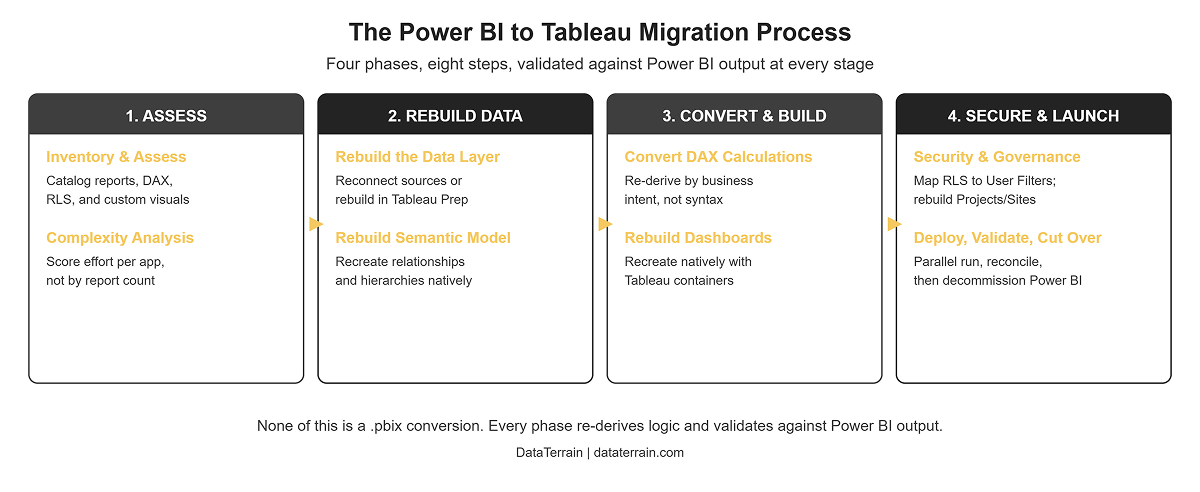
- Inventory and Assess. Catalog Power BI reports, datasets, and semantic models, DAX measures, Power Query transformations, data sources, RLS rules, custom visuals, bookmarks, workspaces and apps, refresh schedules, business-critical reports, and report usage. Score applications based on complexity and business importance before deciding the migration sequence, using the same scoring approach in our key checklist for BI modernization.
- Analyze Dependencies and Complexity. Evaluate DAX depth, Power Query complexity, number of data sources, RLS requirements, custom visuals, data volume, report dependencies, and governance requirements. This prevents organizations from estimating migration effort simply by counting reports.
- Rebuild the Data Layer. Reconnect Tableau to the required source systems or rebuild Power Query logic using Tableau Prep or an upstream ETL/data warehouse layer. Validate source data and row counts before rebuilding calculations, often against a governed data lake or warehouse.
- Rebuild the Semantic Model. Recreate relationships, dimensions, measures, hierarchies, and business definitions within the Tableau architecture. The objective is to establish a reliable data foundation before dashboard development.
- Convert DAX Calculations. Re-derive DAX measures as Tableau calculated fields and LOD expressions. Focus on business intent, not syntax. Validate each important calculation against the Power BI result.
- Rebuild Dashboards. Recreate dashboards using Tableau-native visualizations, filters, actions, parameters, navigation, and interactions. Do not attempt to reproduce every Power BI layout element exactly if Tableau provides a more appropriate native interaction; follow the same native-rebuild discipline behind our BI reports and dashboard development work.
- Rebuild Security and Governance. Map Power BI RLS requirements to the Tableau security model. Recreate publishing structures, user permissions, Projects, Sites, authentication, and content access.
- Deploy, Validate, and Cut Over. Publish validated workbooks to Tableau Server or Tableau Cloud. Run Power BI and Tableau in parallel during the transition and compare record counts, KPIs, measures, filters, calculated values, security, refresh results, dashboard behavior, and user workflows. Decommission Power BI content only after business users approve the migrated environment, using the same validation discipline covered in our guide to BI automation for report migration.
How to Estimate Power BI to Tableau Migration Effort
Migration effort depends on complexity, not report count alone.
Important estimation factors include: number of Power BI reports, number of datasets, number and complexity of DAX measures, Power Query transformation complexity, semantic model complexity, number of source systems, RLS requirements, custom visuals, bookmarks and complex interactions, data volume, refresh architecture, Tableau Server or Cloud requirements, validation scope, user acceptance testing, and number of migration waves.
A representative assessment or Proof of Concept can provide a more reliable estimate than applying a fixed cost or time estimate to every Power BI report.
Power BI to Tableau Migration Challenges
DAX-to-LOD Conversion. DAX and Tableau calculations use different concepts and evaluation behavior. Complex CALCULATE logic, filter context, time intelligence, and calculation groups can require significant re-engineering, similar to the legacy script migration challenges we see when converting other proprietary calculation logic.
Semantic Model Differences. You can't simply copy the Power BI semantic model into Tableau. Relationships, dimensions, measures, and hierarchies may need redesign.
Custom Visuals. Power BI custom visuals may not have direct Tableau equivalents. Each visual needs to be assessed and either recreated, replaced, or redesigned.
Security Migration. Power BI RLS rules need to be redesigned and tested using Tableau's security capabilities.
Performance Differences. Power BI's VertiPaq engine and Tableau's Hyper engine process and optimize data differently. Performance should therefore be benchmarked after migration rather than assumed to remain unchanged.
Governance Changes. Power BI Workspaces and Apps do not map directly to Tableau Projects and Sites. Permissions, publishing workflows, ownership, and governance need to be redesigned, the kind of governance redesign covered in our BI modernization checklist.
Skills and Training. Teams experienced in DAX and Power Query may require training in Tableau calculations, LOD expressions, Tableau Prep, dashboard design, and Tableau administration.
Power BI to Tableau Migration Risks and Mitigation
| Risk | Mitigation |
|---|---|
| DAX calculation discrepancies | Re-derive and validate calculations |
| Data-model inconsistencies | Redesign and document the target model |
| RLS errors | Test with representative users |
| Unsupported custom visuals | Identify alternatives during discovery |
| Performance degradation | Benchmark Tableau independently |
| Governance gaps | Redesign Projects, Sites, and permissions |
| User adoption issues | Include users in UAT |
| Timeline overruns | Prioritize applications by complexity |
| Data-refresh problems | Validate Tableau refresh architecture before cutover |
How Much Does Power BI to Tableau Migration Cost?
There is no reliable fixed price for a Power BI to Tableau migration because the cost depends on the environment's complexity.
The main cost drivers are: number of Power BI reports and datasets, DAX complexity, Power Query complexity, number of data sources, data-model redesign, custom visuals, RLS requirements, dashboard redesign, Tableau Server or Cloud architecture, validation and UAT, migration timeline, number of migration waves, and required training and governance changes.
Organizations should therefore avoid estimating migration cost solely on a per-report basis. A representative Proof of Concept can help establish actual conversion effort before scaling the migration.
How Long Does Power BI to Tableau Migration Take?
A Power BI to Tableau migration can take several weeks to several months, depending on report volume, DAX complexity, data architecture, security requirements, and validation scope.
A focused migration involving business-critical reports may be completed within several weeks, while larger enterprise programs may require multiple migration waves over several months.
The most important timeline drivers are: number of reports and datasets, DAX complexity, Power Query complexity, data-model redesign, custom visual dependencies, RLS requirements, validation requirements, user acceptance testing, and Tableau deployment architecture.
Best Practices for Power BI to Tableau Migration
- Migrate by business intent, not DAX syntax.
- Rebuild the data model before rebuilding dashboards.
- Convert and validate calculations individually.
- Identify unsupported custom visuals during discovery.
- Test RLS using representative user accounts.
- Build dashboards natively in Tableau rather than pixel-matching Power BI, following the same design principles in our BI reports and dashboard development guide.
- Run Power BI and Tableau in parallel during validation.
- Prioritize business-critical reports first.
- Train Power BI developers on Tableau calculations and Tableau Prep.
- Use a Proof of Concept before scaling an enterprise migration, the same phased discipline in our BI modernization checklist.
Key Takeaways
- Power BI to Tableau migration is a re-engineering exercise, not a file conversion.
- DAX-to-LOD conversion is one of the most important technical considerations.
- Power BI semantic models need to be redesigned for Tableau.
- Power Query transformations may need to be rebuilt in Tableau Prep or an upstream ETL layer.
- RLS, custom visuals, bookmarks, and governance structures require separate assessment.
- Migration cost depends on complexity, not report count alone.
- Migration timelines can range from several weeks to several months.
- Parallel validation reduces the risk of data and calculation discrepancies.
- A phased migration is generally easier to control than a single enterprise-wide cutover.
- A representative Proof of Concept can establish migration feasibility, effort, and risks before full-scale implementation.
Frequently Asked Questions
Migrate Power BI to Tableau with DataTerrain
Migrating from Power BI to Tableau requires more than rebuilding dashboards. The target data model, calculations, security, visualizations, governance, and deployment architecture all need consideration.
With 17+ years of experience in BI migration and automation, 400+ customers, and 27,000+ reports and dashboards delivered, DataTerrain supports organizations through Power BI assessment, data-model redesign, DAX-to-Tableau calculation conversion, dashboard redevelopment, security implementation, validation, and phased deployment.
DataTerrain can begin with a Proof of Concept using a representative sample of your Power BI environment, allowing your team to evaluate the migration approach before scaling the project.
Request a Free Proof of Concept to assess your Power BI-to-Tableau migration requirements.
Related Reading
- Key Checklist for Successful BI Modernization
- From Any to Any: How BI Automation Simplifies Report Migration
- BI Reports and Dashboard Development
- Automated Power BI to Tableau Migration for Enterprise Analytics
- Power BI to Tableau Migration for Financial Services
- Qlik to Power BI Migration: The Complete Guide
- Amazon QuickSight vs Tableau: Key Differences
- Legacy Scripts Migration