- 30 July 2026
Oracle HCM Organization Tax Summary Report – US
Payroll and tax teams require accurate quarterly tax information for reconciliation, compliance review, and audit support. Although Oracle Fusion HCM maintains federal and state payroll tax balances, organizations may require a customized report that reproduces the structure and functionality of reports previously used in their legacy payroll system.
DataTerrain developed an Oracle HCM Organization Tax Summary Report with two separate versions:
- Organization Tax Summary – Federal
- Organization Tax Summary – State
Users select and run the appropriate version based on whether federal or state tax information is required. The report can be executed for a single company or across all configured companies.

- Share Post:
-

-

Customer Profile
A US-based enterprise transitioning its payroll reporting from PeopleSoft to Oracle Fusion HCM required quarterly federal and state tax summary reports for payroll reconciliation, compliance review, and audit support.
Business Requirement
The customer had prebuilt Federal and State Organization Tax Summary reports in PeopleSoft that needed to be retired within a short timeframe. To maintain continuity in payroll tax reporting, the customer required similar reports to be developed in Oracle Fusion HCM.
Two report versions were required:
Federal Tax Summary Report
The Federal report needed to provide employee-level and company-level quarterly federal tax information, including:
- Federal tax Data Point
- Federal income tax withholding
- Federal Insurance Contributions Act (FICA) taxes
- Federal unemployment taxes
- Other configured federal tax balances
- Federal element-entry details
- Employee Tax QTD and YTD amounts
- Employer Tax QTD and YTD amounts
Employees are listed using their name and Social Security Number, subject to the organization's data-security and masking policies. The report also provides page-level and company-level totals.
State Tax Summary Report
The State report needed to provide quarterly state tax information for the selected company and state jurisdiction.
In addition to company and reporting-period details, the State report identifies the applicable jurisdiction and displays:
- State tax Data Point
- State tax balances
- Employee Tax QTD and YTD amounts
- Employer Tax QTD and YTD amounts
- Employee-level tax details
- Page-level totals
- Company-level totals
The customer required both reports to support execution for either a single company or all companies.
Without these consolidated reports, the process would have involved:
- Running multiple payroll tax extracts
- Retrieving federal and state tax information separately
- Filtering records by company and state jurisdiction
- Extracting federal element-entry information separately
- Combining payroll tax data manually in spreadsheets
- Validating employee, page, and company totals
- Preparing separate review-ready files for federal and state tax reporting
Solution Overview
DataTerrain developed two customized Organization Tax Summary reports in Oracle Fusion HCM.
When initiating the report, the user selects the required report version.
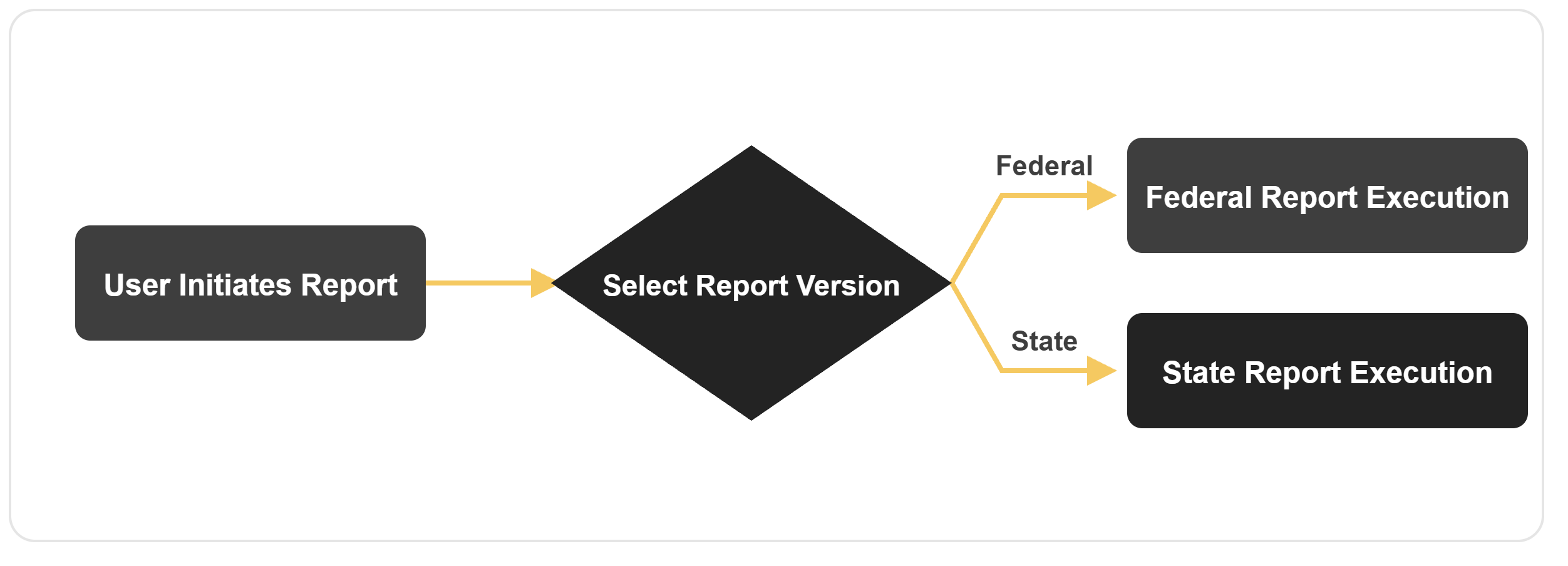
The selected version determines the tax data, parameters, balances, elements and columns included in the output.
Federal Report Execution
When the Federal report is selected, the report retrieves federal payroll tax balances and related federal element-entry details. Typical parameters include:
| Parameter | Notes |
|---|---|
| Company | - |
| Quarter | - |
| Reporting Year | - |
| Payroll or Tax Reporting Unit | where required |
The report can be run for a single company or all companies.
State Report Execution
When the State report is selected, the report retrieves state tax balances for the applicable state jurisdiction. Typical parameters include:
| Parameter | Notes |
|---|---|
| Company | - |
| Quarter | - |
| Reporting Year | - |
| State | If not selected, display all state wherever the company is located |
| Payroll or Tax Reporting Unit | where required |
The State version displays the applicable jurisdiction in the report header and organizes the tax information accordingly.
Report Header Information
Both versions provide report-control information to support traceability and audit review. The report header typically includes:
| Header Feild | Federal | State |
|---|---|---|
| Report ID | ||
| Company name or company code | ||
| Federal Employer Identification Number | ||
| Reporting quarter | ||
| Reporting year | ||
| Page number | ||
| Report run date | ||
| Report run time | ||
| Applicable state jurisdiction | - | (additional) |
The State version additionally displays the applicable state jurisdiction.
Federal Report Output
The Federal Organization Tax Summary Report includes:
- Output Feild
- Employee Social Security Number
- Employee Name
- Federal Tax Balance
- Employee Tax QTD
- Employee Tax YTD
- Employer Tax QTD
- Employer Tax YTD
- Federal withholding details
- FICA tax details
- Federal unemployment tax details
- Federal element-entry details
- Page totals
- Company totals
The exact federal tax balances and element-entry details included in the report can be configured according to the customer's payroll setup and reporting requirements.
State Report Output
The State Organization Tax Summary Report includes:
- Output Feild
- Employee Social Security Number
- Employee Name
- Company
- State Jurisdiction
- State Tax Balance
- Employee Tax QTD
- Employee Tax YTD
- Employer Tax QTD
- Employer Tax YTD
- Page totals
- Company totals
The specific state tax balances displayed depend on the selected jurisdiction and the customer's Oracle HCM tax configuration.
Reporting Approach
HCM Extracts can be used to retrieve the required payroll tax balances, employee information, company details, jurisdictions, and element-entry data. HCM Extracts is suitable for this requirement because it supports:
- Capability
- High-volume payroll and tax data
- Quarter-to-date and year-to-date balance retrieval
- Separate Federal and State reporting logic
- Company-level and jurisdiction-level filtering
- Employee-level tax details
- Scheduled and recurring execution
- Reusable runtime parameters
BI Publisher can be used with the extract to reproduce the structured report layout, including:
- Layout Element
- Report header information
- Quarterly report title
- Company and Federal EIN
- State jurisdiction for the State version
- Employee and employer tax columns
- Page-level totals
- Company-level totals
- Page numbering and run details
Report Execution Flow
The report follows a controlled execution process:
- An authorized user chooses either to run the Federal or State report.
- The user enters the company, quarter, year, and other applicable parameters.
- For the State report, the relevant state jurisdiction is selected.
- Oracle HCM retrieves employee, payroll, tax-balance, and element-entry information.
- The appropriate Federal or State reporting logic is applied.
- Employee Tax and Employer Tax QTD and YTD values are calculated or retrieved.
- Page-level and company-level totals are generated.
- The final report is produced in the required PDF output format.
Data Flow
Federal report
| Data Flow Stage | Detail |
|---|---|
| Input | Company, Quarter, Year, and applicable payroll parameters |
| Source | Oracle Fusion HCM employee, payroll, federal tax balance, and federal element-entry data |
| Processing | Federal tax selection, QTD and YTD balance retrieval, employee and employer tax separation, and total calculation |
| Output | Quarterly Federal Tax Summary Report |
State report
| Data Flow Stage | Detail |
|---|---|
| Input | Company, Quarter, Year, State Jurisdiction, and applicable payroll parameters |
| Source | Oracle Fusion HCM employee, payroll, state tax balance, and jurisdiction data |
| Processing | Jurisdiction filtering, state tax selection, QTD and YTD balance retrieval, employee and employer tax separation, and total calculation |
| Output | Quarterly State Tax Summary Report |
Security and Access Control
The Organization Tax Summary Report respects Oracle Fusion HCM role-based security. Users can access only the companies, payroll data, tax reporting units, jurisdictions, and employee records permitted by their assigned:
- Security profiles
- Legislative data groups
- Legal-employer access
- Payroll security roles
- Data-access roles
Because the report may contain Social Security Numbers and sensitive employee tax information, SSNs should be displayed only to specifically authorized users. Masking can be applied where the complete SSN is not required.
Expected Business Impact
Replacing the retiring PeopleSoft reports with equivalent Oracle HCM Federal and State reports helps maintain continuity in quarterly payroll tax reporting. Potential outcomes include:
- Continued availability of critical Federal and State tax reports after PeopleSoft retirement
- Faster preparation of quarterly tax summaries
- Separate, clearly defined Federal and State outputs
- Consistent Employee Tax and Employer Tax QTD and YTD reporting
- Reduced manual consolidation of payroll tax data
- Easier validation of page-level and company-level totals
- Improved traceability through report ID, run date, run time, and page information
- Reduced risk of errors introduced during spreadsheet preparation
- Better support for payroll reconciliation, compliance review, and audits
Actual time savings depend on the number of companies, state jurisdictions, employees, payroll tax balances, and validation requirements.
Typical Implementation Scope
Implementation of the Federal and State Organization Tax Summary Reports generally includes:
- Review of the existing PeopleSoft Federal and State reports
- Mapping PeopleSoft report fields to Oracle HCM
- Federal and state tax-balance mapping
- Federal element-entry mapping
- Company and Tax Reporting Unit mapping
- State-jurisdiction mapping
- QTD and YTD balance validation
- Employee and employer tax calculation validation
- Page-total and company-total reconciliation
- HCM Extract development
- BI Publisher layout development
- Security and SSN-masking validation
- User acceptance testing
- Production deployment and scheduling
Implementation effort depends on the number of federal and state tax balances, companies, jurisdictions, element entries, and legacy-report rules that must be reproduced.
Organization-Specific Configuration
Every organization has different legal-employer structures, tax reporting units, payroll balances, element configurations, and state-jurisdiction requirements. The reports can be configured with:
- Separate Federal and State versions
- Single-company or all-company execution
- Quarter and year parameters
- State-jurisdiction parameters
- Federal and state tax-balance selection
- Federal element-entry details
- Employee and employer QTD and YTD values
- SSN masking
- Page-level and company-level totals
- Excel, CSV, PDF, or other required output formats
Conclusion
The Organization Tax Summary Report demonstrates how critical PeopleSoft payroll reports can be successfully transitioned to Oracle Fusion HCM without interrupting established tax-reporting processes.
By providing separate Federal and State versions, supporting single-company and all-company execution, and displaying Employee Tax and Employer Tax QTD and YTD values, the solution gives payroll and tax teams a familiar and reliable reporting experience in Oracle HCM.
The reports also preserve important operational features such as company information, Federal EIN, state jurisdiction, report identifiers, run details, employee-level tax information, and page-level and company-level totals.
DataTerrain designs, develops, and enhances Oracle HCM reports for payroll, tax, employee, benefits, compensation, absence, and other enterprise HR reporting requirements.
Migrating from PeopleSoft or another legacy payroll system?
DataTerrain helps organizations recreate Federal Tax Summary, State Tax Summary, payroll reconciliation, and compliance reports in Oracle Fusion HCM while preserving existing business processes.