Contents
- 26 Aug 2026
Informatica PowerCenter on AWS: A Comprehensive ETL Guide
Extract, Transform, and Load (ETL) processes are critical for businesses handling large volumes of data, the same discipline covered in our broader ETL solutions work. Informatica PowerCenter is a widely used enterprise-grade ETL tool, and Amazon Web Services offers the cloud infrastructure to run it at scale without the fixed cost of owning hardware. This guide explains the architecture, deployment process, performance, and security considerations for running PowerCenter on AWS, and how it compares with Informatica's newer cloud-native platform and other AWS-native alternatives.

- Share Post:
-

-

What is Informatica PowerCenter on AWS?
Running Informatica PowerCenter on AWS means hosting the PowerCenter application tier, its metadata repository, and its data staging layer on AWS infrastructure instead of on-premises hardware. The combination gives organizations three practical benefits: elastic compute that scales ETL workloads up or down on demand, fault-tolerant, multi-AZ infrastructure for high availability, and AWS's security and compliance baseline (encryption, IAM access control, and standards such as HIPAA and ISO 27001) to build on top of.
Architecture: Deploying PowerCenter on AWS
A typical deployment maps PowerCenter's components onto specific AWS services:
- Amazon EC2 runs the PowerCenter Integration Service and Repository Service.
- Amazon RDS hosts the metadata repository that stores mappings, workflows, and session configurations.
- Amazon S3 serves as cost-effective staging storage for data in transit between source and target.
- AWS IAM manages user access and security policies across the environment.
Data flow. Data is extracted from source systems, databases, SaaS applications, and flat files, and staged in S3. PowerCenter transforms it using AWS compute resources (EC2, or pushed down further into Lambda or EMR for specific workloads), then loads the processed data into target systems such as Amazon Redshift, RDS, or DynamoDB, a data-lake pattern similar to what we cover in our data lake work at larger scale.
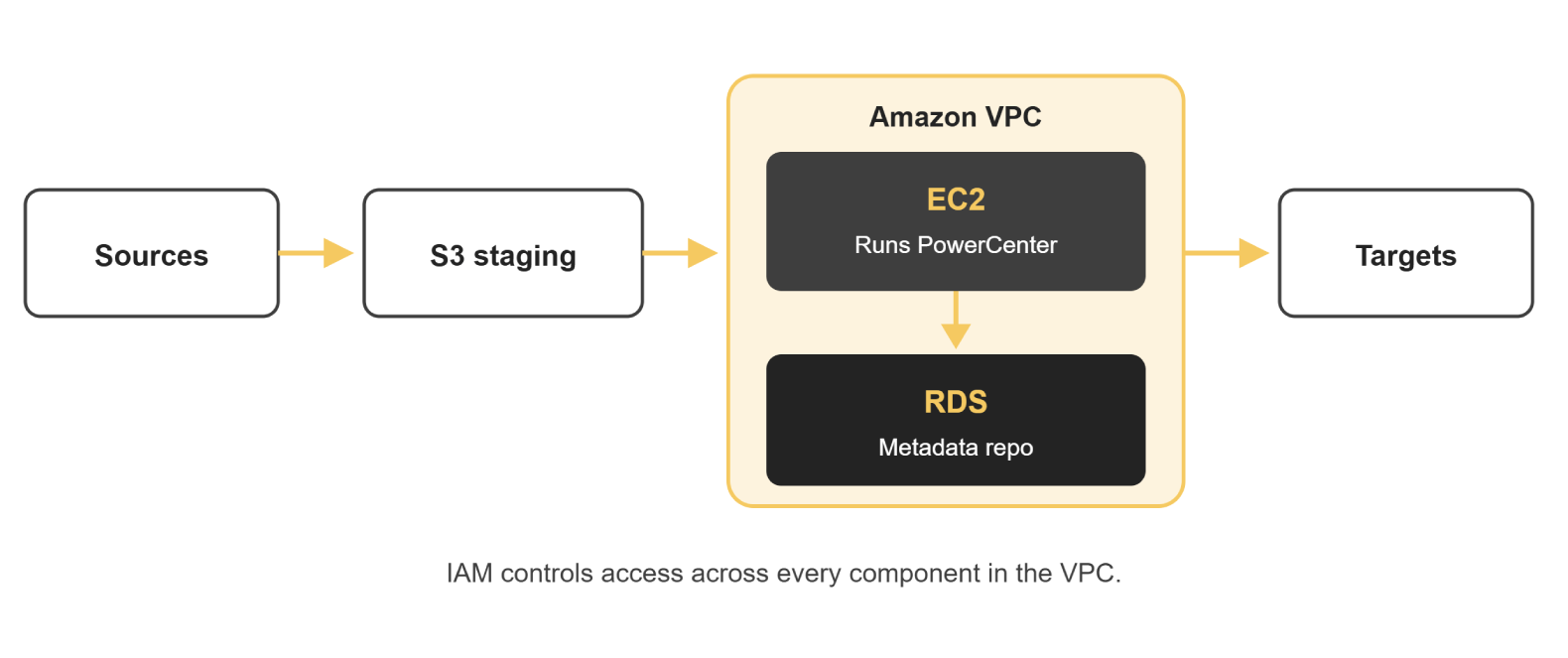
Figure: PowerCenter on AWS deployment architecture, showing VPC, EC2, RDS, S3, and target systems
Step-by-Step Deployment Process
Provision the VPC and networking. Create a dedicated Amazon VPC with public and private subnets across at least two Availability Zones, so PowerCenter components are network-isolated from the start rather than retrofitted with security later.
Launch the EC2 instances. Select instance types based on expected workload, compute-optimized for transformation-heavy work, memory-optimized for large joins, and install the PowerCenter Integration Service and Repository Service, or start from a pre-configured PowerCenter image available in AWS Marketplace.
Stand up the RDS repository. Provision an Amazon RDS instance to host the PowerCenter metadata repository, with automated backups and Multi-AZ enabled for resilience.
Configure S3 staging buckets. Set up S3 buckets for data in transit, with lifecycle policies to control storage costs as staged data ages out.
Set IAM roles and policies. Define least-privilege IAM roles for the PowerCenter service accounts, the S3 buckets, and any Lambda or EMR resources used for pushdown processing, rather than relying on broad, shared credentials.
Connect source and target systems. Configure PowerCenter connections to source databases, SaaS applications, and target systems such as Redshift or DynamoDB, validating connectivity before building production workflows.
Migrate and validate workflows. Move existing mappings and workflows into the new environment, and run them against a sample dataset to confirm output matches the legacy environment before cutting over production traffic, the same validation discipline covered in our guide to automating ETL testing with Python.
Performance Optimization
A few practices consistently matter for PowerCenter running on AWS:
- Right-size EC2 instances for the workload; compute-optimized instances suit CPU-intensive transformations, while memory-optimized instances suit large joins and aggregations.
- Use AWS Auto Scaling to handle peak ETL loads dynamically rather than provisioning for peak capacity year-round.
- Push down transformations where possible. Informatica's pushdown optimization can execute transformation logic directly in Redshift or Snowflake instead of on the EC2 compute layer, often significantly reducing processing time.
- Partition large workloads across multiple nodes rather than running a single large session serially.
Security and Compliance
Security for PowerCenter on AWS operates at two layers, and both need deliberate configuration, not just a default setup.
Infrastructure layer. Deploy PowerCenter components inside a dedicated Amazon VPC for network isolation. Encrypt data at rest using AWS KMS-managed keys, and enforce TLS for data in transit. Configure IAM roles narrowly, granting each service account only the permissions it needs for its specific role, rather than reusing one broad administrative role across the environment. Enable VPC Flow Logs and AWS CloudTrail so access and configuration changes are auditable after the fact, not just at setup time.
Application layer. PowerCenter's own role-based access control should mirror the principle of least privilege applied at the infrastructure layer, restricting who can view or modify specific mappings, workflows, and connection credentials. Enable PowerCenter's audit trail and session logs, and route them to a centralized location (such as CloudWatch Logs) so security and compliance teams have one place to review activity rather than logging into individual EC2 instances.
Together, these two layers let a PowerCenter-on-AWS deployment meet compliance frameworks such as HIPAA, GDPR, and ISO 27001; neither layer substitutes for the other, and both support the governance rigor covered in our key checklist for BI modernization.
Use Cases for PowerCenter on AWS
Enterprise data warehousing. PowerCenter extracts and transforms data before loading it into Amazon Redshift for analytics, feeding the kind of BI reports and dashboards built on top of that warehouse.
Near real-time processing. PowerCenter combined with AWS Lambda enables lighter-weight, event-driven transformations for time-sensitive data.
Hybrid cloud integration. PowerCenter connects on-premises systems to cloud storage like S3, letting organizations migrate at their own pace rather than in one cutover- the same phased philosophy behind our legacy scripts migration work.
PowerCenter on AWS vs. IICS vs. AWS Glue
Running PowerCenter on AWS extends the life of an existing investment, but it's worth being direct about the alternatives organizations increasingly evaluate alongside it:
| Dimension | PowerCenter on AWS | Informatica IICS | AWS Glue |
|---|---|---|---|
| Deployment model | Self-managed on EC2/RDS/S3 | Fully managed SaaS | Fully managed, serverless |
| Infrastructure management | You manage EC2, RDS, patching, scaling | Informatica manages infrastructure | AWS manages infrastructure entirely |
| Pricing model | AWS usage + PowerCenter licensing | Subscription-based (IPUs) | Pay-per-use, no idle cost |
| Best fit | Organizations extending existing PowerCenter investments | Organizations moving to Informatica's cloud-native platform | Organizations building new, AWS-native pipelines without legacy PowerCenter assets |
| Migration effort from PowerCenter | None (already on it) | Moderate; asset reuse supported | High; typically a rebuild, not a lift-and-shift |
Organizations already on PowerCenter, whether on-premises or on AWS, increasingly evaluate whether to keep optimizing the current platform, migrate to IICS, or rebuild specific pipelines natively in AWS Glue. Our detailed comparison of Informatica PowerCenter vs IICS walks through the feature differences, and our PowerCenter to IICS conversion guide covers what a migration actually involves if you decide to move. For organizations building new cloud-native pipelines rather than migrating existing PowerCenter workflows, our guide to IICS cloud data integration covers that path directly. Teams weighing an entirely different ETL platform, such as Oracle's stack, may also find our ODI (Oracle Data Integrator) guide useful for comparison.
Case Study: Scaling Month-End Batch Processing
The following is an illustrative example, not an account of a specific customer engagement.
Consider a mid-size financial services firm running PowerCenter on-premises, with a month-end batch process that aggregates transaction data across a dozen source systems into a Redshift-based reporting warehouse. On-premises hardware was sized for average daily load, so month-end processing routinely ran long and sometimes missed internal reporting deadlines during the year's busiest close cycles.
Migrating to PowerCenter on AWS addressed this directly: EC2 Auto Scaling added compute capacity automatically during the multi-day month-end window and scaled back down afterward, rather than the firm paying for peak capacity every day of the month. Pushdown optimization moved the heaviest aggregation logic into Redshift itself, cutting the compute load on the EC2 tier. The metadata repository moved to a Multi-AZ RDS instance, removing a single point of failure that had previously caused a full day of lost processing during a prior on-premises outage.
The likely outcome of this kind of migration is a month-end process that reliably finishes within its window even during peak volume, without paying for idle capacity the other 25 days of the month, plus a more resilient repository that survives an infrastructure failure without losing a processing day.
Key Takeaways
- Running PowerCenter on AWS typically maps to EC2 for compute, RDS for the metadata repository, and S3 for staging, with IAM managing access throughout.
- A disciplined deployment sequence, network first, then compute, then repository, then connections, then validation, reduces the risk of a rushed cutover.
- Pushdown optimization, right-sized EC2 instances, and Auto Scaling are the levers that matter most for performance and cost control.
- Security requires configuring both AWS infrastructure controls (VPC, IAM, encryption, logging) and PowerCenter's own application-level access controls; neither alone is sufficient.
- PowerCenter on AWS, IICS, and AWS Glue serve different situations: extending an existing investment, moving to Informatica's managed cloud platform, or building new AWS-native pipelines from scratch.
- Auto Scaling during variable workloads like month-end processing is one of the clearest cost and reliability wins of moving to AWS.
Frequently Asked Questions
Run Informatica PowerCenter on AWS with DataTerrain
DataTerrain provides expert implementation, optimization, and support for running Informatica PowerCenter on AWS, from initial architecture and deployment through performance tuning and security hardening.
Related Reading
- Informatica PowerCenter vs IICS: Key Feature Differences
- PowerCenter to IICS Conversion Guide
- IICS Cloud Data Integration: What It Is and How It Works
- Automating ETL Testing with Python: Data Validation
- ODI (Oracle Data Integrator): ELT Guide & Architecture
- BI Reports and Dashboard Development
- Data Lake
- Legacy Scripts Migration