Contents
- 03 Sep 2026
Snowflake vs Databricks: Architecture, Pricing, Performance, and How to Choose
Snowflake and Databricks started at opposite ends of the same problem. Snowflake began as a cloud-native data platform for data warehousing and grew outward into data science and AI; Databricks began as a lakehouse architecture for data engineering and grew inward into SQL warehousing. The old data lake vs. data warehouse split still explains their instincts, but no longer their capabilities, which means the choice is about what fits how your team works and where your data already sits.
Quick Summary
This comparison covers architecture, cost, performance, workload fit, and each platform's limitations. Snowflake is warehouse-first: SQL, managed storage, minimal tuning, and closer to a true SaaS product. Databricks is lakehouse-first: open storage in your own cloud account, with Spark and Python alongside SQL, offering more control and customization at the cost of a steeper learning curve. The decision comes down to your workload mix, team skills, and how much control you want over storage and cost.

- Share Post:
-

-

Key Takeaways
- Both platforms now cover the same ground. Feature checklists no longer separate them; their operating models do.
- The data warehouse vs lakehouse distinction still explains their instincts. Snowflake optimizes for simplicity and managed storage; Databricks for control over open storage in your own account.
- Pricing is not comparable at list price. Snowflake credits include the infrastructure; Databricks DBUs arrive alongside a separate cloud provider bill.
- Workload mix decides it. High-concurrency BI and SQL lean Snowflake; large-scale ETL, streaming, and ML lean Databricks. Running both is a legitimate target, not a compromise.
Snowflake vs Databricks: Quick Overview
Snowflake is a cloud-native data platform built around managed storage and elastic virtual warehouses billed by the second, with governance through Horizon Catalog, Python through Snowpark, and AI through Cortex. Warehouse sizing uses simple T-shirt sizing (X-Small through X-Large), abstracting away the underlying virtual machines. Its strength is that it takes very little administration to run well at high concurrency.
Databricks is a unified, open lakehouse platform. Data stays in open table formats, Delta Lake and Apache Iceberg through Unity Catalog, in your own cloud storage, and compute runs over it through Spark, the Photon engine, or Databricks SQL warehouses via notebooks or SQL directly. Its strength is breadth: data engineering, streaming, and machine learning on the same copy of the data, the same lakehouse consolidation covered in our Databricks to Microsoft Fabric migration guide for organizations weighing a different target platform.
Where They Have Converged
Storage format is no longer a deciding factor, since Snowflake reads and writes Apache Iceberg and Unity Catalog governs Iceberg alongside Delta, effectively settling the argument over open table formats that once separated the two platforms philosophically. Performance on BI workloads is now close enough that it rarely decides the choice on its own, though results still vary by workload: one independent benchmark found Snowflake completing a large-warehouse query in 527 seconds versus 636 seconds on a comparably sized Databricks configuration, a single data point worth treating as illustrative rather than a universal verdict, not a consistent edge for either platform. Scalability isn't a differentiator either; both scale compute elastically and independently of storage. What differs is how much of that scaling and tuning you configure yourself.
Side-by-Side Comparison Table
| Aspect | Snowflake | Databricks |
|---|---|---|
| Origin | Cloud data warehouse | Spark and data science |
| Architecture | Warehouse with managed storage | Lakehouse over open storage |
| Where data lives | Snowflake-managed, plus Iceberg | Your cloud account (S3, ADLS, GCS) |
| Table formats | Managed tables, Apache Iceberg | Delta Lake, Iceberg via Unity Catalog |
| Primary interface | SQL, Python via Snowpark | Notebooks, SQL, Python, Scala |
| Compute | Elastic virtual warehouses (T-shirt sizing) | Spark, Photon, SQL warehouses |
| Governance | Horizon Catalog | Unity Catalog |
| ML and AI | Cortex AI, Snowpark ML (pre-built models) | Mosaic AI, Agent Bricks, MLflow (custom training and fine-tuning) |
| Streaming | Snowpipe Streaming, Dynamic Tables | Structured Streaming, Lakeflow |
| Pricing unit | Credits, infrastructure included | DBUs plus a separate cloud bill |
| Tuning burden | Largely automatic | More control, more to manage |
Key Differences: Architecture, Workload Fit, Pricing Model
Architecture. The clearest way to read the difference is by layer. Both platforms ingest, store, compute, and serve, but Snowflake manages the storage layer for you, while Databricks leaves it in your own cloud account in open formats.
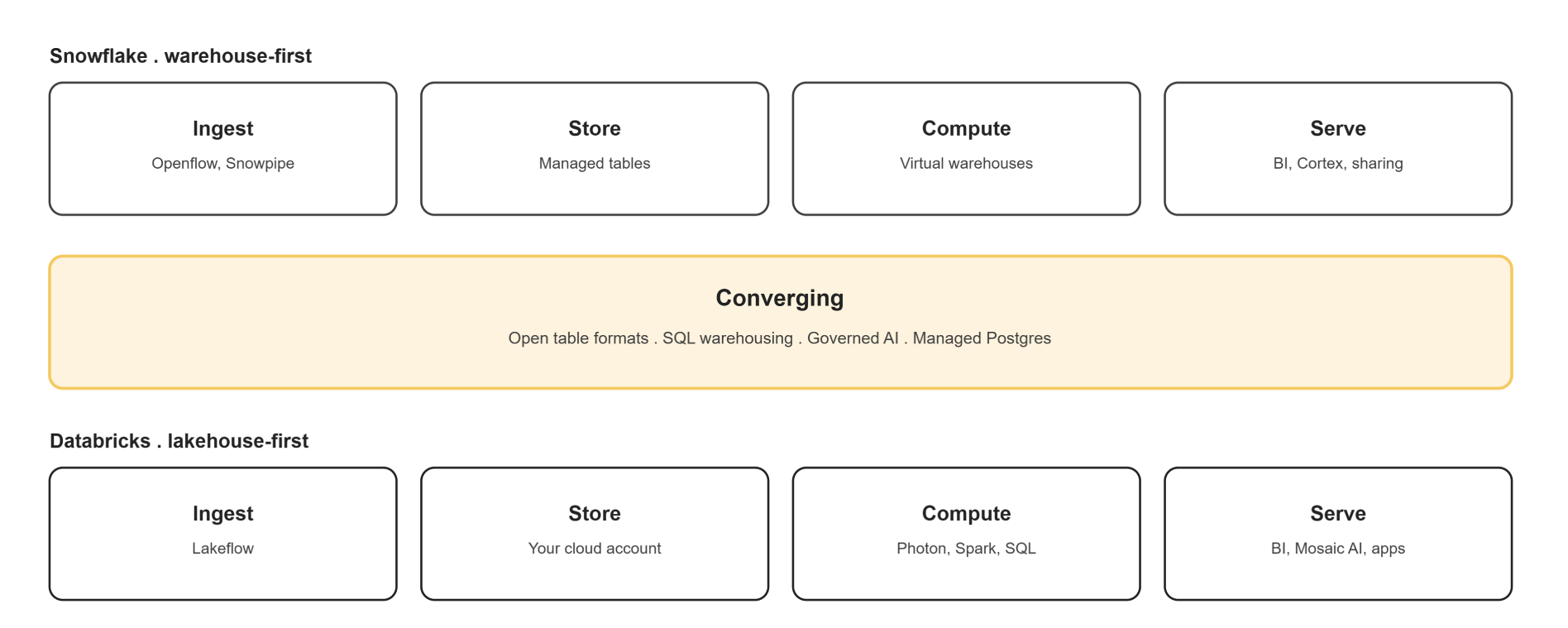
Figure 1: Snowflake as a managed warehouse, Databricks as a lakehouse over your own storage, and the capabilities where the two have converged.
Workload fit. Snowflake is built around SQL and serves high concurrency with little tuning, which suits BI and governed reporting- the same reporting-first fit covered in our BI reports and dashboard development work. Databricks assumes engineering skills and rewards them, which suits heavy pipelines, streaming, unstructured data, and model development, whether that's using Mosaic AI's pre-built models or training and fine-tuning custom ones. Neither is disqualified from the other's territory; the difference is effort.
Pricing. Snowflake bills credits per second of compute with infrastructure included and storage billed separately. As of mid-2026, published rates run roughly $2 per credit for Standard, $3 for Enterprise, and $4 for Business Critical (AWS US East, on-demand), with storage around $23 per terabyte per month. Databricks bills DBUs per second by workload type and tier, with SQL rates commonly cited from roughly $0.22 per DBU on classic warehouses up to around $0.70 on serverless, though these figures shift by region and change over time; confirm current rates directly with Databricks rather than budgeting off a single published number. Your cloud provider then bills the compute and storage underneath separately, the same split-billing pattern covered in our Informatica PowerCenter on AWS guide, where cloud compute and platform licensing are similarly billed by separate parties. Because Databricks splits the bill, list prices mislead, and most overspend on either platform is idle or oversized compute rather than the rate card itself.
Use Cases: When to Choose Snowflake vs When to Choose Databricks
| Situation | Better fit |
|---|---|
| High-concurrency BI dashboards and SQL analytics | Snowflake |
| Large-scale ETL over semi-structured or unstructured data | Databricks |
| The team is SQL-first with limited engineering capacity | Snowflake |
| The team has Python and Spark engineers | Databricks |
| Model training, MLOps, and agent development | Databricks |
| Streaming ingestion at scale | Databricks |
| Data must stay in open formats in your own cloud storage | Databricks |
| Minimal platform administration is a hard requirement | Snowflake |
For data engineering: Databricks usually wins on heavy pipelines, streaming, and unstructured data; Snowflake wins where pipelines are SQL and low operational overhead matters more than flexibility.
For machine learning: Databricks is deeper for training, MLOps, and agent development; Snowflake is stronger for AI over governed data with minimal engineering effort, leaning on Cortex's pre-built models rather than custom training, a similar analyst-vs-engineer split to the one we cover in our Alteryx vs Databricks comparison for a different pair of platforms.
The Hybrid Architecture: Running Both Deliberately
Yes, and this is increasingly the default answer rather than an edge case. Open table formats make the interchange practical: Iceberg or Delta in cloud storage can be read by both platforms, so the same data doesn't need to be duplicated or moved twice, a similar interoperability pattern to the OneLake and Snowflake integration built into Microsoft Fabric, which lets Fabric and Snowflake share data without duplication too.
A working hybrid setup usually looks like this: Databricks owns ingestion, transformation, and model training, writing curated tables to shared storage in Iceberg or Delta. Snowflake reads those same tables to serve BI, dashboards, and business users, without a separate copy or a nightly export job. The split isn't arbitrary; it puts each platform's strength where the workload actually needs it.
The real cost of this pattern is governance, not infrastructure. Two catalogs (Unity Catalog and Horizon) mean two places permissions and lineage can drift apart if nobody owns the relationship. Decide upfront which catalog is the system of record, and treat the other as downstream, not a peer; the same governance-first sequencing covered in our key checklist for BI modernization.
Limitations of Each Platform
| Snowflake | Databricks |
|---|---|
| Full performance assumes data in managed storage; Iceberg tables narrow the gap without closing it | Cluster configuration, tuning, and cost governance are your responsibility, not the platform's |
| You tune warehouse size, not the engine; less control when a workload needs it | Steeper learning curve for SQL-first teams; underused capability is the common outcome |
| ML and MLOps are viable but shallower than a dedicated engineering platform | Cost visibility is harder because the bill is split across two vendors |
| Idle and oversized warehouses drive avoidable spend if nobody is watching | High-concurrency BI needs deliberate design rather than a default configuration |
Both sets of limitations are manageable with the right assessment work up front, which is where most platform-selection projects actually go wrong, not in the technology itself but in skipping a real workload-cost model before committing- the same assessment-first approach behind our data analytics services.
Case Study: Data Platform Selection for Analytics and ML
The following is an illustrative example, not an account of a specific customer engagement. No customer names, figures, or performance results are implied.
A mid-size insurer runs BI on a legacy warehouse alongside a growing volume of claims documents and telematics data that never fit it. The BI team wants Snowflake; the data science team wants Databricks; leadership wants one platform and a number it can defend. The assessment counts the workload mix rather than comparing features: roughly 70% SQL and BI serving 400 dashboard users, 30% engineering and ML over semi-structured data. Both options are cost-modeled on the same workload, including the cloud provider line that sits under Databricks. Neither platform wins outright, so the recommendation is Snowflake as the serving layer with Databricks for the document and telematics pipelines, both reading Iceberg tables in the same storage, with Unity Catalog as the system of record for the engineering estate and Horizon governing what is served. Reports are reconciled against current output and run in parallel for a cycle before cutover, the same parallel-validation discipline covered in our guide to BI automation for report migration.
Frequently Asked Questions
Need Help Choosing Between Them?
DataTerrain has helped organizations design, migrate, and optimize enterprise data platforms for 17+ years, using proprietary automation to move reports and pipelines between platforms with minimal manual rework, across Alteryx, Informatica, OBIEE, Cognos, and legacy systems into Snowflake, Databricks, Microsoft Fabric, and Power BI, the same any-to-any migration approach covered in our ODI ETL guide and our broader reports conversion services. We assess the workload mix, model the real cost of each option, and tell you which platform fits.
Related Reading
- Understanding Microsoft Fabric and Its ETL Migration Capabilities
- Databricks to Microsoft Fabric Migration
- ODI (Oracle Data Integrator) ETL Guide
- Alteryx vs Databricks: Choosing the Right Platform
- Informatica PowerCenter on AWS: The Complete ETL Guide
- Key Checklist for Successful BI Modernization
- From Any to Any: How BI Automation Simplifies Report Migration
- BI Reports and Dashboard Development
- Best Data Analytics Services and Solutions
- Reports Conversion Services
- Data Lake