Contents
- 21 Sep 2026
OBIEE to Microsoft Fabric: RPD Rebuilt on OneLake
A concise guide to migrating Oracle Business Intelligence Enterprise Edition (OBIEE) dashboards and the RPD semantic layer to Microsoft Fabric.
Quick Summary
The OBIEE-to-Microsoft Fabric migration retires Oracle's RPD and WebLogic Server, moves physical-layer sources to OneLake, and rebuilds the RPD's Business Model and Mapping layer as a Fabric semantic model. Answers and Dashboards become interactive Power BI reports on Direct Lake; BI Publisher's pixel-perfect output becomes Power BI Report Builder paginated reports. It's a two-layer rebuild: data and reporting move together, not a single conversion step, and output parity against the original OBIEE results is what makes it production-ready.

- Share Post:
-

-

Key Takeaways
- Not a like-for-like import. The RPD's three-layer semantic model has no direct Fabric import path; it's rebuilt as a Power BI semantic model on OneLake.
- Data and reporting move together. OBIEE's physical-layer sources are landed on OneLake as Lakehouse or Warehouse tables, while dashboards and BI Publisher reports are rebuilt in Power BI.
- Two report types, two paths. Answers and Dashboards map to interactive Power BI reports on Direct Lake, while BI Publisher's pixel-perfect output maps to Power BI Report Builder paginated reports.
- Licensing consolidates. Retiring OBIEE's WebLogic middleware and per-processor licensing is usually offset by Fabric capacity many enterprises already own for Power BI.
- Security is redesigned. RPD session variables and Data Filters are rebuilt as Power BI row-level security (RLS) roles governed through Fabric workspaces.
- Rationalization cuts real scope. Usage analysis typically finds that 30-50% of existing reports and subject areas don't need manual migration.
- Validation determines go-live. Output parity between OBIEE and the new Fabric-hosted reports is what makes a migration production-ready.
- People matter as much as tooling. A realistic OBIEE to Fabric timeline builds in RPD reverse-engineering, pilot conversion, and DAX training, not just the mechanical rebuild of dashboards.
What Is OBIEE to Microsoft Fabric Migration?
OBIEE to Microsoft Fabric migration is the process of retiring Oracle Business Intelligence Enterprise Edition and rebuilding its data and reporting layers on Microsoft Fabric, landing the RPD's physical-layer sources on OneLake, rebuilding the RPD's Business Model and Mapping layer as a Fabric semantic model, and recreating Answers, Dashboards, and BI Publisher reports in Power BI. Because OBIEE's RPD and WebLogic-based architecture differs fundamentally from Fabric's OneLake-based, item-driven platform, migration is a structural rebuild across both the data and reporting layers, not a single conversion step. The scope typically spans the physical data sources, the RPD's business logic, every interactive dashboard, every pixel-perfect BI Publisher report, and the scheduled Agents that deliver them- the same layered-rebuild approach covered in our ETL migration to Microsoft Fabric guide for other source platforms.
In short: OBIEE to Fabric migration replaces a proprietary RPD semantic layer and OBIEE server with OneLake-based data storage and a governed Power BI semantic model; every business model mapping, dashboard, and report is rebuilt, not copied.
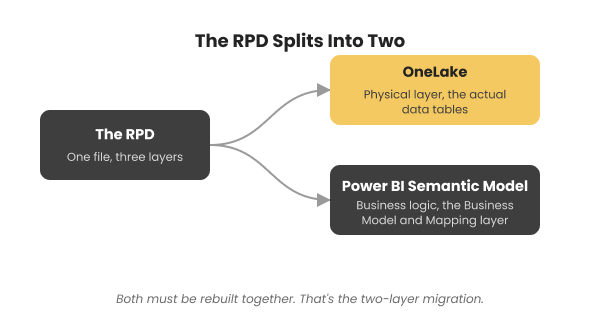
Figure: OBIEE's RPD splitting into two separate Fabric destinations: OneLake for the physical data layer, and a Power BI semantic model for the Business Model and Mapping layer's business logic.
Why Enterprises Are Moving Off OBIEE
Retiring OBIEE in favor of Fabric is usually driven by a mix of cost, platform consolidation, and performance reasons:
- Licensing and infrastructure cost. OBIEE's WebLogic middleware and per-processor licensing often cost more annually than the Fabric capacity that replaces it.
- Unified data and BI platform. Fabric consolidates ingestion, storage, semantic modeling, and reporting on OneLake, removing the separate OBIEE server layer and its physical-layer ETL dependencies.
- Cloud-native scale. Fabric's Lakehouse and Warehouse engines scale past a fixed OBIEE/WebLogic deployment's capacity.
- Modern, actively developed platform. Fabric and Power BI's release cadence and AI-assisted features are far more active than OBIEE's, which Oracle has moved into maintenance mode in favor of Oracle Analytics Cloud.
- Direct Lake performance. Power BI reports on Fabric can query OneLake data directly without a separate import or refresh step, something OBIEE's RPD caching model doesn't offer.
- Simpler operating model. Retiring OBIEE's WebLogic application server and RPD development tooling removes a significant patching and maintenance burden from the platform team, the same operational simplification covered in our Azure to Microsoft Fabric migration guide.
A related question worth separating from this migration: if the Oracle database feeding OBIEE needs to stay operational for other systems even after OBIEE itself retires, Oracle Mirroring can replicate that data into OneLake live via Change Data Capture, without a full ETL rebuild. This is a different decision than migrating OBIEE's reporting layer, and our Oracle to Microsoft Fabric: Migration & Mirroring guide covers that option directly.
OBIEE to Fabric Asset Mapping
Mapping OBIEE assets to their Fabric equivalents is the foundation for scoping any OBIEE RPD-to-Fabric conversion.
| OBIEE Asset | Fabric Equivalent | Migration Note |
|---|---|---|
| RPD Physical layer | OneLake Lakehouse / Fabric Data Warehouse tables | Physical source tables are landed on OneLake, replacing OBIEE's direct database connections |
| RPD Business Model and Mapping layer | Power BI semantic model (Direct Lake) | Logical fact/dimension structure is rebuilt as a Fabric/Power BI semantic model |
| RPD Presentation layer | Power BI dataset display folders | Subject area groupings are rebuilt as display folders for report authors |
| Repository/session variable | DAX measure / Power Query parameter | Dynamic RPD calculations are re-implemented as DAX measures or parameters |
| ETL feeding OBIEE | Data Factory pipeline / Dataflow Gen2 | Source-to-RPD ETL is rebuilt as Fabric-native ingestion pipelines |
| Answers / Analysis (interactive) | Power BI report on Direct Lake | Rebuilt on top of the semantic model, not a pixel-for-pixel port |
| Dashboard | Power BI dashboard/report | OBIEE dashboard pages become Power BI report pages or pinned dashboard tiles |
| BI Publisher report (pixel-perfect) | Power BI Report Builder paginated report (RDL) | Closest match for print/compliance-oriented, pixel-perfect output |
| Agent (scheduled alert) | Power Automate / Data Factory trigger | Scheduled delivery and threshold alerts are rebuilt using Fabric-native scheduling |
| Data Filter / RPD session security | Row-level security (RLS) role / OneLake permission | RPD-level security rules are rebuilt as DAX-filtered RLS roles and OneLake access control |
| OBIEE LDAP/SSO integration | Fabric workspace role / Microsoft Entra ID | Authentication moves to Fabric's Entra ID-backed workspace and item-level access model |
Step-by-Step Migration Process
- Discovery. Catalog every RPD subject area, physical source, Answers/Analysis, Dashboard, Agent, and BI Publisher report, and score each to sequence the work, the same complexity-scoring approach covered in our key checklist for BI modernization.
- Data landing. Move RPD physical-layer sources onto OneLake as Lakehouse tables or a Fabric Data Warehouse, rebuilding any upstream ETL as Data Factory pipelines or Dataflow Gen2.
- Semantic model design. Rebuild the RPD's Business Model and Mapping layer as a Fabric semantic model, using Direct Lake mode where possible.
- Report rebuild. Recreate dashboards and interactive Answers as Power BI reports, and rebuild BI Publisher output in Report Builder.
- Security and distribution rebuild. Reimplement Data Filters as RLS roles, and rebuild Agent-based scheduling as Fabric-native triggers or subscriptions.
- Validate and cut over. Reconcile Fabric and Power BI output against the original OBIEE results row by row before retiring OBIEE and WebLogic infrastructure, the same row-level validation discipline covered in our guide to automating ETL testing with Python.
Common OBIEE Migration Challenges
- RPD complexity. Years of accumulated business logic, calculated measures, and physical joins need careful reverse-engineering before they can be rebuilt on OneLake and a Fabric semantic model.
- Two-layer rebuild. Both the data layer (RPD physical sources onto OneLake) and the reporting layer (Answers, Dashboards, BI Publisher into Power BI) must migrate together, doubling coordination effort versus a reporting-only migration.
- Pixel-perfect fidelity. BI Publisher's print-oriented layouts require dedicated Report Builder RDL work to preserve exact formatting for compliance-driven reports.
- Security model mismatch. RPD session variables and Data Filters don't map one-to-one onto RLS roles or OneLake permissions, so access rules need re-validation.
- Report bursting. OBIEE's per-recipient scheduled delivery doesn't fully replicate through Fabric-native scheduling alone; more advanced distribution needs Power Automate.
- Institutional knowledge. RPD design decisions are often held by one or two long-tenured OBIEE developers, so documenting the reasoning behind each business model mapping matters as much as converting it.
OBIEE Migration Best Practices
- Inventory the RPD, physical sources, and catalog together before estimating effort; this is a two-layer migration, not just a report conversion.
- Land data on OneLake early, so the new semantic model and every converted report target the same governed storage layer from day one instead of a patchwork of interim targets, the same data lake foundation covered in our data lake work.
- Design a single, shared Fabric semantic model rather than rebuilding logic separately for every dashboard.
- Use Direct Lake mode where the workload supports it, to avoid rebuilding OBIEE's caching and refresh logic from scratch.
- Validate RLS roles with real user accounts, not just admin accounts, before decommissioning OBIEE, since silent access gaps are easy to miss otherwise.
- Run legacy OBIEE and the new Fabric/Power BI reports in parallel for a defined validation window before cutover, the same parallel-run discipline covered in our guide to BI automation for report migration.
- Coordinate the cutover with OBIEE and WebLogic support renewal dates so the migration timeline aligns with when licensing costs would otherwise reset.
Case Study: OBIEE to Fabric Migration
Representative profile of an OBIEE to Fabric migration engagement, not a single named client, reflecting a pattern seen across enterprise BI and data platform modernization projects.
The challenge. An energy company ran regulatory and operations reporting on an aging OBIEE deployment backed by an on-premises Oracle warehouse, with a small team maintaining RPD logic and rising WebLogic infrastructure costs.
The approach. DataTerrain inventoried all nine RPD subject areas and their physical sources, landed the data on OneLake, rebuilt the business model as a Fabric semantic model using Direct Lake, recreated BI Publisher's compliance reports in Report Builder, and validated output against OBIEE before cutover.
| Metric | Result |
|---|---|
| RPD subject areas migrated | 9 subject areas rebuilt as one cloud-native semantic model on shared Fabric capacity |
| Row-level parity | Full match after validation, OneLake-backed semantic model (Delta/Parquet) |
| Legacy platform | OBIEE and WebLogic infrastructure retired |
Frequently Asked Questions
Migrate Your OBIEE Estate with DataTerrain
DataTerrain has migrated legacy BI and data platforms across enterprise engagements. Our assessment inventories your OBIEE RPD, physical sources, and catalog, maps them to OneLake and a governed Fabric semantic model, and delivers validated dashboards and paginated reports with output-parity testing before cutover- the same broad platform coverage reflected in our ETL migration to Microsoft Fabric work.
Related Reading
- OBIEE to Power BI Migration
- OBIEE to OAS Migration
- Oracle to Microsoft Fabric: Migration & Mirroring
- ETL Migration to Microsoft Fabric
- Azure to Microsoft Fabric Migration
- Tableau to Microsoft Fabric Migration
- Microsoft Fabric Migration 2026: 8 New Features Worth Knowing
- Automating ETL Testing with Python: Data Validation
- Key Checklist for Successful BI Modernization
- From Any to Any: How BI Automation Simplifies Report Migration
- Data Lake