Contents
- 09 Sep 2026
Qlik to Microsoft Fabric Migration: QlikView and Qlik Sense to Power BI
Quick Summary
Migrating Qlik to Microsoft Fabric means moving QlikView or Qlik Sense data, business logic, data models, dashboards, and security into Microsoft Fabric and Power BI. Because Qlik applications do not have a direct Power BI import path, migration is a rebuild rather than a file conversion. The process involves discovery and assessment, data and pipeline migration, data-model redesign, calculation conversion, report and security rebuilding, and validation before cutover. The target architecture uses OneLake, Delta tables, Fabric data-engineering components, Power BI semantic models, and Power BI reports. Direct Lake is one available storage mode for semantic models over Fabric data, alongside Import and DirectQuery.
At a Glance
- Source: QlikView or Qlik Sense data, load scripts, associative models, calculations, sheets, and security
- Target: Microsoft Fabric and Power BI OneLake, Delta tables, semantic models, and Power BI reports
- Main effort: Rebuilding data preparation, the semantic model, calculations, visualizations, and security
- Calculation migration: Qlik expressions and Set Analysis are typically reimplemented using DAX and/or other Fabric/Power BI transformation logic
- Data migration: Qlik data can be moved or integrated into Fabric using appropriate ingestion, replication, or data-engineering approaches
- Still required: Validate the rebuilt reports and business results against the original Qlik applications before cutover
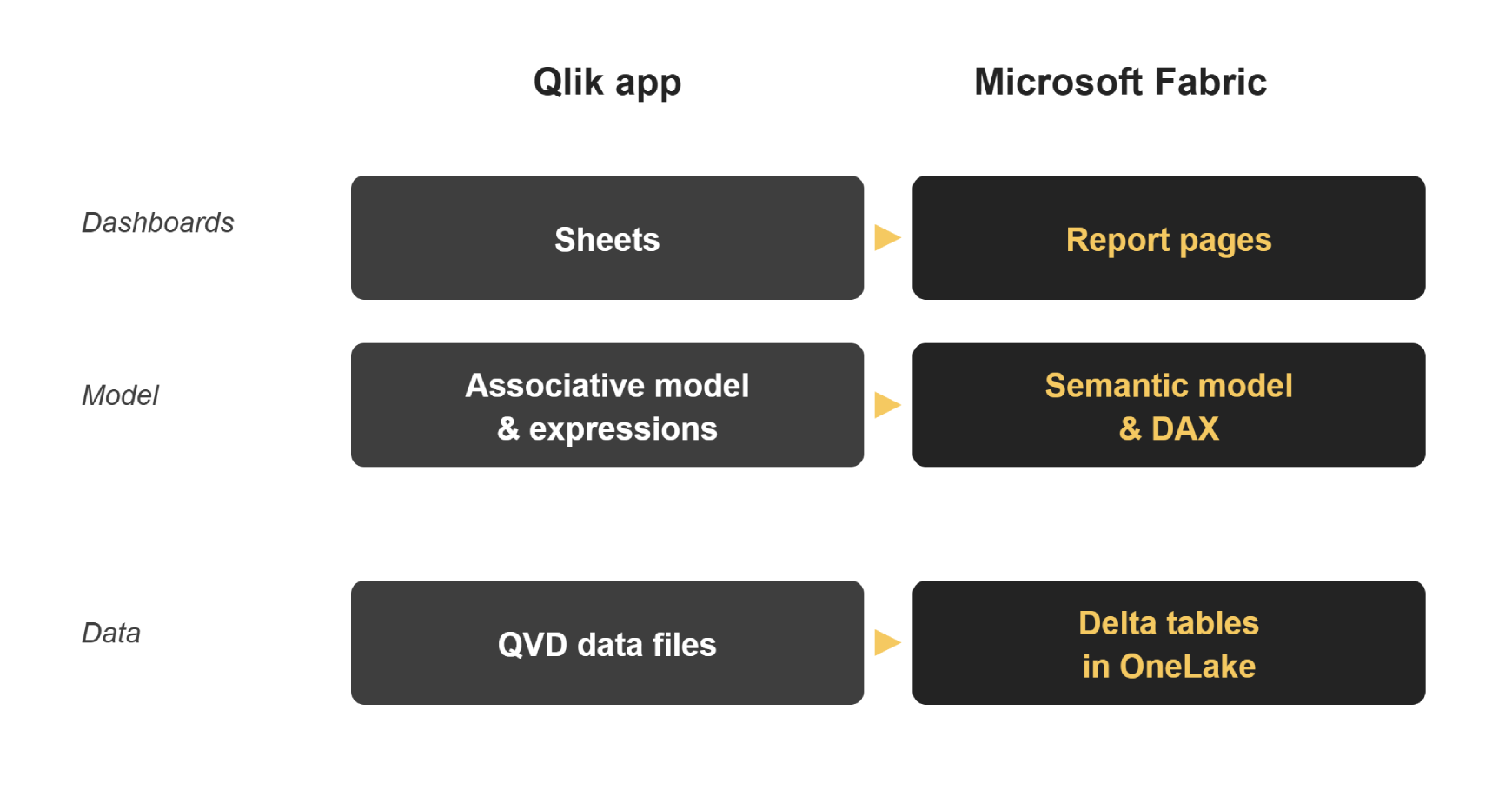
Figure 1. A Qlik app is rebuilt in Fabric layer by layer - data becomes Delta tables, the model becomes a semantic model with DAX, and sheets become report pages.

- Share Post:
-

-

What Is Qlik to Microsoft Fabric Migration?
Qlik to Microsoft Fabric migration is the process of moving QlikView or Qlik Sense analytics assets into Microsoft Fabric and Power BI. A typical migration covers the underlying data, Qlik load scripts, associative data model, calculations, visualizations, security rules, and reporting workflows.
Qlik and Power BI use different application architectures, so the migration generally involves rebuilding the application rather than converting the original Qlik file. Data is moved into the target Fabric architecture, transformation logic is redesigned, the semantic model is rebuilt, calculations are implemented in DAX or other appropriate target technologies, and Qlik sheets are recreated as Power BI reports. Microsoft Fabric provides multiple options for creating Power BI semantic models, including Direct Lake, Import, and DirectQuery.
Can Qlik Be Directly Converted to Power BI?
No. You can't simply open or import QlikView and Qlik Sense applications into Power BI as native Power BI reports. A Qlik to Microsoft Fabric migration therefore typically involves:
- Assessing Qlik applications and dependencies
- Moving or integrating the underlying data into Fabric
- Redesigning the data model
- Rebuilding calculations and business logic
- Recreating reports and visualizations
- Rebuilding security
- Validating the Power BI version against the original Qlik application
The goal is not to reproduce the Qlik file itself; it's to reproduce the required business outcomes and reporting experience on the target platform.
What Gets Migrated from Qlik to Microsoft Fabric?
A Qlik migration typically covers five major layers:
- Data: QVDs, source connections, historical data, and data structures
- Data preparation: Qlik load scripts, transformations, joins, filters, and business rules
- Semantic model: fields, dimensions, measures, relationships, hierarchies, and business logic
- Reports: sheets, charts, filters, selections, dashboards, and user interactions
- Security: Section Access, user roles, permissions, and data-access rules
Not every Qlik object has a one-to-one equivalent in Power BI. Unsupported extensions, specialized interactions, and platform-specific logic may need to be redesigned rather than directly reproduced.
Why Organizations Migrate from Qlik to Microsoft Fabric
- One platform for data and reporting: Fabric brings data engineering, storage, analytics, and Power BI reporting into a connected platform
- A shared data foundation: OneLake provides a common data layer that can be accessed by Fabric workloads
- Microsoft ecosystem integration: Fabric and Power BI integrate with the broader Microsoft data and identity ecosystem
- Modern analytics architecture: Fabric supports lakehouse, warehouse, semantic-model, analytics, and AI workloads
- Flexible semantic-model options: Power BI semantic models can use Direct Lake, Import, or DirectQuery depending on workload requirements
- Capacity-based planning: organizations can evaluate Fabric capacity, Power BI requirements, workload concurrency, storage, and existing Microsoft agreements when planning the target environment
Evaluate the business case against the organization's data architecture, licensing, workload requirements, migration effort, and long-term operating model, rather than assuming migration will automatically reduce costs.
QlikView vs Qlik Sense Migration to Microsoft Fabric
Both QlikView and Qlik Sense migrations involve rebuilding analytics assets in the target Fabric and Power BI environment, but the assessment should account for differences in application design, data connections, extensions, security configuration, and deployment patterns.
| Source Platform | What Typically Moves |
|---|---|
| QlikView | QVDs, load scripts, data models, expressions, sheets, Section Access, and reports |
| Qlik Sense | Data connections, load scripts, associative models, measures, sheets, extensions, and security rules |
The migration principles are similar, but the source inventory should identify platform-specific dependencies before conversion begins.
Qlik to Microsoft Fabric Component Mapping
Each Qlik component is assessed and rebuilt in the appropriate Fabric or Power BI component rather than simply converted.
| Qlik | Microsoft Fabric / Power BI | Migration Note |
|---|---|---|
| QVD data files | Delta tables in OneLake | Loaded or integrated into the target Fabric architecture |
| Load script | Power Query/M, Dataflows, notebooks, pipelines | Target depends on transformation complexity and architecture |
| Associative data model | Power BI semantic model | Tables, relationships, dimensions, and measures are explicitly designed |
| Qlik app | Power BI report + semantic model | Separated into a reusable model and report |
| Sheets | Power BI report pages | Rebuilt page by page |
| Measures and expressions | DAX measures | Business logic reimplemented rather than translated line by line |
| Set Analysis | DAX filter logic | Rebuilt using DAX and the target semantic model filter context |
| Section Access | Power BI RLS and Microsoft security controls | Access rules redesigned and tested |
| Qlik extensions | Native or custom Power BI visuals | Unsupported extensions may require redesign |
| Bookmarks and selections | Power BI bookmarks, slicers, filters, interactions | User experience redesigned for Power BI behavior |
How Does Qlik to Microsoft Fabric Migration Work?
A typical enterprise migration follows six major stages.
1. Discovery and Assessment
Inventory every QlikView and Qlik Sense application, sheet, data source, QVD, load script, calculation, extension, user role, and security dependency. Identify which applications are business-critical, which share data, and which contain complex logic that could require additional redesign.
2. Data and Pipeline Transition
Identify where the data behind each Qlik application currently resides and determine how to bring it into Fabric. Depending on the architecture, organizations can use Fabric pipelines, Dataflows, notebooks, other ingestion mechanisms, or Qlik-supported integration approaches. Qlik also provides Microsoft Fabric integration capabilities, including options for moving data into Fabric environments. The objective is to establish a reliable target data layer rather than reproduce unnecessary application-level data copies.
3. Rebuild the Data Model
Redesign Qlik's associative model as a Power BI semantic model. Explicitly define tables, dimensions, relationships, measures, hierarchies, and filter behavior based on the target reporting requirements. A star-schema approach may suit many analytical workloads, but the final model should reflect the actual business and performance requirements.
4. Rewrite Calculations and Business Logic
Assess Qlik expressions and Set Analysis and reimplement them using DAX and other appropriate transformation or modeling logic. Qlik load scripts may also be redesigned using Power Query/M, Dataflows, notebooks, pipelines, or other Fabric components depending on where the transformation belongs in the target architecture. The objective is to preserve the business meaning of the calculation, not simply reproduce the original syntax.
5. Rebuild Reports and Security
Recreate Qlik sheets as Power BI report pages. Rebuild charts, filters, slicers, bookmarks, interactions, navigation, and other user-facing functionality using Power BI capabilities. Assess Qlik Section Access separately and map it to the target security model, including Power BI row-level security where appropriate.
6. Validate and Cut Over
Compare the rebuilt Power BI reports with their Qlik counterparts. Validate data accuracy, calculations, filters, security, report behavior, and performance before production cutover. For critical applications, running the Qlik and Power BI versions in parallel provides an additional validation period before moving users to the new platform.
Qlik to Microsoft Fabric Migration Tools and Automation
Migration tooling can automate parts of a Qlik-to-Microsoft Fabric migration, but it does not eliminate the need for architecture decisions, business-logic review, and validation. Depending on the environment, organizations may use Qlik-supported Fabric integration and data-movement capabilities, Microsoft Fabric pipelines, Dataflows, notebooks, and other data-engineering components, metadata and script-analysis utilities, automated Qlik-to-Power BI conversion tools, custom migration utilities, or AI-assisted migration and code-conversion tools.
Automation is especially useful for repetitive activities such as application inventory, metadata extraction, script analysis, object mapping, converting repeatable patterns, and validation. Complex Set Analysis, custom extensions, business-specific calculations, semantic-model decisions, and security rules still require engineering review.
Can Qlik Data Be Moved to Fabric Without Rebuilding the Qlik Application?
In some architectures, yes. Qlik provides integration capabilities for Microsoft Fabric, including Open Mirroring scenarios for moving or replicating data. However, moving or replicating the data does not automatically migrate the Qlik application. You still need to assess and rebuild Qlik calculations, the semantic model, visualizations, extensions, user interactions, and security rules in Power BI, where required.
Common Qlik to Microsoft Fabric Migration Challenges
- Rewriting calculations: Qlik expressions and Set Analysis use different calculation semantics from DAX. The challenge isn't simply changing syntax; business logic and filter behavior must be reproduced correctly in the Power BI semantic model's filter context.
- Redesigning the data model: Qlik's associative model behaves differently from a Power BI semantic model. Tables and relationships must be explicitly designed for the target environment, so the migration is an architectural redesign, not a structural copy.
- Recreating Qlik selections: Rebuild Qlik's associative selection experience using Power BI slicers, filters, cross-filtering, bookmarks, and other report interactions. The user experience may need redesign rather than one-to-one reproduction.
- Choosing the right storage mode: Fabric supports Direct Lake, Import, and DirectQuery semantic-model approaches. Direct Lake works directly with Delta tables in OneLake and is designed for high-performance interactive analysis over Fabric data. The appropriate choice depends on data size, freshness requirements, modeling requirements, security, and performance expectations.
- Migrating extensions: Qlik extensions may not have a direct Power BI equivalent. If no equivalent native or custom visual exists, you may need to redesign the report interaction.
- Rebuilding security: Qlik Section Access and Power BI security operate differently. Document, rebuild, and test access rules independently rather than assuming they carry over automatically.
- Developing new skills: teams moving from Qlik may need experience with Power BI, DAX, Power Query/M, semantic modeling, and Microsoft Fabric.
How to Validate a Qlik to Power BI Migration
Validation should compare the rebuilt Power BI environment with the original Qlik application at both the data level and report level. Key validation areas include:
- Record counts and data completeness
- KPI values
- Totals and subtotals
- Calculated measures
- Date and time calculations
- Filters and selections
- Cross-filtering behavior
- Security and user access
- Report visualizations
- Data freshness
- Query and report performance
The safest approach for mission-critical applications is to run the Qlik and Power BI versions in parallel and compare representative business outputs before production cutover. Perform validation at each migration wave rather than waiting until the entire Qlik estate has been rebuilt.
Qlik Migration Best Practices
- Move one application or wave at a time: prioritize applications based on business value, complexity, dependencies, and readiness. A phased rollout reduces the risk of moving the entire Qlik estate at once
- Rebuild shared data once: where multiple Qlik applications use the same underlying data, design a reusable Fabric data layer and semantic model rather than rebuilding the same logic separately for every report
- Baseline before you build: capture important Qlik KPIs, calculations, filters, and security behavior before migration. These baselines become the reference point for validation
- Separate data, model, and report logic: keep the Fabric data layer, semantic model, and Power BI reports logically separated where appropriate. This improves reuse and makes future changes easier to manage
- Involve report owners: the people who use each Qlik application can identify business-critical calculations, report behavior, and user interactions that may not be obvious from technical metadata alone
- Automate repeatable work: use automation for inventory, metadata extraction, repetitive conversion patterns, and validation while reserving expert review for complex business logic and architecture decisions
- Validate before cutover: do not wait until the end of the migration. Validate each application or migration wave before moving users to the new Power BI version
How Long Does Qlik to Microsoft Fabric Migration Take?
Migration time depends on the number of Qlik applications, data volume, complexity of load scripts and Set Analysis, number of data sources, custom extensions, security requirements, and the amount of validation required. A small portfolio of straightforward dashboards can migrate faster than a large Qlik estate with complex associative models, custom extensions, extensive load logic, and highly customized security. The most reliable way to estimate effort is to assess the Qlik inventory first and classify applications by complexity.
Qlik to Microsoft Fabric Migration with DataTerrain
17+ Years Experience | 400+ US Clients | Free Migration Assessment
Migrate QlikView and Qlik Sense to Microsoft Fabric and Power BI with expert assessment, automated conversion, and validation.
DataTerrain helps rebuild your data, business logic, reports, and security for Fabric and Power BI. Explore our Automated BI Reports Conversion Service or request a Free Migration Assessment.
Key Takeaways
- A Qlik app cannot simply be opened in Power BI. QlikView and Qlik Sense applications are rebuilt in Microsoft Fabric and Power BI rather than converted as native Power BI files
- Qlik data and QVD-based workflows move into a new Fabric data architecture. Data can be loaded or replicated into Fabric and stored in OneLake using Delta-based Fabric data structures
- Direct Lake is an important option for Fabric-based Power BI architectures. It allows semantic models to work directly with Delta tables in OneLake and is designed for high-performance interactive analytics over large Fabric datasets
- Qlik calculations are rebuilt rather than translated line by line. Set Analysis and other Qlik expressions must be reimplemented using DAX and the target Power BI calculation model
- The Qlik associative model must be redesigned. Power BI semantic models use explicitly defined tables, relationships, measures, and filter behavior
- Qlik Section Access must be redesigned for the target security model. Power BI row-level security and other Microsoft security controls can be used where appropriate, with access rules validated independently
- Migration is more than report rebuilding. Data pipelines, business logic, semantic models, visualizations, security, and validation all need to be addressed
Conclusion
Qlik to Microsoft Fabric migration is more than moving dashboards from one BI platform to another. It involves rebuilding the data layer, transformation logic, semantic model, calculations, visualizations, and security for the Microsoft Fabric and Power BI architecture. A successful migration starts with a detailed Qlik inventory, separates data and reporting dependencies, chooses the right Fabric architecture, automates repeatable work where practical, and validates business results before each cutover. For organizations with complex QlikView or Qlik Sense estates, a phased, validation-first approach provides a practical path to modernize analytics while keeping business-critical reporting controlled throughout the transition. Contact DataTerrain for a Qlik to Microsoft Fabric migration assessment.
Related Articles
- Cognos to Microsoft Fabric Migration: A Practical Guide
- Power BI Migration Services: The Complete Enterprise Guide
- Microsoft Fabric vs Informatica: Platform Comparison
- SSAS to Microsoft Fabric Migration: Complete Enterprise Guide