Contents
- 16 Sep 2026
Cognos to AWS QuickSight: The Framework Manager Problem
IBM Cognos has anchored governed enterprise reporting for years, but rising licensing and infrastructure costs, and the pull toward a serverless, cloud-native, AWS-aligned analytics stack, are prompting many organizations to modernize. Cognos-to-AWS QuickSight migration is the route to that stack: moving Cognos reports, dashboards, and the reporting data layer to Amazon QuickSight, AWS's fully managed BI service. ("AWS QuickSight" is the common name for the service formally called Amazon QuickSight.)
Quick Summary
The Cognos-to-AWS QuickSight migration is a re-implementation, not a lift-and-shift. The core challenge is architectural: QuickSight has no equivalent to Cognos Framework Manager, so you rebuild the semantic layer at the dataset level and push heavier modeling upstream into Redshift or Athena. Pixel-perfect reports become QuickSight paginated reports; everything else becomes interactive dashboards backed by SPICE.

- Share Post:
-

-

Key Takeaways
- Cognos to AWS QuickSight migration moves IBM Cognos reporting onto Amazon QuickSight, AWS's serverless, cloud-native BI service.
- It is a re-implementation, not a lift-and-shift: Cognos reports become QuickSight analyses and dashboards, and Cognos calculations become QuickSight calculated fields.
- QuickSight has no direct equivalent of Cognos Framework Manager; the semantic layer is rebuilt at the dataset level, and heavier modeling is best pushed upstream into Redshift, Athena, or Lake Formation.
- Pixel-perfect Cognos reports map to QuickSight paginated reports; interactive content uses parameters, controls, and SPICE (in-memory) for speed.
- Security is reproduced with Row-Level and Column-Level Security plus IAM Identity Center; delivery uses scheduled emails and Snapshot Export.
- Named third-party accelerators exist for this exact migration path, worth evaluating for structural work, but semantic modeling and calculation conversion still need expert review.
- A phased, inventory-driven approach that starts from the Cognos Content Store reduces risk on large estates.
What Is Cognos to AWS QuickSight Migration?
Cognos to AWS QuickSight migration is the process of moving reports, dashboards, and the reporting data layer from IBM Cognos Analytics onto Amazon QuickSight. QuickSight is AWS's fully managed, serverless BI service: it connects to AWS and third-party sources, stores data in SPICE (its in-memory engine) or queries it live with Direct Query, and lets users build datasets, analyses, and dashboards, plus paginated reports for pixel-perfect output.
Before the step-by-step mechanics, here's the core problem in one picture. Cognos handles modeling, logic, and security through one tool, Framework Manager. QuickSight has no single equivalent; that work splits across three separate AWS services instead. That split is where most of the migration effort actually goes.
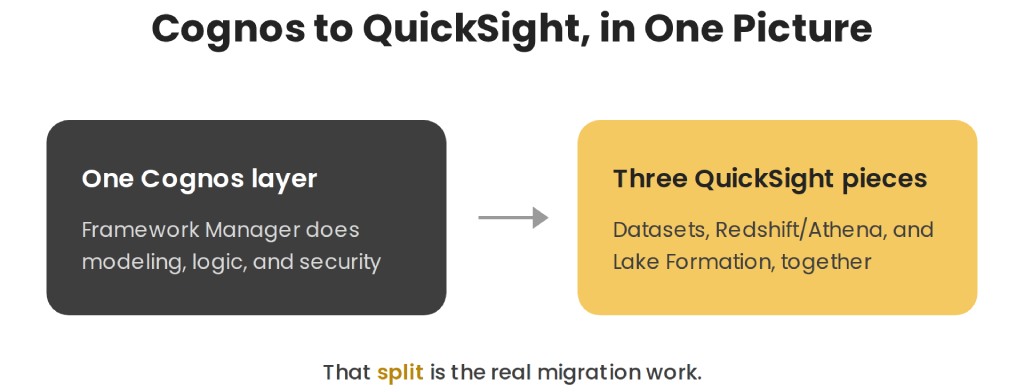
Figure 1: Cognos concentrates modeling and security in Framework Manager; QuickSight distributes that same work across three separate AWS services instead.
A re-implementation, not a copy. Cognos and QuickSight model reporting differently, so migration recreates each Cognos artifact using its QuickSight equivalent rather than translating files one-to-one. QuickSight is more dataset-centric and lighter on the enterprise semantic layer than Cognos: no single tool mirrors Framework Manager's rich logical model. Practically, that modeling is re-expressed in QuickSight datasets and, for anything substantial, pushed upstream into the AWS data layer. Treating the project as an architectural transformation, not a cosmetic tool swap, is what keeps the result accurate and maintainable- the same rebuild-by-intent principle covered in our BI reports migration to Power BI guide for a different target platform.
Why Enterprises Migrate from Cognos to AWS QuickSight
Several factors drive the move, especially for AWS-centric organizations:
- Serverless, no infrastructure. QuickSight scales automatically, removing the servers and capacity management a Cognos deployment requires.
- Cost and pricing model. Pay-per-session reader pricing and consumption-based capacity can lower cost where usage is bursty. Standard QuickSight Reader access runs $3 per user per month on Enterprise Edition, with newer Reader Pro and Author Pro roles available for organizations that want Amazon Q's generative BI capabilities without changing pricing for non-Pro users.
- AWS ecosystem integration. Native, low-friction connectivity to Redshift, Athena, S3, RDS/Aurora, IAM, and Lake Formation, the same AWS-native connectivity covered in our ODI (Oracle Data Integrator) ETL guide for organizations bridging Oracle sources into AWS targets.
- SPICE performance. The in-memory engine serves fast, concurrent dashboards over very large datasets.
- Generative BI. Amazon Q in QuickSight, generally available since April 2024, adds natural-language Q&A, executive summaries, and data stories on top of dashboards, with scenario analysis and unstructured-data insights added as later capabilities through 2024 and 2025.
- Embedded analytics and scale. Dashboards and reports can be embedded in applications and served to large audiences without infrastructure work.
Cognos retains real strengths, notably its rich, governed semantic layer, so the trade is deliberate: QuickSight exchanges some modeling depth for serverless simplicity and AWS-native integration. The fit is strongest when the organization is already invested in AWS, the same AWS-alignment reasoning covered in our Informatica PowerCenter on AWS guide for a different platform pairing.
Mapping Cognos to Amazon QuickSight
A successful migration rests on mapping each Cognos construct to its QuickSight equivalent. The table below summarizes the most common mappings:
| IBM Cognos | Amazon QuickSight (AWS) |
|---|---|
| Interactive report/dashboard | QuickSight analysis → dashboard |
| List & pixel-perfect financial report | QuickSight paginated (pixel-perfect) report |
| Framework Manager package / Data Module | Dataset-level model (joins, calculated fields, custom SQL) + upstream data layer |
| Cognos SQL, macros & calculations | QuickSight calculated fields + custom SQL |
| PowerCubes / Dynamic Cubes | SPICE dataset (in-memory) or Direct Query |
| Data sources | QuickSight sources, Redshift, Athena, S3, RDS/Aurora (SPICE or Direct Query) |
| Content Store (metadata repository) | QuickSight assets in folders/namespaces |
| Cognos Data Manager / IBM DataStage (ETL) | AWS Glue/data pipelines (upstream) |
| Cognos security roles | Row-Level & Column-Level Security + IAM Identity Center |
| Prompts | QuickSight parameters & controls |
| Scheduling & bursting | Scheduled report email + Snapshot Export (PDF / Excel / CSV) |
The mappings that need the most care are the semantic layer and the calculations.
The semantic layer
This is the biggest architectural difference. Cognos abstracts the physical database behind a rich logical layer in Framework Manager or Data Modules. QuickSight has no single equivalent: modeling happens at the dataset level through joins, calculated fields, and custom SQL. For anything beyond a moderate model, the reliable pattern is to govern the data upstream, as curated views or star schemas in Amazon Redshift or Amazon Athena, with access managed through Lake Formation, so QuickSight datasets stay clean and consistent- the same upstream-governance principle covered in our broader ETL solutions work.
Reports and calculations
Interactive Cognos reports and dashboards become QuickSight analyses that are published as dashboards, with static prompts replaced by parameters and controls. Pixel-perfect list and financial reports map to QuickSight paginated reports, which you can schedule and export to PDF, Excel, or CSV. Cognos SQL, macros, and expressions are rewritten as QuickSight calculated fields and custom SQL, with results validated against the originals since the function sets differ; the same validation discipline covered in our guide to BI automation for report migration.
Data and performance
Underlying data is either imported into SPICE for fast, concurrent access or queried live with Direct Query when freshness or data size favors it. QuickSight connects natively to Redshift, Athena, S3, and RDS/Aurora, so you choose between SPICE and Direct Query per dataset based on volume, freshness, and cost.
The Cognos to AWS QuickSight Migration Process
A typical enterprise migration follows a clear sequence:
- Inventory and assess. Extract and analyze the Cognos Content Store; categorize reports as interactive, pixel-perfect, or obsolete.
- Rationalize. Retire unused reports so you migrate only what the business still needs.
- Design the AWS target. Plan the QuickSight account and edition, the upstream data layer (Redshift / Athena / S3), SPICE capacity, and identity.
- Build the data and semantic layer. Create curated views or star schemas upstream and define QuickSight datasets on top of them.
- Set up connectivity. Choose SPICE import or Direct Query per dataset and configure refresh schedules.
- Convert calculations. Translate Cognos SQL and expressions into QuickSight calculated fields and custom SQL, validating results- the same conversion-and-validate discipline covered in our guide to automating ETL testing with Python.
- Rebuild reports. Recreate interactive content as analyses and dashboards with parameters and controls, and pixel-perfect content as paginated reports.
- Configure security and delivery. Apply Row-Level and Column-Level Security, map identities through IAM Identity Center, and set up scheduled report delivery and Snapshot Export.
- Validate and deploy. Compare output side by side with the original Cognos reports, then deploy and decommission Cognos; our key checklist for BI modernization covers the same side-by-side reconciliation.
Common Challenges in Cognos to AWS QuickSight Migration
- Semantic-layer gap. Framework Manager has no one-to-one match; rebuild the model at the dataset level and govern anything substantial upstream in the data warehouse or Lake Formation.
- Multi-fact and stitch queries. Resolve these in prepared views or custom SQL with conformed dimensions rather than complex in-tool joins.
- Calculation conversion. Cognos SQL and QuickSight calculated fields use different functions; validate each measure against the original.
- Pixel-perfect fidelity. Route print-ready reports to QuickSight paginated reports and export to PDF, Excel, or CSV.
- Cubes. Migrate PowerCubes and Dynamic Cubes to SPICE datasets or Direct Query, depending on size and freshness.
- Prompts. Replace Cognos prompts with QuickSight parameters and controls.
- Security mapping. Reproduce Cognos roles with Row-Level and Column-Level Security and IAM Identity Center groups.
- SPICE capacity and refresh. Plan in-memory capacity and refresh schedules so performance and cost stay predictable.
- Report volume. Prioritize by value, migrate in phases, and use accelerators for content audit and conversion, the same phased discipline covered in our key checklist for BI modernization.
Third-Party Migration Accelerators
Several vendors offer named accelerators specifically for Cognos-to-QuickSight conversions, reflecting real demand for this exact migration path. AWS Marketplace lists Nous's "Cognos to AWS QuickSight Migrator" and PMsquare's Cognos cloud migration service; Ironside Group markets an offering called AscentIQ for automated content conversion and migration estimation, and KPI Partners offers a GenAI-powered accelerator for discovery, dashboard conversion, and data mapping.
These tools are worth evaluating, particularly for the repetitive, structural parts of a migration, dashboard inventory, basic report conversion, and initial data mapping. As with any migration accelerator, the same caution applies here as elsewhere: pilot any tool against a representative batch of your own Framework Manager models and pixel-perfect reports before trusting it with production logic, since automated tools consistently handle standard content well and struggle with the same semantic-layer and calculation-conversion challenges that are hard for any approach.
Best Practices for a Successful Migration
- Start from the Content Store. A full inventory and rationalization keeps the active migration footprint small.
- Govern the data upstream. Curate views or star schemas in Redshift or Athena so QuickSight datasets stay clean; this offsets the lighter in-tool semantic layer.
- Choose SPICE or Direct Query deliberately. SPICE for fast, concurrent dashboards; Direct Query for freshness or very large live data.
- Match the artifact to the report. Paginated reports for pixel-perfect output, dashboards for interactive analysis.
- Redesign, don't photocopy. Use parameters, controls, and drill-down to improve on static Cognos layouts.
- Validate side by side. Reconcile every migrated report against its Cognos original before cutover.
- Plan security and identity early. Design Row-Level and Column-Level Security and IAM Identity Center up front.
- Manage cost. Model reader sessions, author roles, and SPICE capacity before broad rollout.
Case Study: Modernizing a Cognos Estate on Amazon QuickSight
The following is an illustrative example, not an account of a specific customer engagement. No customer names, figures, or performance results are implied.
Consider an AWS-centric enterprise running IBM Cognos Analytics with a large Content Store, several Framework Manager packages, and a mix of interactive dashboards and pixel-perfect financial reports. Licensing and server costs are climbing, and the organization wants to consolidate analytics on AWS.
A migration could address this by first inventorying and rationalizing the Content Store, then curating the reporting data as governed views and star schemas in Amazon Redshift, with access managed through Lake Formation. QuickSight datasets would be defined on top, using SPICE for high-traffic dashboards and Direct Query where freshness matters. Cognos calculations would be rewritten as calculated fields and custom SQL, interactive reports rebuilt as dashboards with parameters and controls, and financial statements moved to paginated reports. Security would be reproduced with Row-Level and Column-Level Security through IAM Identity Center, and every report validated side by side against its Cognos original before cutover.
In qualitative terms, the likely outcomes are a serverless, AWS-native analytics platform, reduced licensing and infrastructure overhead, fast SPICE-backed dashboards, and access to generative BI, without losing the reports the business depends on.
Frequently Asked Questions
Migrate Your Cognos Estate with DataTerrain
DataTerrain brings 17+ years of experience in BI migration and automation to Cognos modernization projects, covering Content Store inventory, semantic-layer redesign, calculation conversion, pixel-perfect report migration, and security mapping through IAM Identity Center. Every migration can begin with a representative Proof of Concept to assess complexity and validate the approach before scaling.
Related Reading
BI Reports Migration to Power BI: What Changes | WebI/Cognos to Power BI Migration Challenges | Amazon QuickSight vs Power BI Comparison | Amazon QuickSight vs Tableau: Key Differences | Informatica PowerCenter on AWS: The Complete ETL Guide | ODI (Oracle Data Integrator) ETL Guide | ETL Solutions | Automating ETL Testing with Python: Data Validation | Key Checklist for Successful BI Modernization | From Any to Any: How BI Automation Simplifies Report Migration | Data Lake