Contents
- 18 Sep 2026
Power BI to Amazon QuickSight Migration: Steps, Tools, and Best Practices
Quick Summary
Migrating from Power BI to Amazon QuickSight involves rebuilding Power BI reports, semantic models, DAX calculations, Power Query transformations, security, and data connections in QuickSight. There is no direct import path from Power BI to QuickSight; you must assess, classify, and rebuild every report using QuickSight's analysis and dashboard framework. Key architectural differences include SPICE (QuickSight's in-memory engine) vs Power BI's Import and DirectQuery modes, QuickSight calculated fields vs DAX, and QuickSight's dataset-level row-level security vs Power BI RLS roles. The migration process spans inventory, architecture design, data pipeline migration, report rebuild, security reimplementation, and validation.
Power BI to Amazon QuickSight migration involves rebuilding Power BI reports, semantic models, calculations, security, and data connections in Amazon QuickSight, AWS's cloud-native business intelligence service. Because Power BI and QuickSight use different report architectures, data model structures, and expression languages, migration is a rebuild rather than a file conversion. Power BI .pbix files cannot be imported into QuickSight. Reports are rebuilt as QuickSight analyses and dashboards, Power BI semantic models are rebuilt as QuickSight datasets, DAX measures are reimplemented as calculated fields, and Power Query transformations are redesigned using AWS data services or QuickSight data preparation.

- Share Post:
-

-

What Is Power BI to Amazon QuickSight Migration?
Power BI to Amazon QuickSight migration modernizes a Power BI analytics environment on Amazon QuickSight. Power BI is Microsoft's cloud BI platform, using Power BI Desktop for report authoring, semantic models for the data layer, DAX for calculations, and Power Query for data transformation. Amazon QuickSight is AWS's cloud-native BI service, built on SPICE for in-memory performance, with analyses and dashboards as the report layer, datasets as the data model, and QuickSight calculated fields for business logic.
The two platforms share similar goals but differ substantially in how they achieve them. Power BI's semantic model is a centralized, governed layer that many reports can connect to, with DAX providing a powerful measure language. QuickSight's architecture centers on datasets that connect directly to AWS data sources, with SPICE import or Direct Query as the connectivity model. Reports are built on those datasets using QuickSight's authoring environment. Understanding these architectural differences is the foundation of a reliable migration plan.
Can Power BI Reports Be Directly Converted to Amazon QuickSight?
No. Power BI .pbix files cannot be imported into Amazon QuickSight. The two platforms share no file format and offer no direct conversion path. A Power BI to QuickSight migration requires rebuilding each report rather than converting it. This includes:
- Inventorying the Power BI report and semantic model estate
- Redesigning Power BI semantic models as QuickSight datasets
- Rebuilding Power Query transformations using AWS data services or QuickSight prep
- Reimplementing DAX measures as QuickSight calculated fields
- Rebuilding Power BI reports as QuickSight analyses and dashboards
- Redesigning Power BI RLS as QuickSight row-level security
- Validating QuickSight output against Power BI output before cutover
Migration automation tools can assist with inventory, metadata extraction, and repetitive conversion patterns, but complex DAX, shared semantic models, and custom visuals require engineering review.
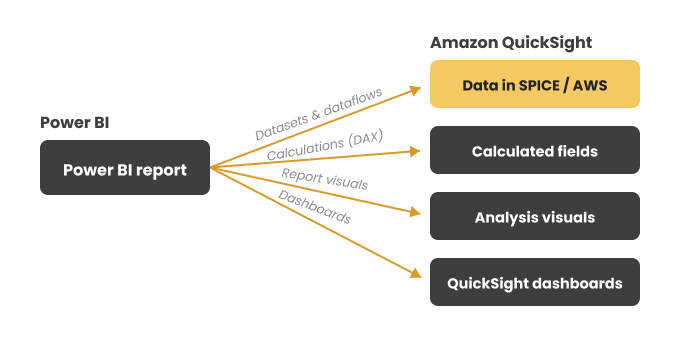
Figure 1. A Power BI report rebuilt on Amazon QuickSight - data connects to AWS and loads into SPICE, calculations are rewritten as calculated fields, and report visuals become analyses and dashboards.
Why Organizations Migrate from Power BI to Amazon QuickSight
- AWS ecosystem consolidation: organizations standardizing on AWS prefer QuickSight for its native integration with Amazon Redshift, S3, Athena, RDS, Aurora, and other AWS data services, eliminating data movement overhead and cross-cloud connectivity complexity.
- Session-based pricing model: QuickSight uses a session-based pricing model rather than per-user Power BI licensing. For organizations with large numbers of occasional report consumers, QuickSight's pricing structure may offer cost advantages.
- Embedded analytics: QuickSight is widely used to embed BI in customer-facing applications. Organizations building embedded analytics within AWS-hosted applications often prefer QuickSight for its embedding APIs, namespace isolation, and per-session pricing.
- Reduced cross-cloud dependency: organizations whose data already resides in AWS benefit from keeping BI within the same cloud environment, reducing latency, data transfer costs, and access configuration complexity.
- AWS-native governance: QuickSight integrates with AWS IAM, AWS Lake Formation, and AWS KMS, aligning BI access control with the broader AWS security and governance model.
The business case depends on the organization's cloud strategy, current data architecture, licensing structure, embedded analytics requirements, and total migration cost. Migration does not automatically reduce costs; evaluate the full picture before committing to a platform switch.
Power BI to Amazon QuickSight: Architecture Comparison
| Concept | Power BI | Amazon QuickSight |
|---|---|---|
| Report type | Power BI report (.pbix) | QuickSight analysis + dashboard |
| Data model | Power BI semantic model (tabular) | QuickSight dataset |
| In-memory engine | VertiPaq (Import mode) | SPICE (Super-fast Parallel In-memory) |
| Live/direct connectivity | DirectQuery mode | Direct Query mode |
| Calculation language | DAX (Data Analysis Expressions) | QuickSight calculated fields (SQL-like) |
| Data transformation | Power Query (M) | AWS Glue, Athena, QuickSight data prep |
| Row-level security | Power BI RLS (DAX filter roles) | QuickSight RLS (dataset-level rules) |
| Identity integration | Microsoft Entra ID / Azure AD | AWS IAM / IAM Identity Center |
| Workspaces/organization | Power BI workspaces and apps | QuickSight folders and namespaces |
| Pixel-perfect reports | Power BI paginated reports (RDL) | QuickSight paginated reports |
Power BI to QuickSight Asset Mapping
| Power BI Asset | QuickSight Equivalent | Migration Note |
|---|---|---|
| Power BI report (.pbix) | QuickSight analysis + dashboard | Rebuilt; no import path |
| Power BI semantic model | QuickSight dataset | Redesigned; SPICE or Direct Query |
| DAX measures | Calculated fields | Reimplemented, not translated directly |
| Power Query (M) transformations | AWS Glue / Athena / QuickSight prep | Rebuilt in appropriate AWS service |
| Power BI RLS roles | QuickSight row-level security | Redesigned different security model |
| Power BI workspaces and apps | QuickSight folders and namespaces | Restructure access and organization |
| Power BI paginated reports | QuickSight paginated reports | Rebuilt with similar print-ready intent |
| Scheduled refresh | SPICE refresh schedule | Rebuild refresh cadence in QuickSight |
DAX to Amazon QuickSight Calculated Fields
DAX is Power BI's measure language, providing a rich filter- and row-context evaluation model for semantic models. QuickSight calculated fields use a SQL-like expression language with a different set of functions, aggregation behavior, and no equivalent to DAX filter context. The two expression systems are fundamentally different; DAX does not translate into QuickSight expressions line by line.
For migration, assess each DAX measure by its business-logic intent rather than its syntax. Straightforward aggregations (SUM, AVERAGE, COUNT) and simple conditional expressions translate to QuickSight calculated fields reasonably directly. More complex DAX patterns, time intelligence functions, filter modifiers such as CALCULATE and USERELATIONSHIP, many-to-many relationship handling, and role-playing dimensions require architectural decisions about whether the logic belongs in the QuickSight dataset, in an upstream AWS data layer (Glue, Athena, Redshift), or in a QuickSight calculated field using SQL aggregations.
Push complex DAX business logic into the data layer where possible, using SQL transforms or AWS Glue jobs, rather than replicating it entirely in QuickSight calculated fields.
Power BI Security to Amazon QuickSight Row-Level Security
Power BI row-level security uses DAX filter expressions applied to roles within the semantic model. A user is assigned to a role, and the DAX filter restricts which rows that user can see. QuickSight row-level security operates at the dataset level using a rule-based approach; rules are defined in a dataset that maps usernames or groups to permitted values for specific columns.
The two security models have different capabilities and limitations:
- Power BI RLS filters are defined as DAX expressions, allowing complex dynamic filtering, including hierarchical and user-attribute-based rules
- QuickSight RLS uses dataset-level rules that map users or groups to column values, typically through a permissions dataset, supporting column-level security in addition to row-level security.
- QuickSight integrates with AWS IAM and AWS IAM Identity Center for identity management, rather than Microsoft Entra ID.
Document security rules, redesign them for QuickSight's model, and validate them with representative user accounts before cutover. Do not assume Power BI security roles carry over to QuickSight automatically.
How to Migrate from Power BI to Amazon QuickSight
- Inventory and classify: catalog all Power BI reports, semantic models, DAX measures, data sources, Power Query transforms, RLS roles, workspace access, scheduled refreshes, and downstream consumers. Identify low-usage reports for retirement before migration begins.
- Design the QuickSight target architecture: decide which data sources connect to QuickSight directly, which data is imported via SPICE, which Power Query logic moves to AWS Glue or Athena, and how QuickSight datasets are structured. This architecture decision shapes every subsequent migration step.
- Migrate data connections and pipelines: point QuickSight datasets at the appropriate AWS data sources (Redshift, S3, Athena, RDS). Rebuild Power Query transformations as AWS Glue jobs, Athena SQL views, or QuickSight data preparation steps. Configure SPICE refresh schedules for imported datasets.
- Rebuild the data model as QuickSight datasets: re-create the logical model from Power BI semantic models as QuickSight datasets, defining joins, calculated fields, and SPICE or Direct Query connectivity for each dataset.
- Reimplement DAX measures as calculated fields: assess each DAX measure for business-logic intent and reimplement it using QuickSight calculated fields or upstream SQL logic. Validate calculated field output against original DAX output for representative data scenarios.
- Rebuild reports as QuickSight analyses and dashboards: recreate Power BI report pages as QuickSight analyses, then publish as dashboards. Rebuild bookmarks, filter controls, sheet navigation, and visual formatting using QuickSight's authoring tools.
- Implement QuickSight row-level security: design QuickSight RLS rules to replicate the access restrictions applied by Power BI RLS roles. Configure user and group permissions for QuickSight folders and namespaces. Validate with representative user accounts.
- Validate and cut over: compare QuickSight dashboard output against Power BI report output for the same data, time period, and filter scenarios. Reconcile totals, KPIs, and calculated metrics before directing users to QuickSight and decommissioning Power BI.
Common Challenges and Best Practices
- DAX complexity is the primary migration risk: Power BI environments built on complex DAX time intelligence, calculation groups, many-to-many, or advanced CALCULATE patterns require the most migration engineering effort. Identify and document complex DAX early, and plan for data-layer redesign rather than direct expression conversion.
- SPICE capacity planning: QuickSight SPICE has storage limits per account. Large Power BI semantic models imported via SPICE need capacity planning before migration. Direct Query is available for sources where SPICE import is not practical, but performance characteristics differ.
- Shared semantic model equivalence: Power BI supports a single shared semantic model used across many reports. QuickSight datasets are less centralized by default. Design shared datasets in QuickSight and share datasets across analyses to replicate the governed single-model approach.
- Custom visuals: Power BI custom visuals are not available in QuickSight. Visual types used in Power BI reports that have no QuickSight equivalent need to be redesigned using QuickSight's native visual library.
- Validate metrics, not just data: table-level row count matching is not sufficient. Compare KPIs, subtotals, calculated field outputs, and filter behavior between Power BI and QuickSight for the same data before cutover.
- Inventory before retiring: usage analysis of Power BI workspace activity typically reveals low-usage or duplicate reports that can be retired before migration, reducing active scope and ongoing QuickSight maintenance.
How Long Does Power BI to QuickSight Migration Take?
| Migration Scope | Typical Effort |
|---|---|
| Small Power BI environment, straightforward DAX | Weeks to a few months |
| Mid-size environment with complex DAX and multiple data sources | Several months |
| Large enterprise with shared semantic models, advanced DAX, embedded reports | Multiple phases across quarters |
Timeline drivers include total report count, DAX complexity, number of shared semantic models, Power Query transformation scope, security requirements, embedded analytics dependencies, and validation effort. Running usage analysis before migration determines how much of the active Power BI estate actually needs to move; that scope drives the timeline more than platform differences.
Illustrative Example: Power BI to Amazon QuickSight Migration
Illustrative Example. The following is a representative profile based on the types of BI platform migration projects DataTerrain has supported. It is not an account of a specific named client.
A technology company runs approximately 150 Power BI reports across several workspaces, supported by shared semantic models with DAX measures covering revenue, utilization, and customer analytics. The company's data estate is entirely in AWS Redshift as the warehouse, S3 for raw data, and Athena for ad-hoc queries. Power BI connects via DirectQuery and Import mode, requiring gateway configuration and cross-cloud data access. Leadership decides to consolidate BI onto QuickSight to simplify the architecture.
Usage analysis identifies reports with no active consumers; the team retires these with stakeholder sign-off before migration begins. The remaining reports are classified by DAX complexity: straightforward aggregation reports are converted first, while reports with complex time intelligence and CALCULATE patterns are redesigned using Redshift SQL views before rebuilding in QuickSight. Power Query transformations are rebuilt as AWS Glue jobs. SPICE datasets are defined for high-frequency reports; Direct Query is retained for real-time-sensitive views. QuickSight RLS rules replace Power BI RLS roles and are validated with representative user accounts. Reports are validated side by side against Power BI output before directing users to QuickSight.
Power BI to Amazon QuickSight Migration with DataTerrain
17+ Years Experience 400+ US Clients Power BI Estate Inventory DAX to QuickSight Conversion
DataTerrain provides end-to-end Power BI to Amazon QuickSight migration, covering report inventory, DAX conversion, data pipelines, QuickSight datasets, security, and validation. Our Automated BI reports conversion service accelerates report discovery and repetitive migration tasks at scale.
Key Takeaways
- You can't import Power BI reports into Amazon QuickSight. Migration is a rebuild: reports are recreated as QuickSight analyses and dashboards, semantic models as QuickSight datasets, and DAX measures as calculated fields.
- DAX does not directly translate to QuickSight calculated fields. Each DAX measure must be assessed for business logic intent and reimplemented. Complex DAX patterns may need to be pushed into the AWS data layer using SQL, Glue, or Athena.
- SPICE is QuickSight's in-memory engine. It is conceptually similar to Power BI's Import mode. QuickSight also supports Direct Query connectivity, similar to Power BI's DirectQuery mode. Choosing between them requires assessment of data volume, freshness requirements, and performance expectations.
- Security must be redesigned, not assumed to transfer. Power BI RLS uses DAX filter roles; QuickSight uses dataset-level rules. Document, rebuild, and validate security with representative user accounts.
- AWS ecosystem integration is the primary migration driver. Organizations with data in Redshift, S3, Athena, and RDS benefit from QuickSight's native connectivity, reduced data movement, and unified AWS governance.
- Inventory and usage analysis before migration reduce scope. Power BI report usage data typically reveals low-use content that can be retired, reducing active migration scope and ongoing maintenance in QuickSight.
Conclusion
Power BI to Amazon QuickSight migration is an architectural rebuild: reports, data models, calculations, transformations, security, and pipelines are all redesigned for QuickSight's framework rather than converted from Power BI's. Organizations that approach the migration with a complete inventory, a clear architecture decision for SPICE versus Direct Query, a data-layer strategy for complex DAX, and side-by-side output validation at every wave consistently deliver QuickSight environments that accurately replace Power BI within an AWS-first analytics infrastructure. Contact DataTerrain for a free assessment of your Power BI-to-Amazon QuickSight migration.
Related Articles
- Microsoft Fabric vs Amazon Redshift: Which Fits Your Stack?
- Power BI Migration Services: The Complete Enterprise Guide
- Oracle BI to Power BI Migration: Complete Enterprise Guide
- Alteryx vs Databricks: A Data Analytics Platform Comparison