Contents
- 22 Sep 2026
Hadoop to Databricks Migration: Architecture, Process, Mapping & Challenges
Enterprises are moving from on-premises Hadoop environments to Databricks to modernize cloud data engineering, analytics, and processing workloads.
A Hadoop to Databricks migration is not a simple copy of an existing cluster. Hadoop commonly combines HDFS storage, Hive tables, YARN resource management, and MapReduce or Spark processing across an on-premises environment. Databricks uses a different architecture: data is stored in cloud object storage, commonly as Delta Lake tables, while Spark-based compute is provisioned separately.
The migration therefore involves moving data to cloud storage, converting or reorganizing it for the target architecture, re-implementing workloads, rebuilding orchestration, and validating results before retiring Hadoop.
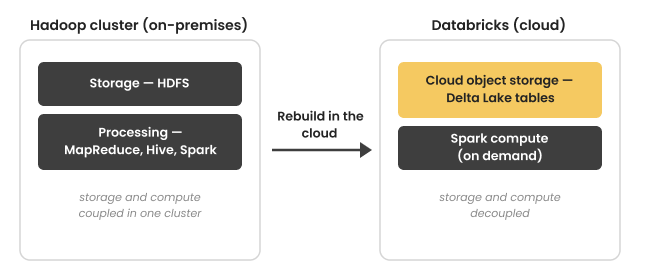
Figure 1. The core architectural shift: Hadoop typically combines storage and compute within an on-premises cluster, while Databricks separates cloud storage from compute and uses Apache Spark for data processing.

- Share Post:
-

-

Key Takeaways
- Hadoop to Databricks is an architectural migration. Data, processing workloads, dependencies, and schedules move or are re-created for a cloud-based Databricks environment rather than being copied as a physical cluster.
- HDFS data moves to cloud object storage. Data can be organized as Delta Lake tables to provide transactional capabilities and a table format suited to Databricks workloads.
- MapReduce workloads are re-engineered on Spark. Databricks does not provide a MapReduce runtime, so MapReduce applications need to be redesigned or rewritten as Spark workloads.
- Existing Spark workloads generally require less rework. They can often be migrated by changing data paths, adapting storage formats, and removing Hadoop- or YARN-specific dependencies.
- Hive workloads move toward Spark SQL and the Databricks data platform. HiveQL requires validation because SQL functions, data types, and execution behavior can differ.
- Hadoop orchestration must be rebuilt. Oozie workflows and schedules must be recreated using the orchestration capabilities in the target Databricks environment.
- Validation is part of the migration, not an afterthought. Parallel execution, reconciliation, and business-owner sign-off help establish that migrated pipelines produce the expected results.
What Is Hadoop to Databricks Migration
Hadoop to Databricks migration is the process of moving data, data-processing workloads, and orchestration from a Hadoop environment to the Databricks Lakehouse Platform.
Hadoop is an open-source framework commonly used for distributed storage and processing. A typical Hadoop environment may include:
- HDFS for distributed file storage
- Hive for tables and SQL-based processing
- MapReduce for batch processing
- Apache Spark for distributed data processing
- YARN for resource management
- Oozie or other tools for workflow orchestration
Databricks provides a cloud-based environment built around Apache Spark. Instead of maintaining an on-premises Hadoop cluster, organizations can store data in cloud object storage and provision compute for data engineering, SQL analytics, and other workloads.
This changes the migration approach. The goal is not to reproduce the Hadoop cluster inside Databricks. The goal is to recreate the required data pipelines and workloads on the target architecture while preserving the required data, business logic, schedules, and outputs.
A typical migration therefore includes:
- Assessing the existing Hadoop environment
- Cataloging data, tables, jobs, and dependencies
- Moving data from HDFS to cloud storage
- Converting or reorganizing data into Delta Lake where appropriate
- Re-implementing MapReduce and Hive workloads
- Porting existing Spark workloads
- Rebuilding workflow orchestration
- Re-establishing security and governance
- Testing and reconciling outputs
- Cutting over workloads and decommissioning Hadoop
Why Migrate from Hadoop to Databricks
The reasons for a Hadoop migration vary by organization, but several factors commonly influence the decision.
Aging Infrastructure and Operational Overhead
Traditional Hadoop environments can require organizations to maintain servers, storage, cluster configuration, resource management, security controls, and multiple components. Moving to a managed cloud platform changes the operating model by shifting much of the underlying infrastructure management to the cloud and platform providers.
Separate Storage and Compute
Hadoop environments commonly provision storage and compute as part of the same cluster architecture. With Databricks, data can remain in cloud object storage while compute resources are provisioned separately. This provides a different approach to scaling storage and processing capacity according to workload requirements.
Delta Lake for Data Reliability
Delta Lake provides capabilities such as ACID transactions, schema enforcement, and time travel on top of data stored in cloud object storage. These capabilities can help organizations move beyond file-based Hadoop storage toward a managed lakehouse architecture.
Unified Data and Analytics Workloads
Databricks provides a common environment for data engineering, SQL analytics, machine learning, and other data workloads. For organizations maintaining several Hadoop ecosystem components, consolidating workloads around a cloud-based Spark platform can reduce architectural complexity.
Cloud Adoption
For organizations already adopting Amazon Web Services, Microsoft Azure, or Google Cloud, migrating Hadoop workloads to cloud storage and cloud-based compute can align data infrastructure with the broader cloud strategy.
Hadoop to Databricks Component Mapping
A successful migration maps each Hadoop component to an appropriate capability in the target environment.
| Hadoop Component | Databricks / Cloud Equivalent | Migration Consideration |
|---|---|---|
| HDFS | Cloud object storage such as Amazon S3, ADLS, or GCS | Move data from HDFS to cloud storage and organize it for the target architecture |
| Hive tables | Delta Lake tables | Convert or recreate tables using the target table format |
| Hive Metastore | Unity Catalog/target metadata architecture | Recreate metadata, ownership, permissions, and governance |
| HiveQL | Spark SQL | Review syntax, functions, data types, and query behavior |
| MapReduce | Apache Spark | Re-engineer MapReduce logic as Spark workloads |
| Existing Spark jobs | Databricks Spark | Port code, update storage paths, and remove Hadoop-specific dependencies |
| Oozie | Databricks Workflows | Recreate dependencies, schedules, parameters, and job execution logic |
| YARN | Databricks-managed compute | Replace Hadoop cluster resource management with target compute configuration |
Treat the mapping as an engineering exercise rather than a one-to-one replacement. Some Hadoop components have a direct functional counterpart, while others require redesigning the workload itself.
Hadoop to Databricks Migration Process
A structured Hadoop-to-Databricks migration approach helps organizations understand dependencies, validate migrated workloads, and reduce disruption to existing data operations. The process typically moves through Hadoop environment assessment, dependency mapping, data migration, workload re-engineering, orchestration, security and governance, validation, and final cutover.
Step 1: Assess the Hadoop Environment
Begin by creating a detailed inventory of the existing Hadoop environment. This assessment should cover HDFS datasets and storage volumes, Hive databases and tables, MapReduce applications, Hive queries and scripts, Spark applications, Oozie workflows and schedules, data dependencies, external systems, downstream consumers, security controls, access requirements, and data-retention policies. The assessment defines the migration scope and helps determine which workloads to migrate, redesign, consolidate, or retire.
Step 2: Map Dependencies and Prioritize Workloads
After inventorying the environment, map the relationships between source datasets, transformation jobs, target tables, schedules, applications, reports, and downstream consumers. Understanding these dependencies helps identify workloads that need to move together and prevents downstream processes from being overlooked during migration. You can then prioritize workloads based on business importance, technical dependencies, complexity, and migration readiness.
Step 3: Migrate Data from HDFS to Cloud Storage
Move the required data from HDFS to the selected cloud object storage environment, such as Amazon S3, Azure Data Lake Storage, or Google Cloud Storage. Large Hadoop environments require careful planning around data volume, network bandwidth, transfer duration, compression, file formats, encryption, data integrity, and transfer retries. Once the data reaches cloud storage, you can organize it into Delta Lake tables where appropriate for Databricks workloads.
Step 4: Rebuild or Port Data Processing
The amount of code rework depends on the type of Hadoop workload. MapReduce applications need to be re-engineered because Databricks uses Apache Spark rather than a MapReduce execution runtime. Hive workloads can often be translated to Spark SQL, but you should test queries for differences in functions, syntax, data types, and execution behavior. Existing Spark applications generally require less architectural change, although they may need updates to HDFS paths, data reads and writes, Delta Lake integration, and Hadoop- or YARN-specific configuration.
Step 5: Rebuild Orchestration
Hadoop workflows commonly rely on Oozie or other scheduling mechanisms to coordinate data-processing jobs. Recreate these workflows in the target Databricks environment while preserving required job dependencies, schedules, parameters, retry behavior, failure handling, notifications, and upstream and downstream relationships. The objective is to reproduce the required business process using the target platform's orchestration capabilities rather than simply copying the existing workflow configuration.
Step 6: Re-establish Security and Governance
Redesign security and governance controls for the target architecture rather than copying them directly from Hadoop. The migration should address user and group access, data permissions, service identities, encryption, network controls, table and catalog permissions, auditing, and data governance requirements. If the existing Hadoop environment uses technologies such as Kerberos or Apache Ranger, map their security and access-control functions to the corresponding mechanisms in the target Databricks and cloud environment.
Step 7: Test and Reconcile
After migrating the workloads, run them against representative or equivalent source data and compare results with the existing Hadoop implementation. Validation can include row counts, record-level comparisons, aggregates, null counts, duplicate checks, data types, business-rule outputs, pipeline completion times, and downstream report results. For critical workloads, parallel execution allows teams to compare Hadoop and Databricks outputs before production cutover and investigate differences while the legacy environment remains available.
Step 8: Cut Over and Decommission Hadoop
Once the migrated workloads have passed technical and business validation, the organization can begin the final cutover. The organization controls or freezes changes to the legacy workloads, then performs a final data synchronization and runs the Databricks pipelines. Downstream applications, reports, and consumers are then redirected to the new environment, while the team monitors the migrated workloads for unexpected issues. After the required rollback or recovery period has passed and the migration is confirmed, the team can decommission the corresponding Hadoop components.
Common Hadoop to Databricks Migration Challenges
Re-engineering MapReduce Workloads
MapReduce jobs cannot simply be deployed unchanged on Databricks. You need to redesign their processing logic for Spark. Complex jobs may also contain embedded assumptions about Hadoop storage, serialization, partitioning, or execution behavior.
HiveQL Compatibility
Hive queries may require changes when moved to Spark SQL.
Differences can occur in:
- Functions
- Data types
- SQL syntax
- Null handling
- Partition behavior
- Query execution
- UDF implementations
Testing should therefore go beyond checking whether a query executes successfully.
Large-Scale Data Transfer
Hadoop environments can contain terabytes or petabytes of data. Moving that volume requires careful planning around network capacity, transfer windows, bandwidth, security, and data integrity. Depending on the cloud environment and migration architecture, organizations may use high-throughput network connections, managed data-transfer services, or physical transfer appliances.
Small Files
Large numbers of small files can affect data-processing efficiency. Hadoop workloads may accumulate small files over time through repeated batch processing. During migration, review file organization and table layout so the target environment can process the data efficiently.
Security and Governance Changes
Security models do not transfer automatically between Hadoop and Databricks. Map controls implemented through Kerberos, Ranger, operating-system permissions, or other Hadoop components to the target platform's identity, access, and governance model.
Hidden Dependencies
A Hadoop job may depend on more than its primary code. Dependencies can include:
- HDFS paths
- Hive tables
- Environment variables
- YARN settings
- Shell scripts
- Oozie workflows
- External databases
- UDFs
- Service accounts
- Downstream applications
Missing one of these dependencies can cause failures after migration.
Skills and Operating-Model Changes
Moving from Hadoop to Databricks changes the skills required to operate the data platform. Teams may need experience with:
- Cloud storage
- Apache Spark
- Spark SQL
- Delta Lake
- Databricks Workflows
- Unity Catalog
- Cloud security
- Cloud infrastructure
The migration should therefore include operational documentation and knowledge transfer alongside technical implementation.
Hadoop to Databricks Migration Best Practices
Start With an Accurate Inventory
Don't start moving data without understanding the Hadoop environment. Create an inventory of datasets, tables, jobs, workflows, dependencies, and downstream consumers before selecting the migration sequence.
Migrate Incrementally
A workload-by-workload migration can make testing and troubleshooting easier than moving the entire Hadoop environment in one cutover. Start with workloads whose dependencies and expected outputs are well understood.
Separate Data Migration From Workload Migration
Moving the data and rebuilding the processing logic are related but distinct activities. Treat them as separate workstreams with their own validation checkpoints.
Reuse Existing Spark Code Where Practical
Existing Spark applications generally require fewer changes than MapReduce applications. Prioritize code reuse where the application is compatible with the target Databricks runtime and does not rely heavily on Hadoop-specific infrastructure.
Validate Business Outputs
Technical success does not necessarily mean migration success. A job that completes without errors can still produce different results from the Hadoop implementation. Workload owners should therefore validate important outputs using agreed business and technical reconciliation rules.
Plan for Parallel Running
Maintain the Hadoop workload during an appropriate validation period for critical pipelines. Parallel execution allows teams to identify differences before downstream users depend entirely on the migrated pipeline.
Address Security Early
Design security and governance before production cutover, rather than treating them as a final migration task. Identify users, service accounts, data owners, permissions, and audit requirements during the assessment phase.
Frequently Asked Questions
Hadoop to Databricks Migration Checklist
Before decommissioning the Hadoop environment, verify that:
- HDFS datasets have been migrated and validated
- Required Hive tables have been recreated or converted
- Delta tables have been validated where applicable
- MapReduce workloads have been re-engineered
- Hive workloads have been tested in Spark SQL
- Existing Spark jobs have been ported and tested
- HDFS and Hadoop-specific dependencies have been removed
- Oozie workflows and schedules have been recreated
- Security permissions have been configured
- Governance and catalog structures are in place
- Data quality checks have passed
- Critical outputs have been reconciled
- Downstream applications and reports have been validated
- Production cutover has been completed
- Hadoop decommissioning has been approved
Hadoop to Databricks Migration with DataTerrain
A Hadoop-to-Databricks migration requires more than moving data from HDFS to cloud storage. The migration must address data, processing logic, dependencies, orchestration, and validation.
DataTerrain helps organizations plan and execute data platform migrations across complex enterprise environments. With 17 years of data analytics experience, 400+ USA customers, and 27,000+ BI reports and dashboards, DataTerrain brings experience in assessing existing data environments, mapping dependencies, migrating workloads, and validating outputs.
For Hadoop modernization, the migration approach can include HDFS and Hive assessment, workload analysis, MapReduce and Spark migration, cloud data migration, pipeline validation, and downstream reporting considerations. The objective is to help organizations move to Databricks while maintaining the data and business logic their existing workloads depend on.
If your organization is planning a Hadoop to Databricks migration, DataTerrain can help assess the existing environment and define a migration approach based on the workloads, dependencies, data volumes, and reporting requirements involved.
Conclusion
A Hadoop-to-Databricks migration modernizes the data platform, not simply replacing infrastructure. The process involves moving data from HDFS to cloud object storage, adapting data for the target architecture, re-engineering MapReduce and Hive workloads for Spark, porting existing Spark applications, rebuilding orchestration, and establishing the required security and governance controls.
A structured assessment, incremental migration strategy, parallel testing, and output reconciliation can provide a practical path from Hadoop to Databricks while preserving the data processing and business logic existing workloads depend on.
For organizations planning Hadoop modernization, understanding the existing data, workloads, dependencies, and downstream consumers is an important starting point. This assessment provides the foundation for defining the Databricks migration architecture, sequence, and validation approach.
Planning a Hadoop to Databricks migration? Talk with DataTerrain about your existing environment and migration requirements.