• Reports Conversion
  • Oracle HCM Analytics
  • Oracle Health Analytics
  • Services
    • ETL SolutionsETL Solutions
    • Performed multiple ETL pipeline building and integrations.

    • Oracle HCM Cloud Service MenuTalent Acquisition
    • Built for end-to-end talent hiring automation and compliance.

    • Data Lake IconData Lake
    • Experienced in building Data Lakes with Billions of records.

    • BI Products MenuBI products
    • Successfully delivered multiple BI product-based projects.

    • Legacy Scripts MenuLegacy scripts
    • Successfully transitioned legacy scripts from Mainframes to Cloud.

    • AI/ML Solutions MenuAI ML Consulting
    • Expertise in building innovative AI/ML-based projects.

  • Contact Us
  • Blogs
  • Legacy Report Conversion
  • Report Conversion for SAP Crystal Reports to Jasper

Contents

What Is Crystal Reports to Jaspersoft Conversion Why Migrate from Crystal Reports to Jaspersoft What Gets Migrated to Jaspersoft Crystal Reports vs. Jaspersoft How does the Conversion Process work What are the Key Conversion Challenges Can Crystal Reports Conversion be Automated Automated vs. Manual Conversion How to preserve Report Design & Business Logic When should you consider migrating to Jaspersoft Crystal Reports to Jaspersoft Migration Checklist How DataTerrain Supports the Conversion FAQs
  • 08 Sep 2026

Crystal Reports to Jaspersoft Conversion: Complete Migration Guide

Quick Summary

Crystal Reports to Jaspersoft conversion involves assessing and migrating reports, formulas, layouts, parameters, data sources, subreports, and business logic to the Jaspersoft environment. The process typically covers report discovery, analysis, component mapping, formula conversion, report reconstruction, validation, and deployment. Automation can accelerate report analysis and repetitive conversion tasks, while complex formulas, custom layouts, dependencies, and business-specific logic may require expert review. A structured migration helps organizations preserve essential reporting functionality, address compatibility challenges, and establish a maintainable Jaspersoft reporting environment.

Crystal Reports to Jaspersoft conversion involves moving existing Crystal Reports, formulas, layouts, parameters, data connections, and business logic into the Jaspersoft reporting environment. Because the two platforms use different report structures and expression frameworks, successful conversion requires analysis, component mapping, report reconstruction, and validation rather than simple file conversion.

Organizations with large Crystal Reports estates can use automated analysis to inventory reports, identify conversion dependencies, and accelerate repetitive migration tasks. Complex formulas, custom layouts, and business-specific logic may still require technical review and validation.

DataTerrain provides automated Crystal Reports analysis and conversion services to help organizations assess, convert, validate, and modernize their reporting environment.

report-conversion-for-sap-crystal-reports-to-jasper
  • Share Post:
  • LinkedIn Icon
  • Twitter Icon

What Is Crystal Reports to Jaspersoft Conversion?

Crystal Reports to Jaspersoft conversion is the process of moving reports designed in Crystal Reports into the Jaspersoft reporting platform.

A conversion can involve more than the report layout itself. Depending on the reporting environment, the migration may include formulas, parameters, groups, charts, subreports, data connections, filters, styles, and other report dependencies.

Because Crystal Reports and Jaspersoft use different report structures and expression frameworks, reports generally need to be analyzed and mapped rather than simply copied from one platform to another.

Jaspersoft supports report development through tools such as Jaspersoft Studio and JasperReports, while JasperReports Server provides capabilities for managing, interacting with, and scheduling reports.

Why Migrate from Crystal Reports to Jaspersoft?

Organizations may consider moving from Crystal Reports to Jaspersoft when they want to modernize a legacy reporting environment, support changing reporting requirements, or adopt a reporting platform that fits their current application and reporting architecture.

Jaspersoft supports pixel-perfect, scheduled, interactive, and embedded reporting use cases. Its reporting environment also supports managing reports, parameters, scheduling, dashboards, and report repositories.

The right migration decision depends on the organization's existing report estate, technical requirements, application environment, reporting architecture, and long-term reporting strategy.

What Can Be Converted from Crystal Reports to Jaspersoft?

Not every Crystal Reports component has a one-to-one equivalent in Jaspersoft. Assess and map each component based on its purpose and behavior.

Crystal Reports Component Jaspersoft Target Conversion Approach
Report layoutsJaspersoft reportsRebuild and map report sections
FormulasJaspersoft expressionsTranslate and validate business logic
ParametersReport parametersRecreate parameter behavior
GroupsGroups and group expressionsMap grouping logic
ChartsJaspersoft chartsRebuild and validate
SubreportsJaspersoft subreportsMap dependencies and datasets
Data connectionsJaspersoft data sourcesReconfigure target connections
FiltersQuery/report filtersRecreate filtering behavior
Conditional formattingStyles and conditional stylesRebuild formatting rules
SortingReport/query sortingMap and validate sorting logic

The actual conversion approach depends on the complexity and implementation of each report.

Crystal Reports vs Jaspersoft

Crystal Reports and Jaspersoft can both support structured and pixel-perfect reporting, but their report design approaches and underlying technologies differ.

Area Crystal Reports Jaspersoft
Report designCrystal ReportsJaspersoft Studio
Report technologyCrystal Reports report definitionsJasperReports
ExpressionsCrystal formulasJaspersoft/JasperReports expressions
Report deploymentCrystal Reports environmentJasperReports Server and related deployment options
Report interactionStructured reportingInteractive and scheduled reporting
Report managementCrystal Reports ecosystemJaspersoft repository and server capabilities
Embedded reportingCrystal ecosystemJaspersoft embedded reporting capabilities

Evaluate the comparison in the context of the organization's reporting requirements, not platform features alone.

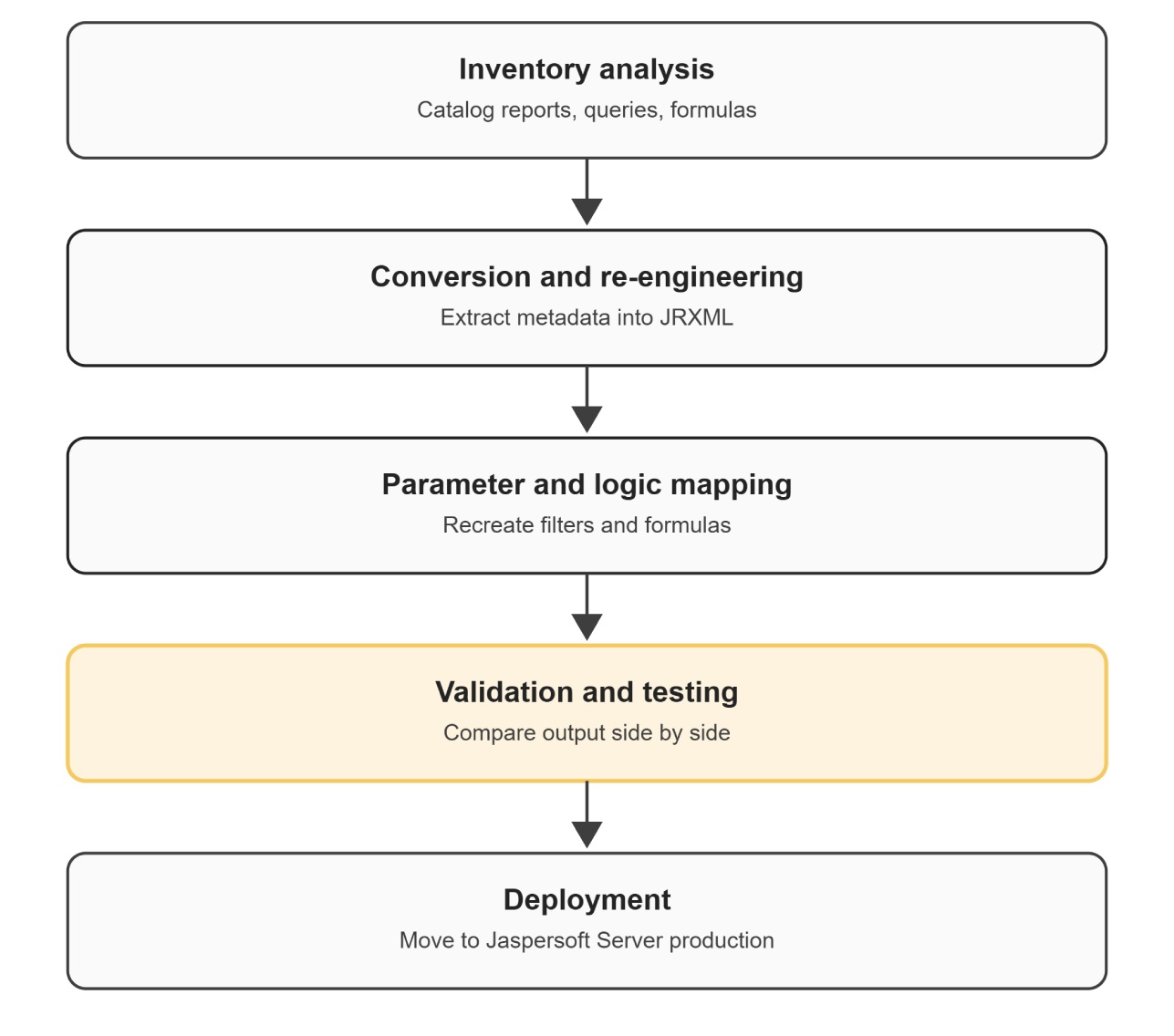
Crystal Reports to Jaspersoft Conversion Process

A structured conversion process helps identify report dependencies before rebuilding and reduces the risk of carrying unnecessary or unsupported components into the target environment.

1. Report Discovery and Inventory

Begin by identifying the complete Crystal Reports estate. This includes reports, report owners, data sources, formulas, parameters, subreports, charts, dependencies, usage patterns, and other components required for conversion. Large reporting environments should be assessed before conversion begins so reports can be prioritized according to business value and complexity.

2. Report Analysis

Each report is analyzed to identify its structure, components, functions, formulas, dependencies, and potential compatibility issues. DataTerrain's conversion solution uses an analysis component to examine report elements, identify missing components, and generate detailed logs that can help technical teams investigate compatibility issues.

3. Report Classification

Reports can then be categorized by complexity and business importance. Simple reports may require relatively straightforward conversion, while reports containing complex formulas, nested subreports, custom layouts, or specialized dependencies may require additional engineering. This classification helps migration teams prioritize conversion waves and focus technical review where it matters most.

4. Component Mapping

Crystal Reports components are mapped to corresponding Jaspersoft capabilities. The mapping should consider not only a report's visual appearance but also its formulas, data behavior, parameters, filters, grouping, dependencies, and expected output.

5. Formula and Logic Conversion

Crystal Reports formulas and business logic need to be analyzed and translated into the target Jaspersoft environment. DataTerrain's conversion approach includes analysis of native functions and embedded formula logic so equivalent functionality can be developed in Jaspersoft. Complex or unsupported logic should be reviewed rather than assumed to convert automatically.

6. Report Reconstruction

The report layout is rebuilt in the Jaspersoft environment. This can include sections, groups, charts, parameters, subreports, styles, formatting, and other visual components. The objective is to preserve required reporting behavior and design intent while adapting the report to the target platform.

7. Validation and Testing

Compare converted reports with the original Crystal Reports output. Validation can include calculations, totals, filters, parameters, grouping, formatting, data accuracy, and report behavior. This stage helps identify differences before releasing converted reports to users.

8. Deployment

Once reports are validated, they can be deployed to the target Jaspersoft environment. JasperReports Server supports centralized report management, interaction, scheduling, and repository capabilities, while Jaspersoft Studio can be used to create and develop reports.

Crystal Reports to Jaspersoft Conversion Challenges

Formula and Function Differences

Crystal Reports formulas cannot always be transferred directly into Jaspersoft. Expressions and business logic must be analyzed and translated for the target reporting environment. Complex formulas may require manual engineering and validation.

Complex Report Layouts

Highly formatted reports can contain multiple sections, groups, nested components, charts, and conditional formatting. These layouts may require reconstruction rather than simple conversion.

Subreports and Dependencies

Reports that depend on multiple subreports or datasets require careful dependency analysis. A conversion that focuses only on the primary report can miss dependencies that affect the final output.

Data-Source Differences

Existing Crystal Reports may depend on specific databases, queries, stored procedures, or connection configurations. The target Jaspersoft environment needs appropriately configured data sources and access to the required underlying data.

Parameters and Filters

Crystal Reports parameters and filtering behavior may need to be recreated in the Jaspersoft environment. Test complex parameter relationships to ensure the converted report behaves as expected.

Output Validation

A visually similar report is not necessarily a functionally equivalent report. Validate calculations, totals, filtering, grouping, parameters, and data output against the original report before production deployment.

Can Crystal Reports Be Automatically Converted to Jaspersoft?

Automation can accelerate Crystal Reports to Jaspersoft conversion, but it does not eliminate the need for technical review. Automated tools can help with report inventory, structural analysis, component identification, formula cataloging, dependency analysis, and repetitive conversion activities.

DataTerrain's conversion solution uses automated analysis to examine report components, identify missing elements, and provide detailed logs for compatibility analysis. However, complex formulas, custom layouts, unsupported components, business-specific logic, and data dependencies may require specialist review.

For large enterprise reporting estates, a combination of automated analysis and conversion with expert validation can help balance migration speed with accuracy.

Automated vs Manual Crystal Reports Conversion

The right conversion approach depends on the number and complexity of reports.

Approach Best Suited For
Manual conversionSmall number of relatively simple reports
Automated analysisLarge reporting inventories requiring assessment
Automated conversion with expert reviewLarge and complex enterprise environments
Hybrid migrationEstates containing both simple and highly customized reports

Automation is particularly useful when teams need to analyze many reports before deciding which reports to convert, redesign, consolidate, or retire. Expert review remains important for business logic, complex formulas, compatibility issues, and validation.

Preserving Crystal Reports Design and Business Logic

A migration should preserve the reporting requirements that users actually depend on rather than simply reproducing every legacy design element. DataTerrain's conversion approach focuses on preserving report design efforts while rebuilding Crystal Reports for the Jaspersoft platform.

During conversion, teams should identify which layouts, calculations, formatting rules, parameters, and business logic are essential. This also creates an opportunity to remove obsolete components and simplify reports that have accumulated unnecessary complexity.

When Should You Consider Migrating from Crystal Reports to Jaspersoft?

A migration may be worth evaluating when an organization has a large or aging Crystal Reports estate, needs to modernize its reporting architecture, or wants to move toward a reporting environment that supports its current application and reporting requirements. It can also make sense when maintaining existing reports has become increasingly difficult or when the organization needs to consolidate reporting technologies.

Before starting a large migration, organizations should assess the existing report inventory, dependencies, business requirements, target architecture, and expected conversion effort.

Crystal Reports to Jaspersoft Migration Checklist

Before Conversion

  • Inventory Crystal Reports and identify report owners, usage, data sources, formulas, parameters, subreports, and dependencies
  • Classify reports according to business importance and conversion complexity
  • Identify obsolete, duplicate, or low-value reports that may not need to be converted

During Conversion

  • Analyze report components and dependencies
  • Map Crystal Reports functionality to Jaspersoft
  • Convert formulas and business logic
  • Rebuild report layouts, parameters, charts, groups, and subreports
  • Configure target data sources and connections

Before Deployment

  • Compare converted reports with the original Crystal Reports output
  • Validate calculations, totals, filters, parameters, grouping, and formatting
  • Test complex reports with representative data
  • Resolve compatibility issues and obtain business validation before production deployment

DataTerrain's Crystal Reports to Jaspersoft Conversion Solution

17+ Years Experience  |  400+ US Clients  |  Automated Analysis  |  Formula Conversion  |  Free Proof of Concept

DataTerrain provides an Automated BI reports conversion service designed to accelerate Crystal Reports to Jaspersoft migration. The solution analyzes report components, identifies missing elements, and generates detailed logs that support compatibility analysis and technical review. The conversion process also analyzes native functions and formula logic and develops equivalent solutions in the Jaspersoft environment. DataTerrain's technical team rebuilds Crystal Reports for the Jaspersoft platform while preserving required report design and functionality. For organizations with large reporting estates, automation can reduce repetitive analysis and conversion effort while allowing specialists to focus on complex business logic, compatibility issues, and validation. Request a demo or proof of concept to evaluate your Crystal Reports environment and understand the conversion approach for your reporting estate.

Schedule a Free Assessment

Key Takeaways

  • Crystal Reports to Jaspersoft conversion is more than file conversion. Reports, formulas, layouts, parameters, data sources, and dependencies need to be analyzed and mapped.
  • Automation can accelerate migration. Automated analysis can help inventory reports, identify components, and support repetitive conversion tasks.
  • Complex reports require technical review. Custom formulas, layouts, subreports, and business-specific logic may require manual engineering and validation.
  • Validation is essential. Compare converted reports with the original Crystal Reports output before production deployment.
  • A structured migration reduces risk. Discovery, analysis, mapping, conversion, reconstruction, validation, and deployment provide a practical framework for reporting modernization.

Conclusion

Crystal Reports to Jaspersoft conversion involves more than moving report files. It requires analyzing layouts, formulas, parameters, data sources, and business logic, then converting, validating, and deploying.

Automation can accelerate repetitive migration tasks, while expert review helps address complex logic and compatibility issues.

DataTerrain helps organizations assess and convert Crystal Reports to Jaspersoft using automated report analysis and technical migration expertise. Request a demo or proof of concept to evaluate your reporting environment.

Frequently Asked Questions

What is Crystal Reports to Jaspersoft conversion?
Crystal Reports to Jaspersoft conversion is the process of moving Crystal Reports, layouts, formulas, parameters, data connections, and related reporting logic into the Jaspersoft reporting environment. The process generally involves analysis, mapping, conversion, reconstruction, validation, and deployment.
Can Crystal Reports be directly converted to Jaspersoft?
Crystal Reports cannot generally be treated as a simple file-format conversion. Reports need to be analyzed and their layouts, formulas, data sources, parameters, and dependencies mapped to the Jaspersoft environment. Automation can speed up repetitive tasks, while complex reports may require technical review.
What Crystal Reports components can be migrated to Jaspersoft?
Depending on the report, components such as layouts, formulas, parameters, groups, charts, subreports, filters, styles, and data connections can be assessed for conversion. The exact approach depends on each report's implementation and complexity.
Can Crystal Reports formulas be converted to Jaspersoft?
Crystal Reports formulas can be analyzed and translated into equivalent logic in the Jaspersoft environment. However, formulas should be validated individually because expression behavior and supported functions can differ between reporting platforms.
How are Crystal Reports layouts migrated to Jaspersoft?
Crystal Reports layouts are analyzed and rebuilt using the target Jaspersoft reporting environment. Sections, groups, charts, formatting, parameters, and other design components may need to be recreated and then validated against the original report.
Can Crystal Reports conversion be automated?
Automation can accelerate report discovery, analysis, component identification, formula cataloging, and repetitive conversion tasks. Complex formulas, custom layouts, unsupported components, and business-specific requirements may still require expert review.
How are converted Jaspersoft reports validated?
Converted reports can be compared with their original Crystal Reports versions for calculations, totals, filters, parameters, grouping, formatting, data accuracy, and overall report behavior. Complete validation before production deployment.
Categories
  • All
  • BI Insights Hub
  • Data Analytics
  • ETL Tools
  • Oracle HCM Insights
  • Legacy Reports conversion

Ready to initiate your BI Migration Journey?

Start Now
Customer Stories
  • All
  • Data Analytics
  • Reports Conversion
  • Jaspersoft
  • Oracle HCM
Recent posts
  • Crystal Reports to Jaspersoft Conversion....
  • SAP BO to Power BI Migration: Complete....
  • snaplogic-data-integration-etl
    SnapLogic Data Integration Streamlines ETL....
  • snaplogic-vs-informatica-etl-comparison
    SnapLogic vs Informatica: What Changed....
  • sap-bo-to-power-bi-migration
    Strategic Advantages of SAP BO to Power...
  • tableau-cloud-migration
    Tableau Cloud Migration: Advantages....
  • tableau predictive analytics
    How to Use Tableau Predictive....
  • Tableau vs Oracle Analytics Cloud
    Tableau vs Oracle Analytics Cloud: Security....
Connect with Us
  • About
  • Careers
  • Privacy Policy
  • Terms and condtions
Sources
  • Customer stories
  • Blogs
  • Tools
  • News
  • Videos
  • Events
Services
  • Reports Conversion
  • ETL Solutions
  • Data Lake
  • Legacy Scripts
  • Oracle HCM Analytics
  • BI Products
  • AI ML Consulting
  • Data Analytics
Get in touch
  • connect@dataterrain.com
  • +1 650-701-1100

Subscribe to newsletter

Enter your email address for receiving valuable newsletters.

logo

© 2026 Copyright by DataTerrain Inc.

  • twitter