- 27 Oct 2026
SQL Server and SSIS to Databricks: What Lakebridge Converts
A SQL Server and SSIS-to-Databricks migration moves a SQL Server data warehouse, its T-SQL procedures, SSIS packages, SQL Agent jobs, and security onto Delta Lake tables and Lakeflow pipelines. It is a re-architecture: the risk sits in procedural code, SSIS logic buried in .dtsx files, and behavior differences such as case-insensitive collation, trailing-space comparisons, and integer division, not in the data copy. Databricks' free Lakebridge toolkit converts T-SQL with deterministic transpilers and can convert SSIS packages to notebooks (still marked experimental), and Lakeflow Connect ingests SQL Server changes through CDC or change tracking, but engineers must still refactor the logic and prove figure-for-figure parity before cutover. Timing matters: SQL Server 2016 extended support ends on July 14, 2026, and SQL Server 2017 follows on October 12, 2027.
Many organizations still run SQL Server and SSIS for their warehouse, often after fifteen years of stored procedures, packages, and nightly Agent jobs. This page covers why teams move now, whether Databricks is the right target, how each component migrates, what Lakebridge does and does not automate, and a phased plan. For the services side, see our Databricks migration services overview, and for the mapping of every legacy ETL tool, our ETL migration to Databricks article.
Quick Summary

- Share Post:
-

-

Key Takeaways
- SQL Server 2016 is out of free support. Extended support ended July 14, 2026, and 2017 ends October 12, 2027.
- It is a re-architecture, not a copy. T-SQL, SSIS, Agent jobs, and security are all re-expressed in the lakehouse model.
- Lakebridge helps, with limits. Its T-SQL conversion is deterministic, while SSIS conversion is experimental, and complex logic still needs engineers.
- Most teams move analytics, not transactions. OLTP databases usually stay on SQL Server and stream changes in through CDC or change tracking.
- Databricks is not the only target. Fabric and Azure Data Factory fit some Microsoft-centered estates better.
- Parity needs evidence. Reconcile against SQL Server through at least one full business cycle before cutover.
Why Now: SQL Server Support Dates
The case for leaving a SQL Server warehouse usually builds up over time, and the support calendar now adds a hard edge:
| Version | Security Fixes End | Status |
|---|---|---|
| SQL Server 2016 | July 14, 2026 | Ended; paid Extended Security Updates run to July 17, 2029 |
| SQL Server 2017 | October 12, 2027 | In extended support |
| SQL Server 2019 | January 8, 2030 | Security fixes only since February 28, 2025 |
| SQL Server 2022 | January 11, 2033 | Mainstream support to January 11, 2028 |
| SQL Server 2025 | January 6, 2036 | Current release |
These dates come from trackers that mirror Microsoft's lifecycle data, checked in October 2026, so confirm yours on Microsoft's lifecycle page. An upgrade is one answer, but every upgrade means re-testing packages, procedures, and drivers, which is why many teams re-platform once instead. Other common drivers include:
- Elastic scale. SQL Server scales up on bigger servers sized for the nightly peak, while Databricks scales out for month-end loads and back down when idle.
- Licensing and infrastructure cost. Core-based licensing and dedicated ETL servers add up, whereas Databricks bills compute by usage and auto-terminates compute, so charges stop when it's idle. Savings aren't automatic and depend on how you govern usage.
- Beyond batch ETL. SSIS was built for scheduled batch loads, while Databricks handles streaming, semi-structured data, and AI workloads on the same governed tables through Unity Catalog.
Databricks, Fabric, or Azure Data Factory for SSIS?
Databricks is one of three common targets, and the right one depends on your stack and goals:
| Situation | Better Fit |
|---|---|
| Lakehouse, machine learning, or multi-cloud are goals | Databricks |
| Microsoft-only stack with Power BI at the center | Microsoft Fabric, including SQL Server to Fabric paths |
| You need to run existing SSIS packages with minimal change first | Azure Data Factory's SSIS runtime, which keeps the package architecture |
| OLTP stays on SQL Server and analytics moves | Databricks, fed by CDC or change tracking |
SSIS is not discontinued: SSIS 2025 shipped with SQL Server 2025, so there is no forced exit from the package model. It deprecated or removed several components, including the legacy SSIS service, 32-bit mode, and the Attunity CDC components, and Microsoft's guidance points to Fabric Data Factory. For more on that trade-off, see our comparison of Alteryx vs SSIS, and for the other direction, Databricks to Microsoft Fabric and Microsoft Fabric migration services.
What Has to Move
Tables are the visible part. A complete inventory has five layers:
| Layer | What It Includes | Commonly Missed |
|---|---|---|
| Data and storage | Databases, schemas, data types, indexes, partitions, and history | How much history genuinely needs to move |
| Procedural logic | Stored procedures, functions, triggers, views, and dynamic SQL | Business rules inside dynamic SQL |
| Pipelines and orchestration | SSIS packages, Script Tasks, catalog parameters and environments, Agent jobs, and file feeds | C# or VB.NET Script Tasks nobody has opened in years |
| Security and governance | Logins, Active Directory groups, roles, row-level security, and dynamic data masking | Row-level predicates that must be rebuilt in Unity Catalog |
| Consumers | SSRS reports, SSAS models, Excel connections, Power BI datasets, and applications | Consumers nobody documented |
Reporting follows the data, so plan SSRS and Power BI in the same wave, using our Power BI consulting services and report conversion work for the report layer.
How Each SQL Server and SSIS Component Migrates
| Component | Common Challenge | How to Solve It |
|---|---|---|
| T-SQL stored procedures | Temp tables, table variables, cursors, WHILE loops, TRY/CATCH, dynamic SQL, and explicit transactions | Build a dependency graph, convert in waves by complexity, replace temp tables with DataFrames or views, and refactor loops into set-based operations, as in our PL/SQL conversion article |
| T-SQL dialect | TOP, ISNULL, CROSS APPLY, + string concatenation, IDENTITY, and MERGE with OUTPUT are SQL Server-specific | Agree a translation standard (TOP to LIMIT, two-argument ISNULL to coalesce or ifnull, CROSS APPLY to CROSS JOIN LATERAL), automate the syntax, and validate query by query |
| Data types and collation | DATETIME rounding, MONEY, UNIQUEIDENTIFIER, BIT, and case-insensitive collation change joins and totals | Agree a type-mapping standard (for example MONEY to DECIMAL(19,4)) and test edge cases such as trailing spaces and mixed-case keys |
| Indexes, columnstore, and hints | Queries tuned with indexes, hints, and partition switching lose their performance profile on Spark | Drop hints, use liquid clustering and data skipping on Delta tables, enable Photon, and benchmark top queries before cutover |
| SSIS data flows | Logic is buried in .dtsx XML: lookups, derived columns, conditional splits, merge joins, and the SCD transformation | Extract package metadata automatically, map each transformation to a DataFrame or SQL pattern, and rebuild flows as Lakeflow Spark Declarative Pipelines with expectations |
| SSIS Script Tasks | Custom C# or VB.NET handles files, APIs, parsing, and edge cases no tool converts reliably | Inventory every script, rewrite the needed logic in Python, and replace file and API handling with Auto Loader, Volumes, and native connectors |
| SSIS control flow and configuration | Precedence constraints, ForEach loops, event handlers, parameters, and catalog environments carry implicit dependencies | Recreate dependencies as Lakeflow Jobs tasks with job parameters, for-each and conditional tasks, and secret scopes for connections |
| SQL Server Agent jobs | Chains mix SSIS, T-SQL, PowerShell, and CmdExec steps with email alerts | Consolidate into Lakeflow Jobs with explicit dependencies, retries, and notifications, and replace index-maintenance steps with Delta table maintenance |
| CDC and Change Tracking | Keeping both platforms in sync without heavy source load, and SSIS 2025 deprecated the Attunity CDC components | Use the Lakeflow Connect SQL Server connector (change tracking or CDC), apply changes with MERGE where needed, and plan to replace any SSIS CDC components that rely on Attunity |
| Security | Windows authentication, roles, row-level security, and dynamic data masking do not carry over | Sync identity groups from Entra ID, redesign access with Unity Catalog row filters and column masks, and test per role; see our guide to migrating row-level security |
T-SQL to Databricks SQL: Common Syntax Mappings
These mappings match what Lakebridge's converters produce for common constructs, and every converted query still needs validating against real data:
| T-SQL | Databricks SQL |
|---|---|
| SELECT TOP 10 | LIMIT 10 |
| ISNULL(a, b) | coalesce(a, b) |
| GETDATE() | current_timestamp() |
| DATEADD(day, -7, GETDATE()) | date_add(current_timestamp(), -7) |
| CROSS APPLY | CROSS JOIN LATERAL |
Syntax is the easy part. The behavior differences in the drift table later on this page are what change results, so treat these mappings as a starting point, not a finish line.
What Lakebridge Covers for SQL Server and SSIS
Lakebridge is Databricks' free, open-source migration toolkit from Databricks Labs. Databricks states it can automate up to 80% of migration tasks, a vendor figure for favorable cases. According to its documentation, it covers this source as follows:
| Lakebridge Piece | What It Does for SQL Server and SSIS | What Still Needs Engineers |
|---|---|---|
| Assessment | A SQL Server profiler and the Analyzer inventory objects and score complexity | Deciding what to retire and sequencing waves |
| Morpheus transpiler | Converts T-SQL to Databricks SQL deterministically, including CROSS APPLY to CROSS JOIN LATERAL, and recent releases add cursor statements; it warns when it cannot guarantee equivalent results | Warnings and errors need manual fixes, and it does no semantic type-checking |
| BladeBridge transpiler | Handles ETL sources, including converting SSIS packages into Databricks notebooks, which the documentation marks as experimental | Script Tasks, complex data flows, and validation of every converted package |
| Switch (LLM-based) | An experimental option for constructs the deterministic tools do not cover | Output needs review because it is LLM-generated |
| Reconcile | Compares source and target data to prove the move | Choosing what to compare and signing off before cutover |
Lakebridge is a Databricks Labs project, so confirm support terms before you rely on it for production timelines, and check current coverage for your versions because it changes between releases. Our Databricks migration services overview covers how tooling and services divide the work.
Other SSIS conversion options exist. A Databricks Community article describes an AI-assisted migration utility that reads exported .dtsx files and generates notebooks, and partner accelerators offer similar automation. Treat any AI-generated output as a first draft that needs review and reconciliation.
Moving the Data: Federation, Lakeflow Connect, and CDC
Databricks' own migration guidance suggests a sequence that avoids a big-bang copy:
- Read through first. Lakehouse Federation lets Databricks query SQL Server in place, which gives analysts early access while history moves.
- Bulk-load history. Use JDBC extracts or exported Parquet files, partitioned for parallel throughput.
- Keep Databricks current. The Lakeflow Connect SQL Server connector, generally available, ingests changes into Unity Catalog streaming tables using change tracking or CDC, with a full snapshot as an option.
- Run in parallel and reconcile until the numbers match.
A few details matter when you plan the connector. It works only against the primary SQL Server instance because change tracking and CDC aren't available on read replicas, and it supports Azure SQL Database, Azure SQL Managed Instance, Amazon RDS, SQL Server on VMs, and on-premises servers reached over ExpressRoute or Direct Connect. Change tracking needs SQL Server 2012 or later and suits tables with primary keys, while CDC keeps full history and is needed for SCD Type 2. The ingestion gateway runs continuously on classic compute, so you pay for it even when the ingestion pipeline is idle, and it belongs in your cost model.
A Phased Migration Plan
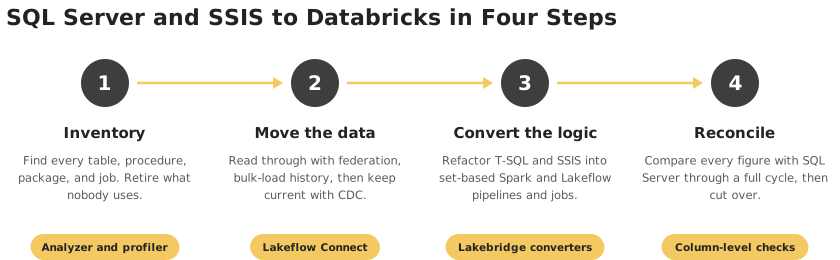
Four steps to move a SQL Server and SSIS estate to Databricks.
| Phase | What Happens | Output |
|---|---|---|
| Discovery and assessment | Inventory databases, procedures, SSIS packages, Script Tasks, Agent jobs, and consumers, with usage and complexity | A scoped inventory sized from evidence |
| Rationalization | Retire unused tables, procedures, packages, and reports, merge duplicate loads, and decide how much history moves | A smaller scope, and the biggest lever on cost |
| Target design | Define the medallion layers, Unity Catalog structure, cluster policies, identity integration, and waves | A target architecture and wave plan |
| Pilot | Migrate one visible, low-risk workload end to end to test converters, data movement, and reconciliation | Measured automation rate and accuracy |
| Data and code conversion | Load history, start CDC, and convert procedures, packages, and jobs into PySpark, Spark SQL, and Lakeflow pipelines | Converted, tested code |
| Validation and parallel run | Reconcile row counts, aggregates, and checksums table by table, and compare key reports through a month-end | Signed-off reconciliation |
| Cutover and decommission | Repoint SSRS and Power BI, train users, monitor cost, and retire SQL Server warehouse and SSIS servers | Realized savings |
Decide early which workloads stay on SQL Server. Transactional applications usually do, with changes streamed into the lakehouse. For the broader lifecycle view, see our key checklist for BI modernization and our overview of data warehouse to Databricks migration. Other sources follow similar patterns, as in our articles on Teradata to Databricks, legacy systems to Databricks, and data platform migration to Databricks.
Refactoring a Stored Procedure: A Worked Example
A procedure that aggregates payments into a temp table and then updates balances one customer at a time is typical SQL Server code. This is an illustrative example, not a client engagement.
T-SQL
CREATE PROCEDURE dbo.usp_UpdateCustomerBalance @RunDate DATE
AS
BEGIN
  SELECT CustomerID, SUM(Amount) AS Total
  INTO #daily
  FROM dbo.Payments
  WHERE PaymentDate = @RunDate
  GROUP BY CustomerID;

  DECLARE @id INT, @total MONEY;
  DECLARE c CURSOR FOR SELECT CustomerID, Total FROM #daily;
  OPEN c;
  FETCH NEXT FROM c INTO @id, @total;
  WHILE @@FETCH_STATUS = 0
  BEGIN
    UPDATE dbo.CustomerBalance
    SET Balance = ISNULL(Balance, 0) + @total
    WHERE CustomerID = @id;
    FETCH NEXT FROM c INTO @id, @total;
  END
  CLOSE c;
  DEALLOCATE c;
END
Databricks SQL (set-based)
MERGE INTO gold.customer_balance AS t
USING (
  SELECT customer_id, SUM(amount) AS total
  FROM silver.payments
  WHERE payment_date = :run_date
  GROUP BY customer_id
) AS s
ON t.customer_id = s.customer_id
WHEN MATCHED THEN
  UPDATE SET t.balance = coalesce(t.balance, 0) + s.total;
The temp table and the cursor loop disappear, and one atomic MERGE does the work. Recent Lakebridge releases can translate cursor statements, but a cursor loop on Spark still runs row by row, so the refactor to set-based logic is where the performance comes from. Two checks matter here: MONEY becomes DECIMAL(19,4) so totals match, and the original is not safe to re-run, because a second run would add the same payments again. Make the migrated job repeatable, for example by recording which run dates were applied. Please test this example in a Databricks workspace before adapting it.
Where Silent Drift Hides on SQL Server
| SQL Server Behavior | What Changes on Databricks | Safeguard |
|---|---|---|
| Case-insensitive default collation | String comparisons are case-sensitive, so joins, DISTINCT, and filters change | Decide the rule deliberately, and normalize keys where the old behavior must hold |
| Trailing spaces ignored in string comparisons | Spark treats 'A' and 'A ' as different values | Trim keys explicitly and test with real data |
| Integer division (5 / 2 returns 2) | Spark SQL's / operator returns a fractional result | Use integer division explicitly where the original truncated |
| ISNULL(a, b) | Databricks has an ISNULL(expr) function that returns true or false | Translate the two-argument form to COALESCE or IFNULL |
| DATETIME and MONEY | DATETIME rounds to 3.33 ms steps and MONEY has four decimals | Map to TIMESTAMP and DECIMAL(19,4), and reconcile at column level |
| WITH (NOLOCK) and isolation levels | Delta tables give snapshot isolation, so dirty-read results differ | Review every hint and confirm what the report intended |
These are the differences behind totals that never quite reconcile, and the reason for column-level checks like those in our automated ETL testing with Python approach. The same set-based thinking appears in our comparison of traditional vs modern ETL.
Best Practices for a Low-Risk Migration
- Rationalize before you migrate. Never move tables, procedures, packages, or reports nobody uses.
- Design Unity Catalog and identity group mapping first, before loading the first table.
- Start with a pilot that is visible to the business but low-risk, and use it to measure real automation rates.
- Inventory every Script Task early. Custom .NET code is the most common source of surprise effort.
- Benchmark small jobs in the pilot. Tiny loads can run slower on a distributed platform because of start-up and overhead, so decide per workload what belongs in Databricks.
- Refactor for Spark instead of translating T-SQL and SSIS step by step.
- Automate reconciliation and run it on every load during the parallel run, through at least one month-end.
- Set cluster policies and budget alerts from day one, including the ingestion gateway.
- Version notebooks and pipelines in Git with CI/CD deployment, keeping data security compliance requirements in mind.
Frequently Asked Questions
Scope Your SQL Server Migration with DataTerrain
Moving a SQL Server warehouse is easy to start and hard to finish because the effort hides in the procedures, packages, and numbers that must still match. DataTerrain brings 17+ years and 400+ clients in data and reporting modernization, including Microsoft-centered estates, with automated assessment, T-SQL and SSIS conversion, and figure-for-figure validation. Start with our ETL Solutions or the wider Databricks migration services page.
Related Reading
Databricks Migration Services | Teradata to Databricks Migration | ETL Migration to Databricks | Data Warehouse to Databricks | Legacy Systems to Databricks | Data Platform Migration to Databricks | Cloud Migration to Databricks | SSIS to Microsoft Fabric Migration | SQL Server to Microsoft Fabric Migration | SSIS to Azure Data Factory | Alteryx vs SSIS | Databricks to Microsoft Fabric Migration | Legacy PL/SQL to Modern ETL | Traditional ETL vs Modern ETL | Automating ETL Testing with Python | Migrating Row-Level Security | Power BI Consulting Services | Reports Conversion Services | Key Checklist for Successful BI Modernization | ETL Solutions