Contents
- 28 Sep 2026
Informatica to Azure Data Factory Migration: Process, Challenges & Best Practices
Informatica to Azure Data Factory migration is the process of re-architecting Informatica PowerCenter or Informatica Intelligent Cloud Services (IICS) mappings, workflows, sessions, schedules, and connections into Azure Data Factory pipelines, Mapping Data Flows, Copy Activities, triggers, linked services, and appropriate Integration Runtime configurations. Because Informatica and ADF use different execution models, migration typically requires assessment, component mapping, redevelopment, testing, data validation, and controlled cutover.
Quick Summary
Informatica to Azure Data Factory migration involves assessing existing PowerCenter or IICS workloads, rebuilding mappings and workflows, migrating data movement and schedules, configuring Azure connectivity, and validating migrated pipelines against Informatica results. Key considerations include transformation conversion, on-premises connectivity, incremental loads, workflow dependencies, performance, security, testing, and production cutover.

- Share Post:
-

-

Informatica to Azure Data Factory Migration at a Glance
| Area | Informatica | Azure Data Factory |
|---|---|---|
| Source | PowerCenter / IICS | Azure Data Factory |
| Transformation | Mappings & transformations | Mapping Data Flows |
| Orchestration | Workflows / Worklets | Pipelines |
| Data movement | Sessions | Copy Activity |
| Scheduling | Workflow Manager | ADF triggers |
| Connections | Repository connections | Linked services |
| On-premises access | Informatica runtime | Self-hosted Integration Runtime |
| Target | Databases/files/warehouses | Azure storage, databases and analytics platforms |
What Is Informatica to Azure Data Factory Migration?
Informatica to Azure Data Factory migration modernizes ETL and data integration workloads from Informatica PowerCenter or IICS to Microsoft's Azure Data Factory platform.
Informatica commonly executes data integration through mappings, sessions, workflows, connections, and scheduling configurations. ADF uses pipelines for orchestration, Copy Activity for data movement, Mapping Data Flows for visual transformations, triggers for scheduling, linked services for connections, and Integration Runtime for data integration execution and connectivity.
The migration is therefore not simply a file or code conversion. You must analyze and rebuild existing data movement, transformation logic, dependencies, scheduling, connectivity, and operational requirements for the target architecture.
Why Migrate from Informatica to Azure Data Factory?
Organizations may consider migrating from Informatica to ADF when they want to align data integration workloads more closely with their Azure environment.
Key drivers include:
- Azure ecosystem integration: Connect data pipelines with Azure services such as Azure Synapse, Azure Databricks, Azure SQL, Azure Storage, and Azure Functions.
- Cloud-based data integration: Move ETL workloads toward managed Azure services and reduce dependence on separately managed ETL infrastructure.
- Centralized orchestration: Use ADF pipelines to coordinate data movement, transformations, dependencies, and downstream activities.
- Scalable data movement: Use ADF Copy Activity and appropriate Integration Runtime configurations for cloud and hybrid data movement.
- Reduced infrastructure management: Azure-managed components can reduce the infrastructure administration associated with traditional on-premises ETL environments.
- Hybrid connectivity: Use self-hosted Integration Runtime where data sources remain in on-premises or private network environments.
The actual business case depends on workload volume, architecture, licensing, infrastructure, data movement, transformation complexity, and Azure consumption requirements.
Informatica vs Azure Data Factory
| Capability | Informatica | Azure Data Factory |
|---|---|---|
| ETL/ELT design | Mappings and transformations | Pipelines and Mapping Data Flows |
| Orchestration | Workflows and sessions | Pipelines and activities |
| Data movement | Sessions | Copy Activity |
| Scheduling | Workflow Manager | Triggers |
| Transformations | Informatica transformations | Mapping Data Flow transformations |
| Connections | Repository connections | Linked services |
| On-premises connectivity | Informatica environment | Self-hosted Integration Runtime |
| Azure integration | Requires integration with Azure services | Native Azure ecosystem integration |
| Monitoring | Informatica monitoring | ADF pipeline and activity monitoring |
ADF uses Integration Runtime as the compute/connectivity layer between activities and linked services. Azure Integration Runtime supports managed cloud execution, while self-hosted Integration Runtime supports scenarios involving private or on-premises data sources.
Informatica to Azure Data Factory Component Mapping
Not every Informatica component has a direct one-to-one equivalent in ADF. Map each asset based on its business logic, execution requirements, dependencies, and target architecture.
| Informatica Component | Azure Data Factory Equivalent | Migration Approach |
|---|---|---|
| Mappings & transformations | Mapping Data Flows | Rebuild transformation logic |
| Workflows & Worklets | Pipelines | Recreate orchestration and control flow |
| Sessions & connectors | Copy Activity | Rebuild source-to-target movement |
| Workflow Manager schedules | Triggers | Recreate scheduling and dependencies |
| Update Strategy | Alter Row | Rebuild insert/update/delete logic |
| Repository connections | Linked Services | Reconfigure connections |
| Parameters | Pipeline/Data Flow parameters | Recreate runtime configuration |
| Mapplets | Parameterized Data Flows | Redesign reusable logic |
| Integration Service dependencies | Integration Runtime architecture | Select appropriate Azure or self-hosted IR |
Informatica to Azure Data Factory Migration Architecture
A typical target architecture can follow this pattern:
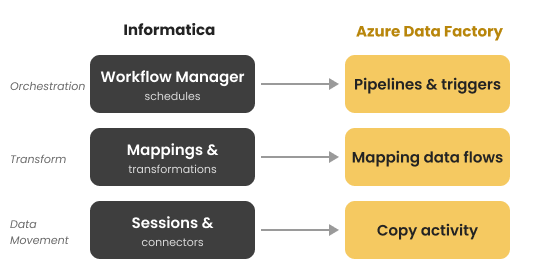
Figure 1. Rebuild an Informatica workflow in Azure Data Factory layer by layer—sessions become Copy activities, mappings become data flows, and schedules become triggers.
Source Systems → Integration Runtime → ADF Pipelines → Copy Activity / Mapping Data Flows → Azure Storage / Azure SQL / Synapse → Analytics
For cloud-accessible sources, Azure Integration Runtime can provide managed compute for data movement and Data Flow execution. For sources inside private or on-premises networks, self-hosted Integration Runtime can provide the connectivity bridge required for data movement.
Design the target architecture before rebuilding individual mappings so storage, connectivity, security, monitoring, and environment requirements are consistent across migrated workloads.
Step-by-Step Informatica to Azure Data Factory Migration Process
1. Assess and Inventory Informatica Workloads
Identify all:
- Mappings
- Workflows
- Sessions
- Worklets
- Mapplets
- Connections
- Parameters
- Schedules
- Dependencies
- Data sources and targets
Capture data volumes, execution frequency, run times, transformation complexity, business criticality, and dependencies.
2. Classify and Prioritize Workloads
Group workloads according to complexity and business importance.
Simple, standardized mappings can be migrated earlier, while complex transformations, proprietary logic, shared components, and highly dependent workflows may require deeper redesign.
3. Analyze Business Logic and Dependencies
Document transformation rules, expressions, lookups, aggregations, joins, filters, update strategies, error handling, and workflow dependencies.
This prevents technical conversion from losing the business logic embedded within the Informatica environment.
4. Design the Target ADF Architecture
Define:
- ADF pipelines
- Mapping Data Flows
- Copy Activities
- Linked services
- Datasets
- Integration Runtime configuration
- Azure storage targets
- Security and credential management
- Development, testing, and production environments
5. Rebuild Data Movement
Recreate Informatica session-based source-to-target movement using ADF Copy Activities.
For incremental workloads, implement an appropriate approach such as watermark-based processing or change tracking rather than automatically reloading complete datasets.
6. Re-architect Transformation Logic
Rebuild Informatica transformations using ADF Mapping Data Flows or other appropriate Azure compute where required.
Redesign and validate common transformations such as Expression, Aggregator, Joiner, Lookup, Router, and Filter based on their target implementation.
7. Rebuild Workflows and Schedules
Convert Informatica workflows and worklets into ADF pipelines and control-flow activities.
Recreate sequencing, conditions, dependencies, retries, error handling, and scheduling using ADF pipeline capabilities and triggers.
8. Test, Validate, and Cut Over
Run migrated pipelines alongside Informatica workloads where practical.
Compare source and target results before retiring the original workflows.
Common Informatica to Azure Data Factory Migration Challenges
Complex Transformation Logic
Informatica mappings may contain nested transformations, proprietary functions, lookup logic, aggregations, and update strategies that require redesign rather than direct conversion.
Approach: Rebuild transformations individually and validate their outputs against the original Informatica logic.
On-Premises Connectivity
Organizations may still depend on databases and files located inside private networks.
Approach: Configure and monitor self-hosted Integration Runtime for the relevant private-network data movement scenarios.
Workflow Dependencies
Informatica workflows can contain sequencing, dependencies, conditional execution, and scheduling logic.
Approach: Explicitly document and recreate these dependencies within ADF pipelines and triggers.
Incremental Loads
Incremental processing patterns used in Informatica may need redesign in ADF.
Approach: Implement suitable watermark, change-tracking, or other incremental-load patterns based on the source system and business requirement.
Performance Differences
Mapping Data Flows and other ADF execution patterns behave differently from the Informatica runtime.
Approach: Establish performance baselines, test representative workloads, and tune data movement, transformations, partitioning, and execution configuration.
Reusable Logic
Mapplets and shared Informatica components cannot simply be copied into ADF.
Approach: Redesign reusable logic through parameterized pipelines and data flows where appropriate.
Security and Governance Considerations
Design security as part of the migration rather than adding it after deployment.
Key considerations include:
- Identity and access management
- Role-based access
- Linked service security
- Credential management
- Azure Key Vault integration where appropriate
- Network and firewall requirements
- Self-hosted Integration Runtime security
- Development, testing, and production separation
- Pipeline monitoring and operational auditing
For private-network connectivity, install the self-hosted Integration Runtime within the relevant network environment so it can communicate with Azure Data Factory and execute supported integration activities.
How to Validate an Informatica to ADF Migration
Validation should compare the migrated ADF pipeline with the original Informatica workflow before production cutover.
| Validation Area | What to Check |
|---|---|
| Row counts | Source and target record counts |
| Data values | Key fields and record-level results |
| Aggregations | Business totals and control totals |
| Transformations | Expression and transformation results |
| Incremental loads | New, updated, and unchanged records |
| Dependencies | Pipeline sequencing and conditions |
| Performance | Execution time and resource behavior |
| Error handling | Failed records and retry behavior |
| Business acceptance | Functional requirements and expected outputs |
A parallel-validation approach can reduce migration risk by identifying differences before retiring the Informatica environment.
Manual vs Automated Informatica to ADF Migration
| Approach | Suitable For | Consideration |
|---|---|---|
| Manual | Smaller or highly customized environments | Greater manual effort |
| Automated | Large volumes of standardized workloads | Requires validation and exception handling |
| Hybrid | Complex enterprise migrations | Automates repetitive work while allowing expert redesign |
Automation can accelerate asset discovery, inventory, standard migration patterns, and repetitive conversion work. However, complex transformation logic, dependencies, proprietary functionality, and architecture changes still require technical review and validation.
Informatica to Azure Data Factory Migration Best Practices
- Inventory the complete Informatica environment before migration.
- Classify mappings by complexity and business criticality.
- Document transformation logic and dependencies.
- Design the target ADF architecture before rebuilding workloads.
- Use reusable and parameterized pipelines where appropriate.
- Select the appropriate Integration Runtime for each connectivity scenario.
- Establish data-quality and reconciliation baselines before migration.
- Validate migrated pipelines against Informatica outputs.
- Migrate in controlled waves rather than attempting a single large cutover.
- Monitor ADF pipelines after production deployment.
- Maintain rollback and contingency procedures for critical workloads.
- Review and optimize performance after migration.
How DataTerrain can help
DataTerrain provides data and BI migration services for organizations modernizing legacy data integration and reporting environments. The migration approach can include workload assessment, asset inventory, transformation re-architecture, pipeline development, validation, and controlled cutover.
DataTerrain's broader BI Reports Conversion capabilities can also support organizations that need to modernize the reporting layer alongside their ETL or data integration environment.
For organizations planning an Informatica to Azure Data Factory migration, the engagement can include:
- Assessment & scoping: Inventory mappings, workflows, sessions, dependencies, and business-critical workloads.
- Re-architecture: Redesign Informatica transformation and orchestration logic for ADF.
- Migration & testing: Rebuild pipelines, configure connectivity, and validate migrated workloads.
- Validation & cutover: Reconcile migrated outputs against Informatica before production retirement.
Ready to evaluate your Informatica environment?
Get a Free BI Migration Assessmentto understand workload complexity, dependencies, migration requirements, and the appropriate modernization approach.
Key Takeaways
- Informatica to Azure Data Factory migration is a re-architecture exercise, not a simple file conversion.
- Informatica mappings are redesigned using ADF Mapping Data Flows and other appropriate transformation approaches.
- Workflows and worklets are rebuilt as ADF pipelines and control-flow activities.
- Sessions and source-to-target data movement are commonly rebuilt using Copy Activity.
- Recreate Workflow Manager schedules using appropriate ADF triggers.
- On-premises and private-network sources may require self-hosted Integration Runtime configuration.
- Complex transformations, incremental loads, dependencies, and performance require detailed assessment and testing.
- Parallel validation helps compare ADF results with Informatica before production cutover.
- A phased or hybrid migration approach can help manage complex enterprise workloads.
Final Thoughts
Informatica to Azure Data Factory migration provides a path for organizations to modernize ETL and data integration workloads within an Azure-oriented architecture. However, successful migration depends on more than rebuilding mappings and pipelines. Organizations must address transformation logic, workflow dependencies, incremental processing, connectivity, security, performance, and data quality.
A structured approach - assess, map, design, rebuild, test, validate, and cut over ‐helps organizations move Informatica workloads to Azure Data Factory while maintaining the business logic and data integrity required for production operations.
For organizations with large or complex Informatica estates, combining automation with expert engineering and parallel validation can help accelerate repetitive migration work while providing the technical review needed for complex workloads.
Related Resources
- Informatica to Microsoft Fabric Migration
- Informatica PowerCenter to IICS Migration
- BI Migration: The Complete Enterprise Guide
- Enterprise BI Migration Services