Contents
- 03 Nov 2026
Databricks Standard to Premium: Is Your Workspace Governed?
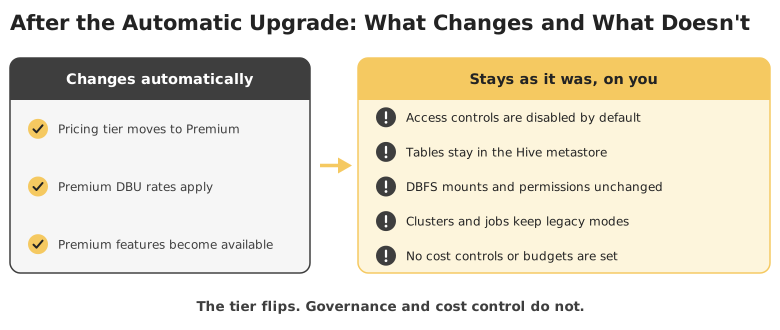
Azure Databricks retired its Standard tier: new Standard workspaces stopped on April 1, 2026, and remaining Standard workspaces were scheduled for automatic upgrade to Premium on October 1, 2026. The upgrade changes the tier, not the architecture, so tables stay in the Hive metastore, DBFS mounts and permissions stay as they were, workspace access controls are disabled by default, and Premium's higher per-DBU rates apply. A Standard to Premium migration is therefore the work after the flip: enabling access controls, upgrading to Unity Catalog, replacing mounts with external locations and volumes, running jobs as service principals, and putting cost controls in place.
Teams on the Standard tier chose it for cost, proofs of concept, and early lakehouse projects, and many workspaces still carry that loosely governed setup. This page covers what the automatic upgrade does and does not do, how each workspace component moves, how to upgrade Hive tables, how to control Premium costs, and a phased plan. For the wider program, see our Databricks migration services overview.
Quick Summary

- Share Post:
-

-

Key Takeaways
- The upgrade is a tier change. Architecture, tables, mounts, and permissions stay as they were.
- Access controls are off after the upgrade. Microsoft documents that access control settings are disabled by default on upgraded workspaces.
- Hive metastore and DBFS carry the risk. Tables, mounts, hard-coded paths, and init scripts must move to Unity Catalog, external locations, and volumes.
- Premium costs more per DBU. Cluster policies, serverless, budgets, and right-sizing belong in the plan from day one.
- Existing workspaces keep the Hive metastore. New workspaces are Unity Catalog-only, so legacy setups drift further from the platform's direction.
- Tools help, but validation stays manual. Databricks Labs UCX speeds assessment and upgrades, and every job and report still needs testing.
Why Standard to Premium Matters Now
- The Standard tier is gone on Azure. Microsoft's notice set April 1, 2026 as the end of new Standard workspaces and October 1, 2026 as the retirement date, with remaining Standard workspaces automatically upgraded to Premium. Confirm each workspace's current tier in the Azure portal or account console.
- AWS and Google Cloud moved earlier. Third-party reports say Standard was sunset on both clouds in October 2025, so confirm your own cloud's status with Databricks.
- Premium rates are higher. An auto-upgraded workspace that changes nothing else runs the same workloads at a higher DBU rate, so check Azure pricing for your region and compute type.
- Unity Catalog needs Premium. Workspaces attached to a Unity Catalog metastore must be on the Premium plan, which unlocks governed permissions, row filters, column masks, lineage, and audit.
- New workspaces are Unity Catalog-only. From late September to early October 2026 (Databricks documentation lists September 30, and the Azure page lists October 8), new workspaces are provisioned without DBFS root and mounts, the Hive metastore, no-isolation shared clusters, or runtimes before 13.3 LTS. Existing workspaces and their workflows are not affected.
- Premium unlocks the newer platform. Databricks SQL, serverless compute, Lakeflow pipelines, Mosaic AI, and predictive optimization all build on the Premium and Unity Catalog foundation.
What the Automatic Upgrade Does and Skips
| Area | After the Automatic Upgrade | What You Still Have to Do |
|---|---|---|
| Pricing tier | Workspace moves to Premium rates | Baseline spend and set cost controls |
| Access control | Workspace access control settings are disabled by default | Enable them and define role-based permissions on notebooks, clusters, and jobs |
| Hive metastore tables | Unchanged, in the workspace-local metastore | Upgrade to Unity Catalog |
| DBFS root and mounts | Unchanged | Replace with external locations and volumes |
| Clusters and jobs | Keep running as before | Move to supported access modes and service principals |
| New capabilities | Available | Adopt them deliberately |
Premium includes everything in Standard, so the tier change itself does not remove features. Problems usually appear later, when teams adopt Unity Catalog and move to shared access modes.
Five Layers of a Standard Workspace to Inventory
| Layer | What It Includes | Commonly Missed |
|---|---|---|
| Data and storage | Hive metastore tables, DBFS root data, mount points, external storage accounts, and the credentials that reach them | Mounts created with secrets that nobody remembers |
| Compute | Cluster configurations, access modes, runtime versions, pools, init scripts, libraries, and policies | No-isolation clusters and DBFS-based init scripts |
| Code and pipelines | Notebooks, jobs, Lakeflow Spark Declarative Pipelines (formerly Delta Live Tables), and workflows that reference hive_metastore, DBFS paths, or mounts | Hard-coded dbfs:/ and /mnt/ paths |
| Security and governance | Users, groups, service principals, secrets, table and workspace permissions, audit logging, and network controls | Broad default access that was never designed |
| Consumers and cost | BI tools, applications, shares, and the usage baseline for managing Premium spend | Dashboards still querying through all-purpose clusters |
Hive-based estates follow the same patterns as other legacy moves, so our legacy systems to Databricks article covers the Hive-to-Unity Catalog side in more depth.
How Each Workspace Component Moves to Premium
| Workspace Component | Common Challenge | How to Solve It |
|---|---|---|
| Pricing tier and cost | Premium DBU rates are higher, so an untouched workspace costs more | Baseline spend with system tables, then right-size clusters, enforce cluster policies and auto-termination, adopt serverless where it pays off, and set budget alerts |
| Workspace access control | Settings are disabled after the upgrade, and most users effectively have broad access | Enable them, sync identity-provider groups, define least-privilege roles, and see our guide to migrating row-level security |
| Hive metastore tables | Tables, views, and grants live in a workspace-local metastore that Unity Catalog does not use | Run an assessment such as Databricks Labs UCX, then upgrade with SYNC, CLONE, or CTAS, and bridge with Hive metastore federation while you migrate |
| DBFS root and mounts | Data reached through mounts and secrets bypasses Unity Catalog governance | Create storage credentials, define external locations and volumes, move DBFS root data out, then disable DBFS root and mounts |
| Cluster access modes | No-isolation clusters, RDD APIs, and sparkContext calls are unsupported on shared Unity Catalog compute | Classify workloads by compatibility, move incompatible ones to dedicated access mode, and refactor unsupported code |
| Hard-coded paths and names | Two-level table names and dbfs:/ or /mnt/ paths break once data moves | Scan code, convert to three-level names and volume paths, and set a default catalog per workspace to reduce change volume |
| Init scripts and libraries | Cluster init scripts and JARs on DBFS are deprecated or blocked on shared compute | Move them to workspace files or volumes, allowlist them, and test cluster start-up |
| Jobs and pipelines | Jobs run as individual users with personal tokens and reference legacy tables | Run jobs as service principals, repoint them to Unity Catalog, and deploy from Git with Databricks Asset Bundles, as in our Python ETL automation article |
| BI and SQL consumers | Power BI and other tools connect through costly, slow-starting all-purpose clusters | Stand up SQL warehouses sized per workload, repoint connections, and govern access through Unity Catalog |
| Security and compliance | Audit logging, network controls, and encryption were never configured | Enable audit and diagnostic logs, configure IP access lists or private connectivity, and apply customer-managed keys where required, as covered in our data security compliance article |
Upgrading Hive Tables to Unity Catalog
Databricks documents several routes, and the right one depends on how each table is stored:
| Option | Best For | What Happens |
|---|---|---|
| SYNC | External tables, and managed tables stored outside DBFS root | Registers the same files as Unity Catalog external tables with no data copy, and can be re-run to pick up changes |
| CREATE TABLE CLONE | Hive managed tables | Copies the data into a Unity Catalog managed table, which also unlocks predictive optimization |
| CTAS | Tables needing schema or format changes | Rewrites the data into a new Unity Catalog table |
| Upgrade wizard in Catalog Explorer | Bulk upgrades of external tables by schema | Creates Unity Catalog external tables |
| Hive metastore federation | Bridging during the migration | A foreign catalog mirrors the Hive metastore so workloads can query it through the Unity Catalog namespace |
This is an illustrative example, not a client engagement.
-- External table: register the same files in Unity Catalog, with no data copy
SYNC TABLE main.sales.orders FROM hive_metastore.sales.orders DRY RUN;
SYNC TABLE main.sales.orders FROM hive_metastore.sales.orders;

-- Managed table in DBFS root: clone into a Unity Catalog managed table
CREATE OR REPLACE TABLE main.sales.customers
DEEP CLONE hive_metastore.sales.customers;
Run SYNC with DRY RUN first to see what it will change, and add a deprecation comment to each original Hive table after migration so nobody keeps writing to it. Never reuse the DBFS root storage location as Unity Catalog managed storage. Please test this example in a non-production workspace before adapting it, and see our data warehouse to Databricks article for lakehouse layout choices.
Controlling Premium Costs from Day One
Premium costs more per DBU, so cost control is part of the migration, not a follow-up:
- Baseline before you change anything. Use system tables to record current DBU consumption by workload, so later savings are measurable.
- Enforce cluster policies and auto-termination. Limit sizes and idle time so one notebook cannot run up the bill.
- Right-size SQL warehouses and clusters per workload instead of sharing one oversized cluster.
- Adopt serverless where it fits. It removes start-up time and idle cost, but workloads should first pass a compatibility test on standard access mode with Databricks Runtime 14.3 or above.
- Set budgets and alerts by workspace and tag, so overspend surfaces in days, not at month-end.
For platform-wide cost and governance decisions, see our data platform migration to Databricks article; for cloud-level planning, our cloud migration to Databricks article; and for rethinking the platform itself, our Databricks to Microsoft Fabric comparison.
A Phased Standard to Premium Migration Plan
| Phase | What Happens | Exit Criterion |
|---|---|---|
| Discovery and assessment | Inventory workspaces, Hive tables, mounts, clusters, init scripts, jobs, notebooks, and BI connections, capture a cost baseline, and flag code that is incompatible with Unity Catalog | A scored inventory |
| Rationalization | Retire unused tables, clusters, jobs, and notebooks, consolidate duplicate workspaces, and decide what data is worth upgrading | An approved, smaller scope |
| Governance design | Define the metastore, catalogs per environment or domain, naming standards, group and service principal model, storage credentials, external locations, and network security | A signed-off design and wave plan |
| Tier upgrade and security baseline | Confirm every workspace is on Premium, then enable access controls, cluster policies, audit logging, and network controls before migrating data | Controls verified |
| Unity Catalog migration | Attach workspaces to the metastore, upgrade tables and views, replace mounts with external locations and volumes, and translate legacy permissions into grants | Tables and grants reconciled |
| Workload modernization and validation | Repoint notebooks, jobs, and pipelines, move compute to supported access modes or serverless, repoint BI tools to SQL warehouses, and reconcile outputs against the legacy setup | Signed-off parity |
| Cost optimization and decommission | Monitor DBU use, tune policies and warehouse sizing, then disable DBFS root and mounts and Hive metastore access once everything is validated | No remaining legacy dependency |
Reconcile outputs with automated checks like those in our automated ETL testing approach. Reports and dashboards move in the same wave as their tables, so see our key checklist for BI modernization, Power BI consulting services, and enterprise BI migration services for the report layer.
Best Practices for a Low-Risk Migration
- Treat the tier change as a governance project, not a billing event.
- Verify the tier of every workspace first, because upgraded workspaces start with access controls disabled.
- Capture a cost baseline before changing anything.
- Rationalize before you migrate. Never upgrade tables, jobs, or clusters nobody uses.
- Design catalogs, groups, and storage credentials before moving the first table.
- Start with a pilot workload that is visible to the business but low in risk.
- Find dependencies early with automated assessment tooling for Hive metastore, DBFS, and access-mode issues.
- Run jobs as service principals and deploy everything from Git, including pipelines modernized through our ETL migration to Databricks approach.
- Keep legacy paths read-only during the transition, then disable them once outputs are validated.
Frequently Asked Questions
Scope Your Databricks Premium Migration with DataTerrain
The tier flipped automatically, but governance, storage access, and cost control did not, and that is where migrations drift over budget. DataTerrain brings 17+ years and 400+ clients in data and reporting modernization, with automated assessment, Unity Catalog migration, cost governance, and validated cutover.